
Is it important to used matched memory? This question has intrigued me for a while. When cramming as much memory in a Mac as you can, should you use the same size and speed and brand to ensure maximum compatibility and stability?
Most Macs don’t need matched sizes, apart from some of the dual processor Power Macs, so you can put in any size with each other. I have had some Blue & White G3 Power Macs with 128 MB sticks and 512 MB sticks together, and they worked fine. But what about same brand sticks?
The trouble is, as my Mac expeditions are done on such a tight budget, I usually grab RAM where I can, so I have never had a chance to put it to the test. When testing these things, it is always better to use the same hardware so you get an exact comparison.
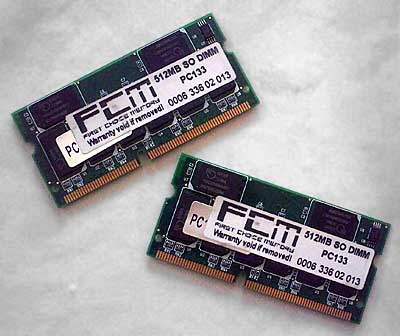
A pair of matched 512 MB modules from First Choice.
I recently obtained three more 512 MB sticks of PC133 144-pin Mac laptop RAM. Coupled with the existing 512 MB stick in my 867 MHz PowerBook, I now have enough to max both my 867 MHz and my 400 MHz PowerBook G4 to their 1 GB limits.
I first removed the 256 MB module in my 867 MHz PowerBook and popped in a second 512 MB stick. Both sticks were different brands, and I benchmarked the machine. Xbench gave a result of 26.43 and Geekbench gave a result of 519.
Then I took both sticks out and put in two 512 MB sticks that were the same brand. For the record, they were made by First Choice Memory. I ran the benchmark tests again. Xbench gave a result of 27.50 and Geekbench gave a result of 523.
A slight improvement. Xbench gave a 4% increase, which is quite a lot considering it is the same amount of RAM as before. Geekbench, however, only gave a 0.8% increase. But you have to bear in mind both programs use different methods of benchmarking.
Is it worth it to have matched memory? That depends on the financial cost of a matched pair against an unmatched pair.
In older machines, we tend to do everything possible to increase their potential. My machine is hardly stock. It has a faster 5400 RPM hard drive in it, I upgraded recently from 768 MB of RAM to 1 GB and then replaced that with 1 GB of matched RAM, all to slightly increase system performance.
There is a minimal increase in performance, enough to raise an eyebrow, so if buying matched RAM is drastically more expensive than buying unmatched RAM, I would have serious reservations.
Whether it increases system stability is another matter. My machine was rock solid before I switched to matched RAM, so it will be hard to tell if there is any improvement in that area. I bought some extra RAM cheaply, and it just happened to be a matched pair.
If you can get matched RAM without a price premium, do it. It helps performance a bit, but from my experience unmatched RAM offers just as much stability.
Follow Simon Royal on Twitter or send him an Email.
Like what you have read? Send Simon a donation via Tip Jar.
keywords: #ram #matchedram #fast #stable #techspectrum #simonroyal
short link: http://goo.gl/mZkN0x
searchword: matchedram
