
Low End Mac Reader Specials
TypeStyler For Mac OS X is Now Shipping! Download The Free Fully Functional 60 Day Tryout at www.typestyler.com
OWC: Get the Right Memory for Your Mac Top Quality, Competitive Price, Lifetime Backed Free Expert Support + Installation Videos too! MacBook & mini 8GB, iMac 16GB, Mac Pro up to 32GB. Click here
Don't install Parallels to play poker online! Poker Mac will show you how
to download and install a native Mac poker application such as Full
Tilt Poker Mac.
Laptop Hardware Provided by TechRestore - Overnight Mac & iPod Repairs.
Compare products like desktop computers, apple laptops, apple macs, and LCD Monitors side by side! All the information and reviews to make the best purchasing decision for new mobile phones, sat nav systems, or MP3 players. The Ciao online shopping community makes searching products easy for you.
Mac Spectrum
Safari 4 Beta Is Lightning Fast
- 2009.02.26 - Tip Jar
Popularity: ![]()
![]()
![]()
![]()
I'm a keen follower of Mac web browsers, so when Apple released a new version of Safari - even a beta - I had to try it. Most owners of low-end Macs know they are for basic uses and browsing the Web, so finding a good browser that performs at a reasonable speed is vital to keeping these older machines going.
I use a PowerBook G4/867 MHz running Mac OS X 10.5 "Leopard" on a daily basis. It is my main Mac and have been trying out a flurry of different browsers over the last couple of weeks.
Speed
Cruz and Stainless are promising streamlined browsers, but Firefox 3 still has that even mix of functionality, features, and speed. Okay, Firefox 3 can be a little sluggish at times, but I have found it to be the most compatible with the web world.
I was intrigued by Apple's claims that Safari 4 Beta processes HTML almost 3 times faster than Firefox 3 - and 3 times faster than Internet Explorer 7. It is also supposed to process JavaScript 4.2 times faster than Safari 3 and a whopping 30 times faster than Internet Explorer 7, thanks it its Nitro JavaScript engine.
Not only that, Safari 4 supports HTML 5 and CSS 3 standards and is the first browser to pass the Acid 3 test. All in all, it looks a cracking browser on paper - but how does it perform in the wild?
I have always found Safari to have the edge in terms of speed over other Mac browsers, but Safari 4 Beta beats even Safari 3 for speed. Once installed, the first run seems a little slow, but give it a few minutes and it wakes up into the speed demon that Apple promises.
Web pages load in lightning fast times, and even Flash-heavy sites that were really sluggish and choppy on Safari 3 and Firefox 3 loaded quicker. Although it didn't resolve the choppiness of Flash videos, it certainly was an improvement.
Requirements
The system requirements for the new Safari 4 Beta are as follows:
- For Mac: Mac OS X 10.5.6 with Security Update 2009-001 or OS X 10.4.11. 256 MB RAM. Will run on any G3, G4, G5, or Intel Mac with built-in FireWire.
- For Windows: Windows XP SP2 or Windows Vista. 256 MB RAM and a 500 MHz or faster Pentium processor.
It is interesting that Apple chose to support Safari 4 on Tiger. I thought it might be a Leopard-only application, especially with rumours that it will be bundled with the forthcoming release of Snow Leopard.
User Interface
Okay, you can have the world's fastest browser, but if it looks ugly or is awkward to use, then you are going to lose out. Apple has changed a few UI items in Safari 4 Beta - some good and some not so good.

Safari 4 moves tabs to the top of the browser window.
The first thing you will notice is that the tab bar has been moved from under the address bar to the top of the page. At first I found this odd, but after a few hours of use I have grown used to it. There have been a lot of complaints from other users about this, complaining that you have to move your mouse even further, but really it is only a little higher than before.
One new feature I do not like is the removal of the blue loading bar that has sat in the background of the address bar so you can see the progress of a page loading. Instead, you have a small spinning wheel - similar to the one you see on you Mac's grey boot screen.
Fortunately you can use Terminal to change the tab bar position and to being back the blue loading bar.
To move the tab bar back to the position in was in Safari 3:
$ defaults write com.apple.Safari DebugSafari4TabBarIsOnTop -bool NO
To move it back to the top:
$ defaults write com.apple.Safari DebugSafari4TabBarIsOnTop -bool YES
To bring back the inline progress loading indicator:
$ defaults write com.apple.Safari DebugSafari4IncludeToolbarRedesign -bool NO $ defaults write com.apple.Safari DebugSafari4LoadProgressStyle -bool NO
Top Sites
The biggest new addition to Safari 4 Beta is the new 'Top Sites' feature. It is a page of small thumbnails of web pages, allowing you to simply click on picture of a page - then it takes you straight to it. While this has been a feature of Opera for a while, a neat inclusion is that Safari will automatically update these, learning what sites you visit the most and keeping these in there. The more you use Safari, the better it's learning is. After only a few days of use, it has pretty much worked out the sites I visit, and while I could have put these in the bookmark bar, the top sites feature takes one manual step out of the process.
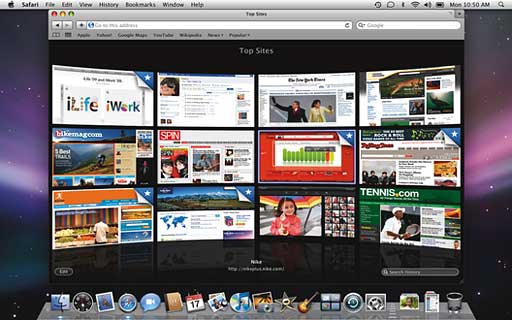
Safari's new Top Sites feature uses CoverFlow.
You can set it to display six large thumbnails, twelve medium thumbnails, or twenty four small thumbnails.
This might sound like a novel idea, but it is very handy and you get very used to it quickly.
Conclusion
Let's not get carried away. This is a beta and not the full release, so you have to expect some bugs and glitches - although so far I have not come across any.
Safari 4 is shaping up to be an awesome browser. The new features are fantastic on the whole, and the increase in speed, even on my 867 MHz G4, is very impressive.
Will we see a second beta? Maybe. Will the final be launched to coincide with Snow Leopard? Most probably.
Give it a try. I think you will be impressed.
Recent Columns by Simon Royal
Royal also has his own Mac specific website.
- A Place for the Classic Mac OS in the Age of Snow Leopard, 10.19. Mac OS 9 has been out of production for nine years, but for basic tasks, such as word processing and email, it provides plenty of power.
- Adding USB 2.0 to a Titanium PowerBook G4, 08.20. TiBooks have built-in USB 1.1, but with a compatible USB 2.0 CardBus card, you can go 2.0. Problem is, not all cards work.
- 'Snow Leopard' and the End of PowerPC Macs, 08.14. Mac OS X 10.6 will be the first version of OS X without PowerPC support. That marks the beginning of the end for G4 and G5 Macs.
- Lombard, the Forgotten PowerBook, 05.06. Sitting between the legendary WallStreet and the widely known Pismo, Lombard provides great value and handles OS X nicely.
- More in the Mac Spectrum index.
Links for the Day
- Mac of the Day: 17" iMac G4/800 MHz, July 2002 - The iMac 'grows up' with a 17" 1440 x 900 display.
- Group of the Day: LisaList supports Lisa users.
- November 8 in LEM history: 99: OS 9: I think I like it - 01: The simplified Mac life - Soured on Windows - Flea market Mac - 02: Little room for improvement in new 'Books - Combo drive upgrade for iceBooks - 04: Re-Porter - 05: Fix the old iMac or buy a Mac mini? - Apple's Copland project - 06: MacBook Core 2 - MacBook value equation - Cheap is as cheap does - 07: Problems with Classic mode in Tiger - The G4 Power Mac that won't run Leopard
- Support Low End Mac
Recent Content on Low End Mac
- Quad-Core CPU Makes Sense in MacBook Pro, OS X 10.6 Causing Overheating, Overseas Power, and More, The 'Book Review, 11.06. Also Late 2009 MacBook reviewed, how to add RAM to new MacBook, 18.4in Acer notebook used Intel i7, and SanDisk SSD chosen for Sony VAIO X.
- Dumping Macs for Google Apps, SSD in iMac, Late 2009 iMac Performance Problems, and More, Mac News Review, 11.06. /newsrev/09mnr/1106.html
- WiFi Paranoia, iMac-O-Lantern, Magic Mouse Does Click, Free Clipboard Managers, and More, Charles W. Moore, Miscellaneous Ramblings, 11.05. Also strange time stamps, problem with ColorIt on Intel Mac, and the story behind OS X 10.5.4 install discs.
- IDE Is Dead; Long Live SATA!, Dan Knight, Mac Musings, 11.04. SATA has displaced parallel ATA. While IDE hard drives haven't disappeared, the best deals are in SATA hard drives.
- QuickTime X in Snow Leopard Imports, Trims, and Publishes Video Quickly and Easily, Alan Zisman, Zis Mac, 11.04. The long, slow process of importing video into iMovie to edit it, then render it to another format, is history as QuickTime X does that much more quickly.
- More links in our archive.
Recent Deals
- Best Mac Pro Deals, 11.03. Used 2.66 GHz 4-core, $1,300; 3.0 8-core. $2,299; refurb 2.66 4-core Nehalem, $2,149; 2.93, $2,549; 2.26 8-core, $2,799; 2.93, $4,999.
- Best iPhone Deals, 11.03. New 8 GB iPhone 3G, $$99; refurb 16 GB 3GS, $149; new, $199; 32 GB, $299.
- Best 12" PowerBook G4 Deals, 11.03. Used 867 MHz SperDrive, $348; 1 GHz, $499; 1.33 Combo, $298; SD, $559; 1.5 Combo, $448; SuperDrive, $589.
- Best Power Mac G3 and PCI Video Card Deals, 11.02. Used beige 300 MHz, $25; G4/366, $49; blue & white 350, $80; 400, $90; 450, $105; PCI video cards from $15; shipping additional.
- Best Power Mac G4 and AGP Video Card Deals, 11.02. Used 400 MHz, $50; 733 MHz, $69; 933 MHz, $209; 1.25 GHz dual, $299.
- Best 15" MacBook Pro Deals, 11.02. Used 2.0 GHz, $800; 2.2, $900; 2.4, $1,000; refurb 2.53, $1,449; 2.66, $1,699; 2.8, $1,949; 3.06, $2,169; new 2.53, $1,579; 2.66, $1,799; more.
- Best Mac mini Deals, 10.30. Used 1.33 GHz G4 mini, $379; 1.42, $389; 1.5, $419; 1.83 GHz Core Duo, $350; Core 2, $439; new 2.26 GHz nVidia, $580; 2.53 GHz, $770; Server, $990.
- Best G4 iBook Deals, 10.30. Used 12" 1.07 GHz Combo, $225; 1.33 GHz, $298; 14" 1 GHz, $349; 1.33 GHz, $398; 1.42 GHz SuperDrive, $498.
- Best Classic Mac OS Deals, 10.30. System 6.0.8 floppies, $10; 7.1, $12; 7.5, $20; 7.5 CD, $4; 7.6 $13; 8.1, $11; 8.5, $20; 8.6, $90; 9.0, $20; 9.2.2, $30.
- More deals in our archive.
About LEM | Support | Usage | Privacy | Contacts
Navigation
Used Mac Dealers
Apple History
Video Cards
Email Lists
Favorite Sites
MacSurfer
MacMinute
MacInTouch
MyAppleMenu
InfoMac
Macs Only!
The Mac Observer
Accelerate Your Mac
RetroMacCast
PB Central
MacWindows
The Vintage Mac
Museum
DealMac
DealsOnTheWeb
Mac2Sell
ramseeker
Mac Driver Museum
JAG's House
System
6 Heaven
System 7 Today
the pickle's Low-End
Mac FAQ
Abandonware
Petition
Mac vs. PC Info
Affiliates
The Apple
Store
Mac
Connection
B&H
MacMall
TechRestore
ExperCom
Crucial
Memory
batteries.com
Advertise
MacMinute
MacInTouch
MyAppleMenu
InfoMac
Macs Only!
The Mac Observer
Accelerate Your Mac
RetroMacCast
PB Central
MacWindows
The Vintage Mac
Museum
DealMac
DealsOnTheWeb
Mac2Sell
ramseeker
Mac Driver Museum
JAG's House
System 6 Heaven
System 7 Today
the pickle's Low-End
Mac FAQ
Abandonware
Petition
Mac vs. PC Info
Mac Connection
B&H
MacMall
TechRestore
ExperCom
Crucial Memory
batteries.com
