
Low End Mac users are always looking for ways to get better performance out of their aging machines. Most of these machines are used for web browsing, and this is one of the areas that lower spec’d machines suffer in.
I constantly flit from browser to browser, checking out new ones and new versions of existing ones trying to get that little extra speed. Firefox is good, and TenFourFox (a PowerPC build of Firefox 4) is impressive, but I wanted something even better.
Step up Camino. Camino is an open-source, Mozilla-based OS X-only browser. One of the common complaints about Firefox is its lack of integration with the OS X. Camino was created by an offshoot of the Netscape team to prove that Gecko, Mozilla’s rendering engine, could be embedded in a Cocoa application. As a native OS X application, Camino integrates with the keychain and Bonjour just like Safari does.
I have been following Camino for a number of years (since it was in beta), and it has developed in to a top class, reliable browser. Early versions suffered from sudden crashing and quitting, but since coming out of beta it has grown more and more stable. It is also one of the few browsers not to bloat over time or lose its streamlined edge.
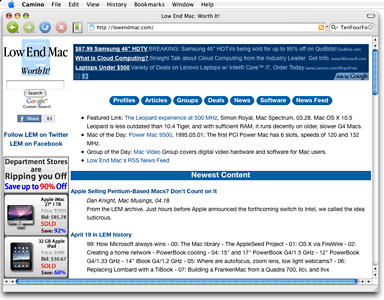
Camino has a clean interface without huge icons or toolbars.
It may not be as fancy looking a Firefox nor have endless add-ons, but then again neither is Safari. Camino is clean looking without oversized icons or toolbars. Everything is just neat and tidy. It’s slimness is its strong point.
How Well Does It Work in the Real World?
I am using all these browsers on a ten-year-old 500 MHz Titanium PowerBook G4 running Mac OS X 10.5 Leopard. (Camino also supports OS X 10.4 Tiger.)
At 46.6 MB, Camino 2.0.7 is quite small compared to Firefox 3.6.16 at 52.8 MB, TenFourFox 4.0 at 54.7, and Safari 5.0.5 at a massive 114.7 MB. It loads within a few seconds and only a handful of bounces on the Dock.
Page loading times are very impressive, easily the fastest of these four browsers.
It’s multiple tabs whether Camino really takes the lead. I have been trawling eBay lately looking for a good deal on an iPhone 3G, opening tab after tab of auction listings. Firefox starts struggling after three tabs, TenFourFox after four, Safari after five, but I opened 11 tabs comfortably in Camino. Now that’s impressive!
Other than its speed and rendering power, why would you choose Camino over more well known, better supported browsers? Or, more to the point, why shouldn’t you chose another browser?
Other Browser Options
I’ll tell you with a quick run down of popular browsers and their pros and cons.
Google Chrome
- Pros: Lightning fast.
- Cons: Still a work in progress, not available for PowerPC Macs (there is an unofficial Chromium port for PowerPC), uses WebKit rendering engine, which suffers the same flaws as Safari.
Safari
- Pros: Tight integration with OS X and very fast.
- Cons: Terrible at rendering pages properly, constant page drop, lack of text editing features in sites like eBay selling pages make it a no for me.
Firefox
- Pros: Good all around browser, multiplatform, infinite possibilities with endless plugins and add-ons.
- Cons: Very resource heavy, not ideal for low-end Macs, PowerPC support stopped at version 3.6, too many add-ons bloat this browser.
TenFourFox
- Pros: Custom fork of Firefox 4 for PowerPC, optimized versions for G3, G4, or G5 Macs.
- Cons: Not a full port of Firefox 4, support and future builds are hanging by a thread as Mozilla moves further and further away from PowerPC and older versions of OS X.
Internet Explorer
- Pros: Tight integration with Windows. Once the de facto browser for Macs (pre-OS X and early OS X), it was good for its time. (Publisher’s note: Version 5.1.7 is no longer available from Microsoft, but you can download it here. It still works on OS X 10.6 Snow Leopard, but it looks incredibly dated and has very poor support for modern Web protocols. dk)
- Cons: As with most Microsoft products, what was once trim and very good browser became a boat for bloat, with more features than most of us need or want. For Windows users, it has been losing market share for years, especially to Firefox and Chrome.
There seem to be hundreds of other browsers that just don’t cut it for me: Opera (current release version requires Mac OS X 10.4 or later on Intel hardware), Shiira (10.4), Stainless (10.5), Sunrise (10.5), iCab (10.3.9), and SeaMonkey (10.4), to name a few, all have their own pitfalls – either they are in early stages or they use the same WebKit engine that Safari does and fall in to the same traps as Safari.
Camino for the Low End
If you have a lower spec’d Mac and don’t care for endless plugins and want to get the fastest browsing experience you can, Camino is for you.
Being Mozilla-based leads to the question of whether Camino will continue to be developed for PowerPC Mac users, or will it be yet another great tool that goes the Intel-only route? If it does, then TenFourFox will be our only saviour. After that, who knows.
For now, enjoy Camino’s raw speed.
Publisher’s note: I’ve also been using Camino for years and appreciate the same things Simon does: It launches quickly, loads pages quickly, renders pages well, handles tabs very well, and is more Mac-like than other Mozilla-based browsers. It runs well on OS X 10.4 and 10.5 PowerPC Macs – and on Intel-based Macs. One pro Simon doesn’t mention: You can tab from field to field, which not all browsers support. And one con: Although Camino uses the keychain, it will only use one ID and password per site, so if you visit a site using multiple IDs (say Gmail), Camino will only remember one of your IDs. dk
Keywords: #camino #caminobrowser #macosx
Short link: http://goo.gl/1jSqxj
keyword: caminobrowser
Follow Simon Royal on Twitter or send him an Email.
Like what you have read? Send Simon a donation via Tip Jar.
keywords: #camino #alternative #browser #macosx #techspectrum #simonroyal
short link: http://goo.gl/FLR4XK
searchword: camino
