
Regular readers will know that I have been searching for the perfect Macintosh word processor for some time. I have almost found it.
The last time I wrote for Low End Mac, I said I would stop using Google Docs, and I have. The word processor that I have settled on, for now, is Pagehand.
One of my longstanding complaints about modern word processing software is bloat, particularly in the form of page layout features that are irrelevant to writing and simply not good enough for publishing (please stand up, Microsoft Word and OpenOffice). What I really want is a text editor that incorporates some important features from word processors: word count, support for Mac OS X’s built-in dictionary, and decent type rendering.
Pagehand goes one better. It has incredibly fine-grained typographical control, and its layout features are unobtrusive and, dare I say it, actually quite good.
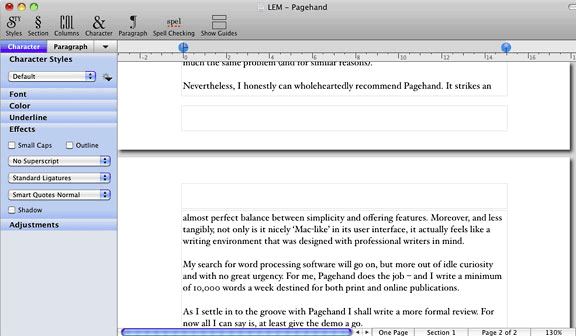
Pagehand “strikes an almost perfect balance between simplicity and features.”
One feature of Google Docs that I miss terribly is what we now call “cloud computing”, though this public relations-devised neologism is unnecessary – we used to call it network storage. Pagehand doesn’t feature any Internet connectivity features – hardly any word processors do – but Google’s sharing facilities are easily replaced with a free Dropbox account. In fact, using Dropbox is better, because it is actually Mac-native and not browser-based.
The downsides of Pagehand are two-fold.
Firstly, the word count is not on-screen at all times. You have to select it from a pull-down menu. This may not seem like a big deal, but it is an irritation. Additionally, as far as I can tell, there is no function for counting the words in a selected section.
Secondly, Pagehand uses PDF as its native file format. This may seem like an odd choice – PDF files are not traditionally editable documents, after all. However, when you see the level of type support built into Pagehand, it makes perfect sense. Alternatives, such as RTF, simply do not offer the same amount of precision.
However, it does mean that document sharing is a nuisance. If you want a document to be editable by another person, then either they have to also be running Pagehand or you have to export in another format, such as RTF. Getting away from duplicated files is one reason why I have avoided Apple’s Pages, which suffers from much the same problem (and for similar reasons).
Nevertheless, I can wholeheartedly recommend Pagehand. It strikes an almost perfect balance between simplicity and features. Moreover, and less tangibly, not only is it nicely Mac-like in its user interface, it actually feels like a writing environment that was designed with professional writers in mind.
My search for word processing software will go on, but more out of idle curiosity and with no great urgency. For me, Pagehand does the job – and I write a minimum of 10,000 words a week destined for both print and online publications.
As I settle in to the groove with Pagehand, I shall write a more formal review. For now I can say give the demo a go.
Keywords: #pagehand
Short link: http://goo.gl/pu5YS3
searchword: pagehand
