
Make Your Mac Region Free for DVD Viewing
- 2006.06.23 - Tip Jar
Popularity: ![]()
![]()
![]()
![]()
![]()
![]()
![]()
![]()
Low End Mac Reader Specials
Memory To Go Special: New 2008 iMac 2GB $42 / iMac Intel Core2 DUO & MacBook Pro 2GB $36 - 1GB $20. MacPro 8 Core Memory 4GB kit $154 / 2GB kit $94 -- Free shipping available.
Download Typestyler, still the Ultimate Styling Tool for Internet, Print and Video Graphics. Works great in Classic with a Native OS X Version on the way. Free Tryout: www.typestyler.com
LA Computer Company: Specials on AppleCare, iMac's, Apple Batteries and Apple A/C Adapters. Also Great prices on Used Apple Computers. Call 1-800-941-7654 Click Here.
OWC: Burn DVDs, DVD-DL, CDs, DVD-Ram - FAST! Superdrive upgrades from OWC starting from $31.99 with options for nearly every Mac. Models with Lightscribe, Blu-Ray too!
Mac users can finally play Party Poker for Mac. Not only that, they can also learn how to play PokerStars for Mac.
Laptop Hardware Provided by TechRestore - Overnight Mac & iPod Repairs.
Compare products like desktop computers, laptops, and LCD TVs side by side! All the information and reviews to make the best purchasing decision for a new cell phone GPS products or MP3 players. The Ciao network makes searching products easy for you.
MacPro Memory 667Mhz With Apple Spec Heat Sink 2GB $ 82 / 4GB $128 / 8GB $256 - Click to Maximize your Macs...
There is one laptop upgrade that gives no performance benefit, but it adds a long-desired feature of frequent travelers, which is a swap of the built-in Combo or SuperDrive for a different model.
Apple's PowerBooks and MacBooks use Matsushita (Panasonic) optical drives, and it's, impossible to flash firmware on these drives. If these drives did everything they are advertised to do, this wouldn't be an issue, but the fact is that most Matsushita SuperDrives, though rated at 8x, only burn at 2x unless you have either Apple's DVD-R media or get very, very lucky on third party media.
The drive in the 12" model also lacks the ability to burn dual-layer disks.
Finally, while this is possibly illegal and definitely voided my warranty, I wanted a drive that I could remove the RPC-2 firmware and replace with RPC-1 firmware, meaning a region-free drive.
Region Codes
DVD movies are region coded, so a movie purchased in the United States (Region 1) won't work on a drive set up for South Korea (Region 3).
This is a non-issue for most people, and it was designed so that video pirates couldn't buy a DVD released early or with different version in one market and sell illegal copies in another market where the movie was not approved or was released later or in a different version.
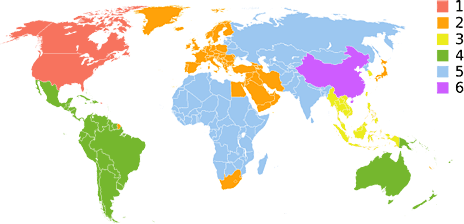
I think this is baloney, and as someone who travels frequently between the United States and South Korea, I have a mixed DVD collection that is roughly 70% Region 1 and 30% Region 3. I'm not sure where, but somewhere along the way I picked up a Region 2 (UK) copy of "Sean of the Dead" as well.
With a laptop drive, the manufacturer generally allows the region to be changed four times after it's initially set, at which time it locks forever. The manufacturer can unlock a locked drive, but will charge for the privilege, as this is not a warranty repair (nothing is broken).
Some manufacturers simply won't do it at all, while others will do it once or twice before closing the door on you.
Going Region Free
On a Windows PC, going region free is much easier than on a Mac. There are software programs that intercept the DVD before the operating system even sees the region code and tricks it into thinking that it's Region 1 regardless of what it really is. I used one such application on my ThinkPads for years and never had to worry about flashing firmware on drives or resetting region counters on the operating system.
Mac users don't have it so good. While there is a website devoted to region free computing (www.rpc1.org), the Mac section is much smaller than the PC section. Worse yet, the brilliant programmer who figured out Macintosh ports of PC drive flashing utilities, a guy who used the handle XVI, has retired, and thus no new flashers have been forthcoming.
All hope is not lost, as there are utilities out there for older drives and for Windows. With access to a PC, a drive can be flashed and then moved to your Mac.
Other obstacles to getting a region free drive in your Mac is the Mac OS itself. Some drives are not supported for burning under Apple's iApps, though Toast will usually burn anything, and a utility called PatchBurn can restore burn functionality in Apple's apps with certain drives. The folks on the www.rpc1.org Mac-specific forum are very helpful, and there are many archived posts about which drives work and which don't.
I spent a lot of time on that forum, and after much research I decided on the Pioneer DVR-K05 slot loading SuperDrive for my pair of PowerBooks. If you own a tray-loading iBook, you can get the DVR-K15, which is the exact same drive except for the tray mechanism.
Software Alternatives
Either way, you want a utility called DVRFlash, an updated firmware, and enough time to read the forums and all of the instructions. This is a fairly complicated procedure that requires you to go into the Terminal. While some members of RPC1.org will point you in the right direction for where to find instructions, most will just rudely diss you for asking the same questions that everyone else has asked and had answered.
I followed the directions in the readme, it worked, and that was it for me. Like the guys on the forum, I don't have the patience (and, unlike them, I also lack the knowledge) to talk someone else through mucking with the terminal. The instructions provided with the files are simple enough, though, so if you print the directions and take your time, you should do okay.
All right, so you've spent your time and money, and now you have a region free drive in your PowerBook. What next? You aren't ready to watch multiple DVD regions yet; you still need to deal with the region change counter in OS X. Fortunately, www.rpc1.org has links in their forum to a program called Region X, which is also now available as a universal binary. What Region X does is allows you to reset OS X's region change counter, so after you've switched back and forth between Regions 1 and 3 four times and your Mac tells you that no further chances are permitted, you can go into Region X and just reset the counter back to 4. It's that easy.
Of course, there is a much easier and cheaper way to watch multiple regions on your 'Book, although it doesn't work with every drive and on occasion has made unwanted region changes to non-region-free (RPC2) drives according to posters on rpc1.org. The solution is use VLC (Video LAN Client) instead of Apple's DVD player.
To make this work you must go into System Preferences for DVD Movie and either set VLC as the default application or set it to ignore. This will cause OS X to think of the non-Region 1 DVD as a data disk and mount it in the Finder. VLC doesn't query region code and will just play the movie, though the interface is nowhere near as nice as Apple's, and there are some stability issues.
Region Free Drives the Best Choice
Finally, you should consider the risk if it does change your region and the fact that it might just not work on your particular computer and drive (it's been known to happen). I tried VLC on my PowerBooks, and it worked great, but I found the interface annoying and the quality a bit jittery compared to Apple's DVD Player, which is why I went to the trouble and expense of getting region free drives.
In the end, if you travel and have movies from more than one region, it's worthwhile to pursue a region free movie solution. For infrequent multi-region users, I'd recommend giving VLC a try first, but for hard core region switchers, a region free drive is the way to go.
My thanks to everyone at www.rpc1.org and to the great work of
XVI, Las Vegas, and The Dangerous Brothers for making the utilities
and firmware available.
- Link: rpc1.org
Andrew J Fishkin, Esq, is a laptop using attorney in Los Angeles, CA.
Recent Best Tools for the Job Columns
- Why one Mac user chose BlackBerry over iPhone, 05.08. The advantages of OS X, Safari, Mail, and iSync don't outweigh the familiarity of BlackBerry, its excellent software, easily replaceable batteries, and a camera-free option.
- Mac again: Picking the right MacBook, 02.29. The 5-year-old PowerBook needed replacing, but is the MacBook Air or the regular MacBook the better choice?
- Mac again, thanks to Microsoft, 02.27. It was Microsoft Exchange Server that drew me away from the Mac, but now Office: 2008 lets me back into the Macintosh world.
- Is the MacBook Air this road warrior's dream machine?, 01.24. A longtime ultraportable user and 12" PowerBook G4 fan looks at the compromises in Apple's lightweight notebook. Will it become his next ultraportable?
- More in the Best Tools for the Job index.
Links for the Day
- Mac of the Day: Mac LC III, Feb. 1993 - The first LC without compromise: 25 MHz 68030 CPU, 32-bit memory, up to 36 MB of RAM.
- List of the Day: G4 'Books an email list for G4 iBooks and PowerBooks.
- September 8 in LEM history: 99: Big sound from the little iMac - Ethernet alternative to USB drives - 00: Building a back-to-school bundle - 03: 17" 1.25 GHz iMac G4 - My Mac Plus revisited - 06: Inside your notebook's battery - Andy Hertzfeld, software wizard - OS X is a pleasure to use - MacBook random shutdown - Core2 7% faster
Recent Content on Low End Mac
- Anticipation: New iPods Now, New Macs Later, Kev Kitchens, Kitchens Sync, 09.05. The season of new iPods is at hand, but new Macs may wait until 2009.
- Buy a MacBook Now or Wait?, MacBook touch Patents, Samsung X360 Takes on MBA, and More, The 'Book Review, 09.05. Also 20 years of portable Macs, data backup and preservation, universal U-Charge battery charger for Mac 'Books, bargain 'Books from $150 to $2,699, and more.
- Listen to Just the Music with the V-Moda Vibe Earbuds, Tommy Thomas, Welcome to Macintosh, 09.05. Well built, the noise canceling earbuds will let you hear all the nuances of your music without letting through background noise.
- Source of iPhone 3G Problems, Army Uses iPods as Field Translators, Gains with Business, and More, iNews Review, 09.05. Also UK bans iPhone ad as 'misleading', iPhone password easy to bypass, GM to offer radios with USB in 2009 models, weather tracking software, and more.
- Macs Gain Ground in August, Consumers Most Likely to Buy Macs, LaCie USB Speakers, and More, Mac News Review, 09.05. Also migrating Time Machine to a new drive and two new keyboards from Logitech.
- Best iPod touch Deals, Low End Mac Deals, 09.05. Refurb 8 GB, $199; new, $284; refurb 16 GB, $299; new, $370; refurb 32 GB, $399; new, $453.
- Best 15" MacBook Pro Deals, Low End Mac Deals, 09.05. Used 1.83 GHz Core Duo, $999; 2.16, $1,125; new, 2.2, $1,450 after rebate; refurb 2.4, $1,699; 2.5, $1,999; 2.6 Santa Rosa, $1,849; rebates on new.
- Best iMac G4 Deals, Low End Mac Deals, 09.05. Used 15" 700 MHz CD-RW, $279; 800 Combo, $300; 1 GHz $390; 17" 800 MHz SD, $439; 1.25 GHz, $449; 20", $569.
- Overclocking a Mac mini Got Me Hooked on Souping Up Macs, Adam Geller, My First Mac, 09.04. Stories of hot rodding iBooks, G3 iMacs, and PCI Power Macs on the cheap.
- Apple Will Not Abandon Optical Drives, the Mac Drought, Purposeful Mac Acquisition, and More, Dan Knight, Low End Mac Mailbag, 09.04. Also Mac OS X 10.5 on a G4-upgraded Blue & White G3 and problems using a flat panel display with a Quadra 700.
- Only Leopard Runs Routine Maintenance Tasks after Startup or Waking from Sleep, Charles W. Moore, Miscellaneous Ramblings, 09.04. Mac OS X 10.5 runs routine system maintenance scripts as soon as possible after starting up or waking up your Mac. Earlier versions of OS X do not do this.
- Best Mac mini Deals, Low End Mac Deals, 09.04. Used 1.25 GHz G4 SD, $549; 1.42 Combo, $409; new 1.83 Core2 Combo, $569 after rebate; 2.0 SD, $769 after rebate.
- Tomorrow's Solid State Drives and Notebooks, Dan Knight, Mac Musings, 09.04. Flash drives are great but have some shortcomings. Some thoughts on building better SSDs and notebooks to use them.
- Best 12" PowerBook G4 Deals, Low End Mac Deals, 09.04. Used 867 MHz Combo, no APX, $490; 1 GHz, $550; SuperDrive, $625; 1.5 GHz w/o APX, $660; w/APX, $675.
- Best 17" PowerBook G4 Deals, Low End Mac Deals, 09.04. Used 1 GHz, $779; 1.33 GHz, $799; 1.5 GHz, $859; 1.67 GHz, $910.
- 11 Mac Browsers Compared, Simon Royal, Mac Spectrum, 09.03. The latest versions of Internet Explorer, Opera, Safari, Shiira, iCab, Radon, Firefox, Netscape Navigator, SeaMonkey, Flock, and Camino tested in Leopard.
- Save Internet Radio, USB and Hard Drives, Hardware Manufacturers vs. Linux, and More, Dan Knight, Low End Mac Mailbag, 09.03. Also Mac won't book after cleaning, newer versions of OS X improve wake from sleep, downgrading to OS 8.6, unreadable pages on Low End Mac, and more.
- Another Free POP3 Provider, Recharging a Dead PRAM Battery, Current Kanga Value, and More, Charles W. Moore, Miscellaneous Ramblings, 09.03. GMX email now available in US, Panasonic UJ-841S drive won't burn discs, restoring a dead PRAM battery in a Pismo, and thoughts on Kanga value today.
- Best eMac Deals, Low End Mac Deals, 09.03. Used 700 MHz Combo, $120; 1.25 GHz SuperDrive, $150; 1.42 GHz, $349.
- Best Mac OS X 10.5 'Leopard' Deals, Low End Mac Deals, 09.03. Mac OS X 10.5, single user, $99; 5 users, $140; 10.5 Server, 10 users, $395; unlimited, $850.
- Best MacBook Air Deals, Low End Mac Deals, 09.03. Refurb 1.6 HD, $1,499; new, $1,690 after rebate; refurb 1.8, $1,699; new, $1,919 a/r; refurb 1.6 SSD, $2,099; new, $2,294 a/r; refurb 1.8, $2,299; new, $2,400 a/r.
- Psystar Strikes Back, Countersues Apple, Frank Fox, Stop the Noiz, 09.03. Psystar is trying to paint Apple as a monopoly and force it to license the Mac OS.
- More links in our archive.
About LEM | Support | Usage | Privacy | Contacts
