Low End Mac Reader Specials
TypeStyler For Mac OS X is Now Shipping! Download The Free Fully Functional 60 Day Tryout at www.typestyler.com
Don't install Parallels to play poker online! Poker Mac will show you how
to download and install a native Mac poker application such as Full
Tilt Poker Mac.
Laptop Hardware Provided by TechRestore - Overnight Mac & iPod Repairs.
Compare products like desktop computers, apple laptops, apple macs, and LCD Monitors side by side! All the information and reviews to make the best purchasing decision for new mobile phones, sat nav systems, or MP3 players. The Ciao online shopping community makes searching products easy for you.
Mac Lab Report
Using Equation Editor
- 2001.07.26
For math and science teachers, entering equations into typewritten (or word processed) documents is often a challenge. For the novice, many tabs, spaces, underlines, and struggles with the Symbol font yield unsatisfactory results. But for years, a tool has been embedded in both AppleWorks and Microsoft Word which will allow you to create publication-quality equations with a minimum of fuss. This article serves as a brief introduction to Equation Editor and how to learn more. Equation Editor is sufficient for most users' needs, particularly in high school (and even elementary school).
Equation Editor is actually a third party program licensed by both Apple and Microsoft for use in their word processing programs. It is a "lite" version of Mathtype, available for $129 ($99 educational) at www.mathtype.com. The vendor's Web site goes into considerable detail explaining what the differences are between Mathtype and Equation Editor; the gist of it is many automation and simplification tools exist in Mathtype. If you write equations regularly, you might want to consider the upgrade.
It's interesting to compare your old version of Equation Editor on Word 5.1 or ClarisWorks to what is included with Microsoft Word 98; they're virtually identical.
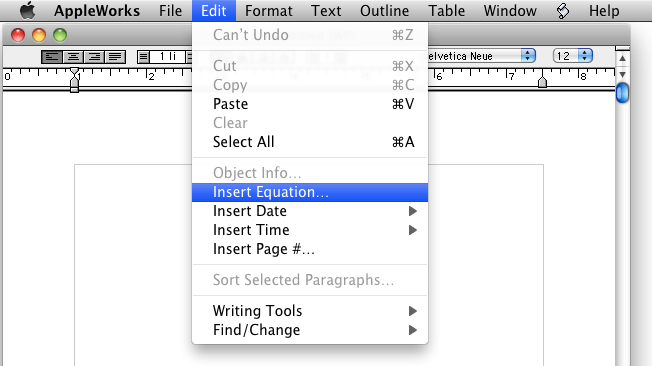
To call up Equation Editor, you can either locate the program on your hard disk (it was most likely installed in your AppleWorks folder) and open it like any other program, or while using the word processor, choose "Insert Equation" from the Edit menu. Equation Editor starts up and becomes the topmost application using this window:
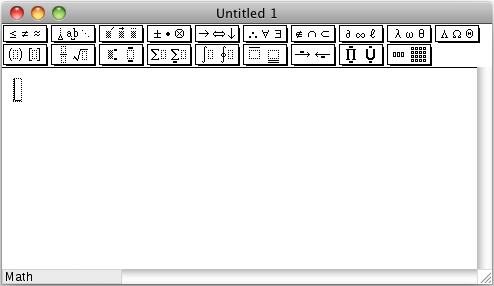
This is where you will construct your equation. For most simple equations, you can just start typing with the keyboard keys. For example, typing "F=ma" generates an equation just like it does in the word processor. However, Equation Editor converts what you've typed into a graphic which is pasted in place. F=ma from equation editor looks very similar to F=ma from the word processor; however, since the Equation Editor generates graphics, you can't edit the equation directly without double-clicking on it.
Converting a document to a web page or other file may cause the graphic to be converted into inline GIFs which can no longer be edited without a paint program, so it's a good idea to keep your original documents as word processor files.
However, the real power of Equation Editor is its ability to write complex formulas without resorting to superscripts and subscripts. Let's consider a simple physics formula for projectile motion, such as:

Typing this equation using just word processing tools took the following steps.
- Type "y = y"
- Type Command-shift-"-" to start subscripts
- Type "0" (zero)
- Type Command-shift-"-" to end subscripts
- Type "+ v"
- Type Command-shift-"-" to start subscripts
- Type "0" (zero)
- Type Command-shift-"-" to end subscripts
- Type "t +"
- Type Command-shift-"+" to start superscripts
- Type "1" (one)
- Type Command-shift-"+" to end superscripts
- Type"/"
- Type Command-shift-"-" to start subscripts
- Type "2" (two)
- Type Command-shift-"-" to end subscripts
- Type "gt"
- Type Command-shift-"+" to start superscripts
- Type "2" (two)
- Type Command-shift-"+" to end superscripts
- Then select the zeros and twos and reduce their font sizes.
On the other hand, entering this equation in Equation Editor takes the following steps:
- Type "y=y"
- Type Command -"l" (lowercase L) "0" then Tab;
- Type "+v"
- Type Command -"l" (lowercase L) "0" then Tab;
- Type "t+"
- Click the button for setting up fractions;
- Type "1", Tab, "2", Tab;
- Type "gt"
- Type Command -"h", "2" then close the window, which inserts the equation into the document.
It's still not beautifully elegant, but it's quite clear it is more efficient than typing in equations with only word processing tools. And Equation Editor also includes tools for square roots, integral signs, the entire Greek alphabet, special mathematical symbols such as set notation and vectors, and matrices.
This is a powerful tool which I plan to have students use in their writing this fall. If you want more help, try using the online help included with the program (press the "help" key on your extended keyboard). This is mainly concerned with keyboard shortcuts. For even more tips to get as much out of the program as possible, visit www.mathtype.com; even though they are giving you an extended sales pitch for the upgrade, the "Equation Editor Tips" page has a lot of valuable content. One valuable tip, for example, suggests that you create an equation document with templates of frequently used equations for you to cut and paste into other documents.
Jeff Adkins is a science teacher who isn't afraid to state his preferences in computing platforms. In his classroom he has everything from a beige All-in-One to a a G4 XServe, and they all work together nicely. He calls himself the "poster child for technology integration" in the classroom. He was the 2006 Outstanding Educator of the Year for the California Computer Using Educators (CUE) organization. He also maintains a site for astronomy teachers at www.AstronomyTeacher.com.
Recent Mac Lab Reports
- Microsoft Word 2004 vs. iWork Pages 1.0 for writing a book, 01.10. Microsoft Word is great for technical writing, powerful yet slow, while Pages lets you concentrate on just writing, making it great for novels.
- iWeb a great tool for quickly creating an attractive website, 09.11. Apple's iWeb software isn't just easy to use, it also integrates nicely with .mac and other programs in the iLife bundle.
- Use your Bluetooth phone to control your Mac? Maybe, 02.27. Salling Clicker software turns many Bluetooth phones into remote controls for Bluetooth-equipped Macs.
- Two more markets the iPhone could conquer, 02.01. How Apple could redefine the ebook and calculator markets with a pair of free apps for the iPhone.
- More in the Mac Lab Report index.
Links for the Day
- Mac of the Day: Mac mini Core Solo, Feb. 2006 - The only Mac to use a Core Solo CPU, this model ran at 1.5 GHz, has integrated graphics, and includes a Combo drive
- Group of the Day: SuperMacs is for those using Umax SuperMac clones.
- November 24 in LEM history: 98: Microsoft's heavy hand - 00: Looking at the iMac - 04: The best Mac for the holidays - Picking the right replacement for a dead mouse - Better battery for 15" AlBook
- Support Low End Mac
Recent Content on Low End Mac
- Why Spaces is My Favorite Leopard (and Snow Leopard) Feature, Charles W. Moore, Miscellaneous Ramblings, 11.23. Spaces, a feature introduced with OS X 10.5, is like having several monitors on your Mac without the cost and space of using multiple displays.
- i5 iMac Benchmarked, Mac mini 'Shouldn't Be Overlooked', Twitter Client for Classic Mac OS, and More, Mac News Review, 11.20. Also why Apple leaves the low end to others, 10.6.2 fixes video playback problem in 27" iMac, 3D Leopard and Snow Leopard performance, and more.
- Apple's Tablet an End Run Beyond Netbooks, Frank Fox, Stop the Noiz, 11.20. Whatever Apple has planned will leverage existing technologies while going beyond what its competitors can offer.
- Apple #4 in Reliability, Apple Tablet a Gadget for All?, HP's i7 Notebook Outdoes Mac Rivals, and More, The 'Book Review, 11.20. Also Flash 10.1 improves video on Hackintosh netbooks, thin-and-light notebooks impress, Windows XP finally on the way out, and more.
- NASA Chemical Sensor for iPhone, Smartphone Death Match, iPhone Earrings, and More, Ian R Campbell, 11.20. Also mobile phone dangers, new apps, GPS solution for iPod touch, new iPod and iPhone cases, and more.
- Replacing the Hard Drive in a Clamshell iBook, John Hatchett, Recycled Computing, 11.19. Yes, it is one of the most difficult Apple notebooks to disassemble and reassemble, but a 10 GB hard drive just will not do.
- IBM Model F: A Great Old Keyboard with an Outdated Layout, Tommy Thomas, Welcome to Macintosh, 11.19. Although it used a different technology than the revered IBM Model M keyboard, the Model F was a great keyboard in its own right.
- More links in our archive.
Recent Deals
- Best G4 iMac Deals, 11.24. Used 15" 700 MHz CD-RW, $150; 800 MHz Combo, $229; 1 GHz, $289; 17" 1.25 GHz, $200; 20" 1.25 GHz, $509.
- Best MacBook Air Deals, 11.24. Used from $899; refurb from $1,099; new 1.6 GHz/120 HD, $1,150 after rebate; 1.8/64 SSD, $1,150 a/r; 1.86/128 SSD, $1,350 a/r; 2.13/128 SSD, $1,694 a/r.
- Best PowerBook G3 Deals, 11.24. Used 233 MHz WallStreet, $75; 266 MHz, $160; 400 MHz Lombard, $199; 400 MHz Pismo, $289; 500 MHz, $350.
- Best 12" PowerBook G4 Deals, 11.23. Used 867 MHz SuperDrive, $348; 1 GHz Combo, $379; SD, $519; 1.33 GHz, $529; 1.5 GHz Combo, $549; SuperDrive, $609.
- Best Mac Pro Deals, 11.23. Used 2.66 GHz 4-core, $1,300; 3.0 4-core. $1,919; refurb 2.66 4-core Nehalem, $2,149; 2.93, $2,549; 2.93 8-core, $4,999; new 2.26 8-core, $2,290.
- Best Time Capsule and AirPort Deals, 11.23. Used 802.11g AirPort Extreme, $49; 500 GB Time Capsule, $150; new, $190; 1 TB dual-band, $280; 2 TB, $469; 802.11n AirPort Extreme, $170.
- Best eMac Deals, 11.18. Used 1 GHz Combo, $100; SuperDrive, $269; 1.25 GHz Combo, $119; SD, $319; 1.42 GHz Combo, $289; SD, $498.
- Best Mac OS X 10.6 and Mac Box Set Deals, 11.18. "Snow Leopard", single user, $25; 5 users, $45; Mac Box Set, single user, $139; 5 users, $180; Server, $414. Shipping included.
- Best Xserve Deals, 11.18. Used 1 GHz dual G4, $649; 2.3 dual G5, $795; 3.0 4-core Xeon, $1,899; refurb 2.26 4-core, $2,499; new, $2,888; refurb 8-core, $2,999; new, $3,449; more.
- More deals in our archive.