
2001 – When the word gets out that you want old Macs, people respond. A reader of this column recently donated several Macs to our school, including an old (1993) PowerBook 145b. Since my PowerBook 5300cs was stolen from a storeroom last fall, I have been ‘Bookless, and all computing has been restricted to home or school.
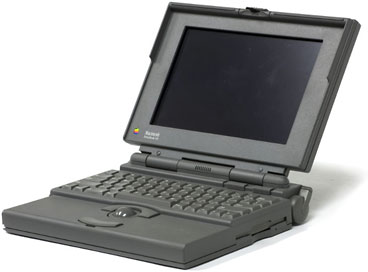 The 145b booted up normally with System 7.1 installed. It has 8 MB of RAM (2 MB onboard and one 6 MB upgrade) and an 80 MB hard drive.
While it does not have an ethernet port or a monitor port, neither is a big issue to me except when transferring a large file, such as a program installer.
The black-and-white display is bright, but the passive matrix design allows the cursor to disappear when moving it rapidly, a phenomenon known as submarining. This was the first time in a while I’d used a trackball rather than the ubiquitous trackpad now seen on all laptops, and I have to say aside from a slight stickiness, the ball just feels more comfortable and allows for finer motor control than the trackpad does.
Using virtual memory to boost the RAM to 12 MB, I connected a Dayna Etherprint adapter. This is ostensibly an adapter to allow LocalTalk printers to talk to an ethernet network. Or to plug into the PowerBook’s printer port and allow it access to ethernet. With no further installation necessary, the PowerBook immediately recognized the network – even though it doesn’t have the Network control panel installed. Try doing anything on Windows when part of the operating system software is missing!
Opening the Chooser showed all the zones and servers on our school network, allowing me to connect to my classroom server and install AppleWorks. Add in a copy of the venerable Disinfectant (just in case of a virus), and you’ve got a useful machine.
AppleWorks 5 (version 6 requires a PowerPC Mac, and the 145b is just an ‘030 machine) installed without a hitch, and I was able to start immediately with some simple word processing and drawing for handouts and documents. It is a little weird working in black and white, but then again, my printer is black and while, and so there isn’t much missing. In fact, it keeps me from forgetting that the nice color pictures I sometimes draw for diagrams won’t reproduce well on a photocopy of a black and white printout.
With some finagling, I could probably fire up the modem and get it on the Net as described in an earlier column this week on Low End Mac, but it meets my needs as is. If your computers are tools, remember that all tools don’t need to do all jobs. Not everything can be fixed with a hammer. (Though I can think of a few students who could stand a few sharp raps to the head.)
Look at all this little gem can do:
- AppleWorks (word processing, drawing, database, etc.).
- Runs sensor software from Vernier for experiments. (Vernier is the science teacher’s low-end Mac Mecca for software on older Macs and even Apple II that fills a useful need for science classes doing real-time data collection.)
- Has a floppy drive for file transfer.
- Has LaserWriter driver (with Etherprint) for printing.
- And it has a little room left over for saving files.
Not everything I do is connected to the Internet. If you’re in the same boat, then maybe one of these nice vintage Macs is the way to go.
Keywords: #powerbook145b #etherprint
Short link: http://goo.gl/7U7ZOm
