
A short while back, I wrote an article about the history of the Apple Command key and why it looks the way it does. One of the many benefits of writing for Low End Mac is all the interesting people you get to correspond with – and I got mail from all sorts of folks in Europe regarding the article.
Here I share some of the mail I got that tells more about the symbol and the Mac than my initial research revealed. Thanks to everyone who wrote, including the many folks who wrote in with confirming information about this topic. I had no idea people would find it so interesting!
Splat Means Ruins
 I am from Denmark. What you’re referring to as the “splat” symbol, is indeed used in Scandinavia as a mark to indicate places of historic interest. I believe that most Scandinavians think that the “splat” symbol is synomymous with ruins.
Thanks,
Tommy Braas
Tommy,
I know a bunch of IT directors who would find that “ruins” interpretation pretty ironic. Thanks for writing.
Jeff
Sightings from Around Scandanavia
Jeff,
Yes, it is true that the symbol is used on roadsigns pointing to sights and places of historic interest. At least here in Denmark; I don’t know about the rest of Scandinavia.
The sign was used by the Vikings for decoration and also appeared on coins. You can see similar motifs on our current coins: <http://www.nationalbanken.dk/nb/nb.nsf/alldocs/Fmoentserie>
The original was 3D; Escher would have liked it, if you can follow me.
rgds
Martin
Here is a link to the site of the Swedish National Road Administration (SNRA) where the sign for Sevärdhet is shown. Sevärdhet means approximately “something worth seeing,” i.e. interesting feature.
<http://www.vv.se/vag_traf/vagmarken/upplysningsmarken2.htm#1_9_2_30>
So, yes it is true that there is a road sign that uses the symbol.
Per Ola Ingvarsson
In Command Key Truth and Fiction, you wrote, “According to this page, ‘Its oldest name is “cross of St. Hannes,” but it occurs in pre-Christian Viking art as a decorative motif. Throughout Scandinavia today the road agencies use it to mark sites of historical interest.’ Do we have any Scandinavian readers – or Scandinavian tourists, for that matter – who can verify this?”
I can verify this as a long time (!) Norwegian citizen and reader. This symbol is used for all officially recognized sites of historical interest, such as stave churches, etc.
Sincerely
Eivind Hovig
Confirmed. The St. Hannes cross is the symbol used to mark historical interesting or important sites, at least in Sweden, where I live. It was very odd to look at that key on the keyboard when I started using Mac’s in 1986, since I am an archaeologist… thus it was my profession during a whole lot of years to give advice about where to put the crosses along the roads… 🙂
Bo Hâkansson
Dear Bo, Per Ola, Martin and Elvind,
Thanks for writing. Thanks to you, I have confirmation that the symbol is used in a similar way in Sweden, Denmark, and Norway. Keep reading; down below we have some more links leading to the command key “in the wild.”
Thanks again,
Jeff
Hello Jeff!
According to someone (I forgot who), the command sign was born on an Apple keyboard because a designer at Apple had recently been to Sweden on a vacation and found the road sign for a rarity (or something worth seeing, a “sight”) very funny and implemented that as a command sign. Later on they added the Apple next to it as well. I guess becuase no one really could say what it was.
Here’s a link to the swedish bureau for roads where they show the road sign and explains what it is (I guess you aren’t fluent in Swedish, but it just says “sight”).
<http://www.vv.se/vag_traf/vagmarken/upplysningsmarken2.htm#1_9_2_30>
The shape is very much like the castles built in the old days in Sweden, where the four corners were rounded (so that they could see enemies from all four ways and attack them if they were under attack) and higher than the rest of the building.
Earlier the sign was called fornminne, which can be translated to ancient monument or relic of antiquity. This would imply that it usually was a ruin of a castle or something else with similar shape. The same sign is used by the bureau that takes care of old monuments and relics, etc. See their link and logo:
<http://www.raa.se/runverket/index.asp>
 They imply the shape being from the old carved stones found in Sweden, called runstenar (runic stones). The sign is also called runmärke, which translates into runic character or something like that.
As you see it’s not easy to explain.
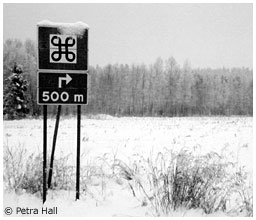
I’ll enclose a picture to show you the road sign in use (not that good, but oh well, it was january 2nd and pretty dark outside and the only one I had on my computer showing my Macfriends that the sign actually exsisted). Pretty, eh? 🙂
Maybe I should go out and take a new picture now, in daylight to show you -without the snow? 😀
Regards,
Petra Hall, Sweden
Dear Petra,
What a thorough response! You sound as if you’d be a good tour guide for visitors to your country. Thanks so much for sharing.
Jeff
More on Apple Keyboard History
Jeff,
Good work on the Command/Apple key history, but you’re missing out on the really great old information about those keys.
(Some history. In addition to being an old Apple II user, I worked through college doing tech support for Beagle Bros., the oldest and most respected Apple II software company in history. These days, I write for PC Magazine.)
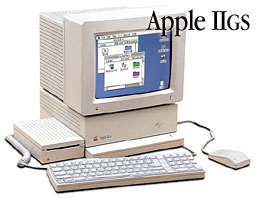
Now then. The Macintosh Keyboard Layout owes a lot more to the Apple II than you might think. This is because the first computer Apple released with an ADB keyboard was the Apple IIGS; the Mac SE came later and used it. Or perhaps the ADB layout was designed with both models in mind. Either way, the Mac keyboard and the Apple II keyboard share a common history.
The Apple IIe was the most popular Apple II, and its keyboard had two Apple keys on either side of the spacebar: the Open Apple key (on the left) and the Solid Apple key (on the right). They were never called “Light Apple” and “Dark Apple” by the industry, mainly because Apple used both white and black silkscreening on the beige keys back then, depending on the model and what subcontractor delivered the keyboards that year.
Interestingly, the Open Apple and Solid Apple keys were electrically identical to the two buttons on the standard Apple II joystick. If you had a very old Apple II (such as an Apple II+) which lacked these keys and you needed to press “Open Apple Q,” you’d press one of the joystick buttons and Q at the same time.
 Back to the IIGS/Mac SE. When the “new” ADB keyboard came out, the Open Apple key became the Apple/Shamrock key. The Solid Apple key became the Option key. Needless to say, this was very annoying when you played a pinball game on a IIGS where the left and right flipper buttons were the Open Apple/Solid Apple keys, and now what used to be the right Apple key (Solid Apple) was now on the left of the keyboard in the form of Option.
So anyway, when you hear a Mac user (and I have a few Macs myself, too) say “Open Apple Q” to quit, that person may be a very old Apple II user. If they call the Option key the Solid Apple key, then you know it for sure.
Anyway, just a clarification. Good article.
Warren Ernst
PC Magazine
Dear Warren,
Thanks so much for your interesting historical information about the keyboards and the use of the symbol on the key. I appreciate you taking the time to write and share your knowledge with us. I remember using Beagle Brothers software to recover disk information on an old 5-1/4″ Apple II floppy that had died. I never had an Apple II joystick to play with, so how the button was like a keyboard key was news to me as well. A similar thing was done on the old Atari ST. In certain programs, pressing the joystick yielded the same thing as typing various keyboard keys, such as 1-8 for the eight position joystick. Thanks again!
Keywords: #commandkey #applecommandkey #maccommandkey
Short link: http://goo.gl/WdyKB5
searchword: commandkey
