
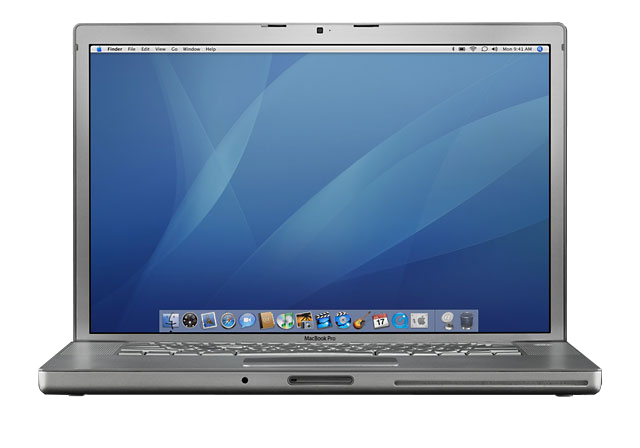
 To the pleasant surprise of the Mac community, Apple began shipping the MacBook Pro (MBP) the week of 2006.02.14 – and with faster CPUs than originally announced. The US$1,999 MBP ships with a 1.83 GHz CPU instead of 1.67 GHz, and the US$2,499 MBP has a 2.0 GHz CPU instead of 1.83 GHz.
For those clamoring for even more speed, there’s a 2.16 GHz build-to-order option at a US$300 premium. This is the first time in Apple history that a computer has been released with a faster CPU than originally announced, and it’s also the first time Apple has offered a faster CPU as a build-to-order option in a notebook.
Apple marked the transition to Intel by discontinuing the well-known, long-respected PowerBook name. The Intel-based pro laptop is known as the MacBook Pro, a name that met with a less-than-enthusiastic reception at the Expo keynote.
Built around Intel’s Core Duo CPU, the new ‘Book offers up to 4x the performance of the old one. That’s a lot of power!
The new MacBook Pro looks a lot like the old 15″ PowerBook G4 at first glance, but its 15.4″ 1440 x 900 display (up from 15.2″ and down from 1440 x 960) is the brightest Apple has ever used on a notebook up to this point. It is a bit larger and thinner than the 15″ PowerBook G4.
There are two other visual clues that this ‘Book is different. There’s a black square above the display for the iSight webcam. And there’s a round spot on the front, a receiver that works with Apple’s remote.
Just like the iMac, the MacBook Pro comes with Front Row.
New with the MacBook Pro is the MagSafe power connector, which is designed to detach itself when someone trips over the cord, thus preventing your ‘Book from crashing to the floor.
Other changes include built-in dual-DVI support for Apple’s 30″ Cinema Display, ATI Mobility Radeon X1600 graphics, an ExpressCard/34 slot (replacing the older PC Card), elimination of FireWire 800, and a “downgrade” to a 4x single-layer SuperDrive.
Note that the built-in display is only capable of 18-bit color, not the full 24-bit color you might expect.
Some Quirks
As of April 2006, there were five revisions of the MacBook Pro, A-E. Serial numbers of the original begin with W8608.
- W8607/8, Rev. A.
- W8609, Rev. B.
- W8610, Rev. C.
- W8611, Rev. D.
- W8612, Rev. E.
We wonder what went wrong here, as this is a very fast and unusual hardware revision schedule for Apple. The models demonstrated at Macworld Expo were preproduction prototypes, and shipping models have had reports of whining, AirPort problems, flickering displays (esp. at maximum brightness), and excessive heat. Perhaps the combination of Intel designing the motherboard and Apple designing an even slimmer enclosure have both been contributing factors, but these issues should have been worked out before Apple began shipping the MBP, not worked out in the hands of guinea pig customers during the first six weeks or so of sales.
Apple has begun replacing logic boards to solve “whining” problems. Models with the new logic board require 10.4.6 or later.
What You Need to Know
- Using the 32-bit only Core Duo CPUs allowed Apple to introduce Intel-based Macs before the Core 2 Duo, which supports both 32-bit and 64-bit operation, came to market. Because OS X 10.7 Lion is a 64-bit only operating system, Core Duo Macs do not support it, making OS X 10.6 Snow Leopard the end of the Mac OS road for the earliest Intel Macs.
. - With a 2 GB memory ceiling, this MacBook Pro wouldn’t run Lion decently anyhow, but the first generation Intel Macs run Snow Leopard very nicely with 2 GB of RAM. If your Early 2006 MacBook Pro has 512 MB, upgrade immediately.
. - The MacBook Pro initially shipped with an Intel-only version of Mac OS X 10.4.4 Tiger and iLife ’06, which is a universal binary. Like other Core Duo Macs, it cannot run OS X 10.7 Lion or later.
. - Believe it or not, it’s totally possible (and is proven to work) a core 2 Duo chip can be soldiered in, in place of the Core Duo chip. This, however, is a laborious process and may provide diminishing results.
. - OpenCL is not supported with the Mobility Radeon X1600 GPU.
Closed Lid Mode
All Intel ‘Books support “lid closed” (or clamshell) mode, which leaves the built-in display off and dedicates all video RAM to an external display. To used closed lid mode, your ‘Book must be plugged into the AC adapter and connected to an external display and a USB or Bluetooth mouse and keyboard (you might also want to consider external speakers). Power up your ‘Book until the desktop appears on the external display and then close the lid. Your ‘Book will go to sleep, but you can wake it by moving the mouse or using the keyboard. The built-in display will remain off, and the external monitor will become your only display.
To resume use of the internal display, you need to disconnect the external display, put the computer to sleep, and then open the lid. This will wake up your ‘Book and restore use of the built-in display.
The Intel-based Macs use a new partitioning scheme known as GPT. Macintel models can only boot from GPT hard drives; APM (Apple’s old partitioning scheme) hard drives cannot be used to boot them. Further, Power PC Macs running any version of the Mac OS prior to 10.4.2 cannot mount GPT volumes.
On the plus side, Macintel models are the only Macs that can boot OS X from a USB hard drive. That should make a lot of Mac users happy, although it may be the beginning of the end for external drives with dual FireWire 400/USB 2.0 support.
Battery life is comparable to the 15″ PowerBook G4.
Details
- Announced January 10th, 2006
- Apple model number: A1150 (EMC 2101)
- Model ID: MacBookPro1,1
- Order Number: MA090LL (1.67 Core Duo, Disc. 2/14/06)
- MA091LL / MA463LL/A (1.83 Core Duo, Disc. 5/16/06)
- MA464LL/A (2.0 Core Duo, 2/14/06 – 5/16/06)
- MA600LL (2.0 Core Duo 5/17/06 – 10/24/06)
- MA601LL (2.16 Core Duo)
- Discontinued on October 24th, 2006 (Last Core Duo Model)
How it stacks up in Geekbench 2 32-Bit
- N/A (1.67) / 2288 (1.83) / 2450 (2.0) / 2657 (2.16) / 1000 (1.6 Ghz SP G5 2003)
Unsupported Mac OS
- Although this MacBook Pro cannot run anything newer than Mac OS X 10.6.8 due to its 32-Bit Core Duo CPU, it’s possible to solder-in a Core 2 Duo CPU. This would allow the MacBook Pro to run Mac OS X Lion without issue. It would also be possible to run all the way up to OS X El Capitan using the Piker Alpha mod, without graphical hardware acceleration (except through the use of a Mini-PCIe to PCIe or Express34 external graphics card modification.)
Mac OS
- Requires Mac OS X 10.4.4 Tiger (or 10.4.6 with new logic board) to 10.6.8 Snow Leopard
Core System
This MacBook Pro shipped with Intel Core Duo “Yonah” 65nm 32-Bit CPUs, using Socket 479 mPGA
- Intel Core Duo T2300 ($1999): 1.67 Ghz, 2 Cores, 2 Threads, 667 MHz Bus
31W TDP, 65nm, 32KB L1 Per-Core, 2 MB L2, 1.1625V – 1.30V voltage range
Comes with: MMX, VT-x, Speedstep, Execute Disable Bit, SSE 3
. - Intel Core Duo T2400 ($1999/2499*): 1.83 Ghz, 2 Cores, 2 Threads, 667 MHz Bus
31W TDP, 65nm, 32KB L1 Per-Core, 2 MB L2, 1.1625V – 1.30V voltage range
Comes with: MMX, VT-x, Speedstep, Execute Disable Bit, SSE 3
. - Intel Core Duo T2500 ($1999/2499*): 2 Ghz, 2 Cores, 2 Threads, 667 MHz Bus
31W TDP, 65nm, 32KB L1 Per-Core, 2 MB L2, 1.1625V – 1.30V voltage range
Comes with: MMX, VT-x, Speedstep, Execute Disable Bit, SSE 3
. - Intel Core Duo T2600 ($2799): 2.16 Ghz, 2 Cores, 2 Threads, 667 MHz Bus
31W TDP, 65nm, 32KB L1 Per-Core, 2 MB L2, 1.1625V – 1.30V voltage range
Comes with: MMX, VT-x, Speedstep, Execute Disable Bit, SSE 3
Memory
- Maximum memory bandwidth not listed by Intel as with newer CPUs.
- ($1999+): 512 MB 667 MHz PC2-5300 DDR2 SDRAM ~5.3 GB/s effective
- Configurable up to 2 GB using 2x 1 GB sticks.
Video
Mac includes DVI to VGA adapter in box, additional adapters optional.
- ($1999): ATI Radeon Mobility X1600, 128 MB GDDR3 SDRAM @~15.01 GB/s, 128-Bit Bus
- 157 Million Transistors, 90 nm process size, PCIe 1.0 x16 @ 4 Gb/s,
- 450 MHz GPU clock, 470 MHz Memory clock (940 Mb/s effective), ~10-25W TDP
- 12 Pixel Shaders, 4 TMUs, 4 ROPs, DX 9.0c (9_3), OpenGL 2.1, Shader model 3.0
.
- ($2499+): ATI Radeon Mobility X1600, 256 MB GDDR3 SDRAM
. - 15.4″ Matte or Glossy widescreen TFT (Thin Film Transistor) Active Matrix LCD color display, 1440 x 900 @110ppi.
- “Simultaneously supports full native resolution on the built-in display at millions of colors and”
- A Dual-Link DVI for 30″ Cinema Display for a maximum resolution of 2560 x 1600, supports mirroring and dual display mode.
Drives
- ($1999): 80 GB Sata 1.0 5400 RPM HDD (1.5 Gb/s)
- A 100 GB HDD was announced with the 1.83 GHz model, but shipped with 80 GB and a reduced price (MA463LL/A).
.
- A 100 GB HDD was announced with the 1.83 GHz model, but shipped with 80 GB and a reduced price (MA463LL/A).
- ($2499): 100 GB Sata 1.0 5400 RPM HDD (1.5 Gb/s)
- MA464LL/A shipped with a 100 GB from 2/14/06 – 5/16/06. Afterward, it was also reduced to 80 GB for a reduced price (MA600LL).
.
- MA464LL/A shipped with a 100 GB from 2/14/06 – 5/16/06. Afterward, it was also reduced to 80 GB for a reduced price (MA600LL).
- ($2799): 100 GB Sata 1.0 5400 RPM HDD (1.5 Gb/s) – No changes made to this model.
. - All Models: 4x DL SuperDrive
- (Write: 4x DVD-R DVD+R DVD+RW DVD-RW, 24x CD-R, 10x CD-RW)
- (Read: 8x DVD-ROM SL, 6x DVD-ROM DL, DVD-R, DVD+R, DVD+RW, DVD-RW, 4x DVD+R DL & DVD-R DL, 24x CD)
Expansion/Misc
- iSight Camera
- 1x DVI port, support for Dual-Link DVI
- 2x USB-A style USB 2.0 ports, one on each side
- 1x FireWire 400
- There is no FireWire 800
- Gigabit Ethernet (RJ-45 style connector)
- IEEE 802.11g AirPort Extreme built in (Wifi 3, 54 Mb/s)
- Modem: optional v.92 56k external USB modem
- Bluetooth 2.0, standard
- IR receiver with support for Apple Remote
- ExpressCard/34 slot, PCIe 1.0
- Kensington Security Lock
- Original MagSafe style power connector
- Singular Internal Microphone
- Stereo Speakers
- 3.5 mm Headphone Jack
- 3.5 mm Microphone Jack
Battery
- 60 Watt-Hour Lithium-Ion Battery
- Estimated by Apple to last 3.5 – 4.5 hours under “normal conditions”
Included In Box
- 15″ Pre-Unibody MacBook Pro
- Protective styrofoam with “MacBook Pro” chiseled into it
- “Square” style 85 Watt 1st-gen MagSafe Power Brick
- Connects straight-in, not an L-shape connector
- Power Brick extension cord
- Power Brick 2-Prong wall socket adapter
- A1156 White Apple Remote with black top
- DVI to VGA adapter
- Other adapters are optional
- “Designed by Apple In California” software box/container
- AppleCare protection plan CD
- Worldwide warranty pamphlet
- Applecare service support guide
- User guide
- Apple stickers
- Software restoration discs
Physical
- Size:H/W/D 1.0 x 14.1 x 9.6 in/2.59 x 35.7 x 24.3 cm
- Weight: 5.6 lb./2.54 kg
Online Resources
- Full list of online resources for the 15″ Core Duo MacBook Pro (Early 2006) on a separate page.
Keywords: #coreduomacbookpro #macbookprocoreduo
Short link: http://goo.gl/iFdWT0
searchwords: coreduomacbookpro, macbookprocoreduo
Online Resources




