
In an unusual Monday product announcement (Apple usually reveals new products on Tuesday), Apple introduced the 17″ MacBook Pro (MBP) with a 2.16 GHz Intel Core Duo CPU. It’s the first MacBook to support FireWire 800, and it also has a dual-layer SuperDrive (vs. single-layer in the 15″ MacBook Pro).
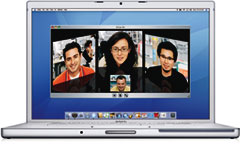 The 17″ MBP looks a lot like the old 17″ PowerBook G4, and its 1680 x 1050 display matches its predecessor’s. It is a tiny bit deeper (10.4″ vs. 10.2″) than the 17″ PowerBook G4.
There are two visual clues that this ‘Book is different. There’s a black square above the display for the iSight webcam. And there’s a round spot on the front, a receiver that works with Apple’s remote, which works with Apple’s Front Row software.
The 17″ MacBook Pro uses the same MagSafe power connector as the 15″ model. It’s designed to detach itself when someone trips over the cord, thus preventing your ‘Book from crashing to the floor.
This model includes built-in dual-DVI support for Apple’s 30″ Cinema Display, ATI Mobility Radeon X1600 graphics, and an ExpressCard/34 slot (replacing the older PC Card). It has 3 USB 2.0 ports, one more than the 15″ MBP offers.
Note that the built-in display is only capable of 18-bit color, not the full 24-bit color you might expect.
What You Need to Know
Using the 32-bit only Core Duo CPUs allowed Apple to introduce Intel-based Macs before the Core 2 Duo, which supports both 32-bit and 64-bit operation, came to market. Because OS X 10.7 Lion is a 64-bit only operating system, Core Duo Macs do not support it, making OS X 10.6 Snow Leopard the end of the Mac OS road for the earliest Intel Macs.
With a 2 GB memory ceiling, this MacBook Pro wouldn’t run Lion decently anyhow, but the first generation Intel Macs run Snow Leopard very nicely with 2 GB of RAM. If your Early 2006 MacBook Pro has 512 MB, upgrade immediately. You really need 1 GB to get okay performance from OS X 10.4 Tiger or 10.5 Leopard. As of August 2014, you can get 2 GB for $23 from Other World Computing, and with Snow Leopard just $20 from Apple, take this MacBook Pro as far as it will go with RAM and operating system.
Early MacBook Pros used decent 5400 rpm hard drives, but newer drives will provide much snappier performance. 7200 rpm notebook drives start at $59 these days (August 2014), and for a serious speed boost, Other World Computing offers a 44 GB solid state drive (SSD) for just $50, although you’ll probably want something with more capacity.
Closed Lid Mode: All Intel ‘Books support “lid closed” (or clamshell) mode, which leaves the built-in display off and dedicates all video RAM to an external display. To used closed lid mode, your ‘Book must be plugged into the AC adapter and connected to an external display and a USB or Bluetooth mouse and keyboard (you might also want to consider external speakers). Power up your ‘Book until the desktop appears on the external display and then close the lid. Your ‘Book will go to sleep, but you can wake it by moving the mouse or using the keyboard. The built-in display will remain off, and the external monitor will become your only display. Since all video RAM is now dedicated to the external monitor, you may have more colors available at higher resolutions.
To resume use of the internal display, you need to disconnect the external display, put the computer to sleep, and then open the lid. This will wake up your ‘Book and restore use of the built-in display.
Intel-based Macs us a new partitioning scheme known as GPT. Macintel models can only boot from GPT hard drives; APM (Apple’s old partitioning scheme) hard drives cannot be used to boot them. Further, Power PC Macs running any version of the Mac OS prior to 10.4.2 cannot mount GPT volumes.
On the plus side, Macintel models are the only Macs that can boot OS X from a USB hard drive. That should make a lot of Mac users happy, although it may be the beginning of the end for external drives with dual FireWire 400/USB 2.0 support.
The MacBook Pro ships with Mac OS X 10.4.6 Tiger and iLife ’06. Like other Core Duo Macs, it is not compatible with OS X 10.7 Lion.
Battery life is comparable to the 17″ PowerBook G4.
- Thinking about a MacBook Pro or have one? Sign up for our MacBook email list.
- Our Tiger Group is for those using Mac OS X 10.4.
- Our Leopard Forum is for those using Mac OS X 10.5.
- Our Leopard Group is for those using Mac OS X 10.5 and 10.6.
- Our Snow Leopard Forum is for those using Mac OS X 10.6.
Details
- introduced 2006.04.24 at US$2,799, glossy finish screen a CTO option beginning 2006.05.15, replaced 2006.10.24 by Core 2 model.
- Part no.: MA092
- ID: MacBookPro1,2
Mac OS
- Requires Mac OS X 10.4.6 Tiger to 10.6 Snow Leopard; not compatible with OS X 10.7 Lion
- Mac OS X 10.6 Snow Leopard compatibility
- Grand Central Dispatch is supported.
- 64-bit operation is not supported with Core Solo or Core Duo CPUs. Upgrading with a Core 2 Duo CPU will not change that.
- OpenCL is not supported with the Mobility Radeon X1600 GPU.
Core System
- CPU: 2.16 GHz Intel Core Duo (Yonah), soldered in place, no upgrade options
- Level 2 cache: 2 MB shared cache on CPU
- Bus: 667 MHz
- RAM: 1 GB, expandable to 2 GB using PC2-5300 DDR2 RAM
- Performance:
- Geekbench 2 (Leopard): 2588
- Geekbench 2 (Tiger): 2645
Video
- GPU: ATI Mobility Radeon X1600 on PCI Express with dual-link DVI support
- VRAM: 256 MB
- Video out: DVI connector (VGA supported with included adapter; S-video and composite video supported with optional adapters)
- display: 17″ (43 cm) 18-bit 1680 x 1050 117 ppi color active matrix
- supports 1280 x 800, 1152 x 720, 1024 x 768, 1024 x 640, 800 x 600, 720 x 480, and 640 x 480 pixels at 5:4 aspect ratio; 1024 x 768, 800 x 600, and 640 x 480 pixels at 4:3 aspect ratio; 720 x 480 at 3:2 aspect ratio
allows mirroring to external display or extended desktop mode
Drives
- Hard drive: 120 GB 5400 rpm SATA; optional 100 GB 7200 rpm drive
- optical drive: 8x dual-layer SuperDrive writes DVD+R at up to 8x, DVD±RW reads DVDs at 4x, double-layer DVD+R at 2.4x), writes CD-R at 24x, writes CD-RW at 16x, reads DVDs at 8x (single-layer) or 6x (double-layer) and CDs at 24x
- floppy drive: external USB only
Expansion
- USB: 3 USB 2.0 ports
- FireWire 400: 1 port
- FireWire 800: 1 port
- Ethernet: 10/100/gigabit
- WiFi: 802.11g AirPort Extreme built in
- Modem: optional v.92 56k external USB modem
- Bluetooth: BT 2.0 built in
- IR receiver: supports Apple Remote
- ExpressCard/34: 1 slot
- expansions bays: none
Physical
- size: 10.4 x 15.4 x 1.0″ (265 x 392 x 25.9 mm)
- Weight: 6.8 pounds (3.1 kg)
- battery: 68 watt-hour lithium-polymer
- AC adapter: 85W MagSafe
Keywords: #macbookprocoreduo #coreduomacbookpro
Short link: http://goo.gl/b5H7vb
searchwords: coreduomacbookpro, macbookprocoreduo




