
Last time we discussed overclocking your Macintosh, but we never really got into the nitty-gritty of actually changing the settings inside your computer, since this can be come a very complicated thing to do. This time we’re finally going to get into it and actually do some over clocking.
Today we’ll be learning how to overclock a Blue and White (B&W) Power Macintosh G3 (a.k.a. Yosemite).
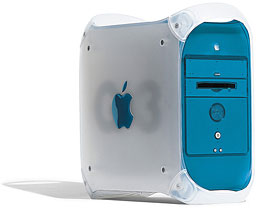 The B&W G3 is one of the easiest Macs to overclock. Why? Because the B&W has a jumper block (we’ll get more into what this is later) right next to the processor! In fact, the jumper block is even labeled “speed control” on the motherboard. Imagine that!
How exactly do you do this “overclocking” thing? If you read my previous article, you already know what it is, but now we’ll go over how to do it. This will require you to open up your G3, so you should follow the normal precautions and always remember that you have the potential to mess up your computer big time.
With all that said and done, it’s time to open your computer. First, disconnect all of the cables (power, USB, etc.) from the back of your computer. Now you can safely go ahead and open it up, which is done by grabbing the little circle on the right hand side of the computer and pulling – the whole side should come down, and you should see (and have access to) the entire motherboard and drive assembly.
Now locate the processor. It’s the thing with all of the aluminum bits sticking out of it. This is called the “heat sink,” and what it does is take extra heat away from the processor.
Next to the processor is a little rectangular box. It should be a shade of baby blue, and it will (unless you or someone else has previously been inside of the computer) be covered by a sticker that says “do not remove, will void warranty” or something of the like. See Accelerate Your Mac for a nice photo.
This is a cover for the jumper block. A jumper block is a device attached to the motherboard that you can use to change settings. (Not necessarily just speed settings. If you’ll notice, all IDE hard drives have jumpers to control settings for master/slave, etc. But that’s a bit off topic here.)
Now that we know what a jumper block is and what it does, it’s time to change some settings (finally!). First, remove the tape (if it’s still there). Next, remove the block cover. You should now see exactly eleven rows of two pins each. This is what controls the systems various speed settings.
This works by placing jumpers on various rows in the box. It just looks empty now because the box you took off also contains the jumpers. You won’t be able to reuse this cover, because it’s preset for your current speed settings – the thing we’ll be changing.
You’ll need to buy new jumpers. All you’ll need to do is head over to your local Radio Shack and ask for part number #276-1512a (according to Accelerate Your Mac). They’ll know what it is, and it’ll only cost you about two bucks.
Once you’ve got the new jumpers, it’s time to set it all up. Looking at the top of the jumper block, you’ll only be changing the first four groups of pins. The others will be kept the same.
You can start by choosing the speed you wish to “jump” to (ha-ha, like the pun?). You shouldn’t add more than 50 to 100 MHz, since instability and other problems can occur.
Now that you have that decided what speed to try, you need to fill in the proper jumpers. Looking at the jumper block with the open end facing you, put a jumper in the third, fourth, sixth, and seventh closest set from you. These control the bus setting and will not be changed regardless of which speed you’ll be going to.
Next, you need to change the upper four jumpers. If you wish to set your processor to 350 MHz, insert a jumper on the uppermost set of pins. If you wish to bump your system to 400 MHz, insert one on the first and third jumper sets. If you wish to overclock to 450 MHz, insert a jumper on the fourth (farthest from you) set. And to try the 500 MHz speed, insert a jumper on the third set of pins.
  CPU Speeds Listed Assume 100 MHz (default) Bus Speed

    (S = Jumper present or "Set", " " = no jumper)

            Multiple     | 4 | 3 | 2 | 1 |
            - -----------+---+---+---+---+
            3x   300 MHz |   | S | S | S |
            - -----------+---+---+---+---+
            3.5x 350 MHz |   |   |   | S |
            - -----------+---+---+---+---+
            4x   400 MHz |   | S |   | S |
            - -----------+---+---+---+---+
            4.5x 450 MHz | S |   |   |   |
            - -----------+---+---+---+---+
            5x   500 MHz |   | S |   |   |
            - -----------+---+---+---+---+

    Above table excerpted from Accelerate Your Mac.
Simple enough? I hope so, because now you’re done. All you need to do is close up your computer, attach your cables, and get back to business.
You will want to test your overclocked G3 to make sure it’s stable by running the computer for several hours with the case closed. Too much heat can make the CPU unstable, meaning you’ll need to step back 50 MHz and try again. Keep in mind that overclocking will not always be successful; you may end up back at your original CPU speed.
If you ever need more information, you can check out my two favorite resources, Accelerate Your Mac! and Bare Feats.
In the end, all you spent was two or three dollars and about twenty minutes of your time to get a large enough speed bump to definitely see a difference in many daily computing chores.
Short link: http://goo.gl/YHMEYz
searchword: overclockbluewhiteg3
