
Low End Mac Reader Specials
TypeStyler For Mac OS X is Now Shipping! Download The Free Fully Functional 60 Day Tryout at www.typestyler.com
Don't install Parallels to play poker online! Poker Mac will show you how
to download and install a native Mac poker application such as Full
Tilt Poker Mac.
Laptop Hardware Provided by TechRestore - Overnight Mac & iPod Repairs.
Compare products like desktop computers, apple laptops, apple macs, and LCD Monitors side by side! All the information and reviews to make the best purchasing decision for new mobile phones, sat nav systems, or MP3 players. The Ciao online shopping community makes searching products easy for you.
Mac Daniel's Advice
Replacement Hard Drive Won't Boot
Dan Knight - 1999.05.26
RR writes: First of all, I'd really like to thank you for the service you (and others, obviously) are performing for the Mac community. You are a tremendous asset, and Mac aficionados the world over owe you a debt of gratitude.
I
have a Mac IIci with an internal 80 MB
disk and an external 540 MB disk. Unfortunately, the power supply in
the external drive is getting very unreliable, and I can't leave it on
for more than half an hour before it starts making funny (not humorous)
noises and running erratically. Then I crash.
That sucks, so I decided to pull the 80 MB drive out of the IIci and replace it with the 540 MB mechanism from the external drive. I've made external drives into internal drives before. I added a Barracuda to my Power Mac 8500, and I swapped a 240 MB drive for the 80 MB drive in my niece's IIsi. Those went well, and everyone is happy.
Last night, I opened my IIci and went through my usual process (very carefully, as always), but it didn't work out the way it usually does. After swapping the drives, I booted up but got a disk with a flashing question mark. I powered off and on again, and I zapped the PRAM twice. Then I booted again. The drive spun up and clicked once or twice, but it didn't work. Maybe it wasn't being recognized. I think it was at about this time that I got a sad Mac with the code 0000000F 00007FFF.
I powered down the system and messed with the cables and stuff to be sure everything was okay. Then I tried it again and got the same thing.
Next, I swapped the 80 MB drive back in, and it booted fine, so I switched back to the 540 MB. No luck.
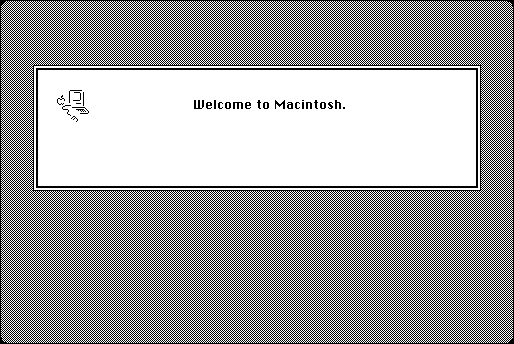
Then I decided to boot from a floppy. I got the "Welcome to Macintosh" screen, but before any INITs loaded I got an error 1 (probably when it tried playing with the hard disk). I tried it numerous times with different floppies and any other variations I could think of. Nothing.
Today, I searched my hard disk and the Web to find out the meaning of sad Mac error codes starting with 0000000F. Wouldn't you know it? The other error codes are discussed in detail but that one isn't!
Is there a reason why I can't use an internal 540 MB drive as a startup disk in a IIci? This disk works fine externally. I can even boot from it. If you think it should be okay, I guess I probably need to try different jumper settings.
The 540 MB drive is an IBM model DALS-3540, P/N 85G3869 (FRU P/N 82G5932), MLC E16092. It has eight significant jumpers that I can mess with (and four marked "unused"). The first three jumpers are for the SCSI ID. I left them all open, which should give me an ID of zero (normal for the internal drive). I don't (currently) have any other SCSI devices attached.
There is also a jumper to "Disable Auto-Spin," which I left open (it was open when this was an external disk). I also left the "Disable Unit Attn" pins open and the "Disable Sync Nego" closed.
Finally, I left the "Termination" pins open. Maybe this should be closed? I guess the internal part of the SCSI bus is permanently terminated. I'm not sure which way the "Termination" pins should be.
Could you suggest different settings (not just for Termination)? I could do trial and error all night long on this thing, but if I'm just barking up the wrong tree, I'd rather admit that I'm lost and ask you for help.
Thanks in advance for any help you can give me!
Mac Daniel replies: Thanks for the kind words. Like most Mac webmasters, I do this because I love the Mac and have information to share.
Since you can boot from the drive in the external case, I'm guessing the case provides termination or you have a terminator on the external drive. That means the drive itself isn't terminated.
The internal drive in your IIci (or any Mac that uses SCSI) must be terminated, so jumper the terminator pins and try again. My guess is your system will come right up. (The 80 MB drive you pulled from your IIci will be terminated. If you put it in an external case, you'll need to disable termination.)
RR sent a note to tell me that it was indeed a termination problem.
Not sure if you should upgrade your old Mac or replace it? Check the Mac Daniel index to see if we've already addressed your problem.
Recent Mac Daniel columns
- WiFi Hardware Compatible with Desktop Macs Running OS X, MetaPhyzx, 03.11. USB, ethernet, PCI, and other wireless hardware compatible with Mac OS X.
- WiFi CardBus Adapters Compatible with PowerBooks, MetaPhyzx, 03.11. CardBus hardware and drivers compatible with PowerBooks running Mac OS X.
- WiFi PC Cards Compatible with PowerBooks Running OS X, MetaPhyzx, 03.11. PCMCIA/PC Card hardware and drivers compatible with PowerBooks running Mac OS X.
- WiFi PC Cards for PowerBooks Running Mac OS 9, MetaPhyzx, 03.10. PCMCIA cards and drivers reported to be compatible with PowerBook running the Classic Mac OS.
- More in the Mac Daniel index.
Links for the Day
- Mac of the Day: 17" MacBook Pro Core Duo, Apr. 2006 - The top-end MacBook Pro includes a 1680 x 1050, 2.16 GHz Core Duo CPU, and supports Apple 30" Cinema Display.
- Group of the Day: G4 List is for those using Power Mac G4s or G4 upgrades.
- November 24 in LEM history: 98: Microsoft's heavy hand - 00: Looking at the iMac - 04: The best Mac for the holidays - Picking the right replacement for a dead mouse - Better battery for 15" AlBook
- Support Low End Mac
Recent Content on Low End Mac
- Pismo WiFi Networking Issue Finally Solved?, Charles W. Moore, Miscellaneous Ramblings, 11.24. It turns out the problems wasn't the Pismo, the Buffalo WiFi card, or Mac OS X 10.4. It was the Wireless G router - Linksys to the rescue!
- Mini VGA to S-video Adapter a No Go for eMacs, Dan Bashur, Apple, Tech, and Gaming, 11.24. You might think that Apple's Mini VGA S-video adapter is a cheap way to connect your eMac or G4 iMac to your TV. You would be wrong.
- Google Calendar with iPhone or iTouch Is Great for Scheduling, John Hatchett, Recycled Computing, 11.24. Web-based Google Calendar allows access and updates from any computing platform, including Mac, Windows, Linux, and iPhone OS.
- Why Spaces is My Favorite Leopard (and Snow Leopard) Feature, Charles W. Moore, Miscellaneous Ramblings, 11.23. Spaces, a feature introduced with OS X 10.5, is like having several monitors on your Mac without the cost and space of using multiple displays.
- i5 iMac Benchmarked, Mac mini 'Shouldn't Be Overlooked', Twitter Client for Classic Mac OS, and More, Mac News Review, 11.20. Also why Apple leaves the low end to others, 10.6.2 fixes video playback problem in 27" iMac, 3D Leopard and Snow Leopard performance, and more.
- Apple's Tablet an End Run Beyond Netbooks, Frank Fox, Stop the Noiz, 11.20. Whatever Apple has planned will leverage existing technologies while going beyond what its competitors can offer.
- Apple #4 in Reliability, Apple Tablet a Gadget for All?, HP's i7 Notebook Outdoes Mac Rivals, and More, The 'Book Review, 11.20. Also Flash 10.1 improves video on Hackintosh netbooks, thin-and-light notebooks impress, Windows XP finally on the way out, and more.
- NASA Chemical Sensor for iPhone, Smartphone Death Match, iPhone Earrings, and More, Ian R Campbell, 11.20. Also mobile phone dangers, new apps, GPS solution for iPod touch, new iPod and iPhone cases, and more.
- More links in our archive.
Recent Deals
- Best G4 iMac Deals, 11.24. Used 15" 700 MHz CD-RW, $150; 800 MHz Combo, $229; 1 GHz, $289; 17" 1.25 GHz, $200; 20" 1.25 GHz, $509.
- Best MacBook Air Deals, 11.24. Used from $899; refurb from $1,099; new 1.6 GHz/120 HD, $1,150 after rebate; 1.8/64 SSD, $1,150 a/r; 1.86/128 SSD, $1,350 a/r; 2.13/128 SSD, $1,694 a/r.
- Best PowerBook G3 Deals, 11.24. Used 233 MHz WallStreet, $75; 266 MHz, $160; 400 MHz Lombard, $199; 400 MHz Pismo, $289; 500 MHz, $350.
- Best 12" PowerBook G4 Deals, 11.23. Used 867 MHz SuperDrive, $348; 1 GHz Combo, $379; SD, $519; 1.33 GHz, $529; 1.5 GHz Combo, $549; SuperDrive, $609.
- Best Mac Pro Deals, 11.23. Used 2.66 GHz 4-core, $1,300; 3.0 4-core. $1,919; refurb 2.66 4-core Nehalem, $2,149; 2.93, $2,549; 2.93 8-core, $4,999; new 2.26 8-core, $2,290.
- Best Time Capsule and AirPort Deals, 11.23. Used 802.11g AirPort Extreme, $49; 500 GB Time Capsule, $150; new, $190; 1 TB dual-band, $280; 2 TB, $469; 802.11n AirPort Extreme, $170.
- Best eMac Deals, 11.18. Used 1 GHz Combo, $100; SuperDrive, $269; 1.25 GHz Combo, $119; SD, $319; 1.42 GHz Combo, $289; SD, $498.
- Best Mac OS X 10.6 and Mac Box Set Deals, 11.18. "Snow Leopard", single user, $25; 5 users, $45; Mac Box Set, single user, $139; 5 users, $180; Server, $414. Shipping included.
- Best Xserve Deals, 11.18. Used 1 GHz dual G4, $649; 2.3 dual G5, $795; 3.0 4-core Xeon, $1,899; refurb 2.26 4-core, $2,499; new, $2,888; refurb 8-core, $2,999; new, $3,449; more.
- More deals in our archive.
About LEM | Support | Usage | Privacy | Contacts
Navigation
Used Mac Dealers
Apple History
Video Cards
Email Lists
Favorite Sites
MacSurfer
MacMinute
MacInTouch
MyAppleMenu
InfoMac
Macs Only!
The Mac Observer
Accelerate Your Mac
RetroMacCast
PB Central
MacWindows
The Vintage Mac
Museum
DealMac
DealsOnTheWeb
Mac2Sell
ramseeker
Mac Driver Museum
JAG's House
System
6 Heaven
System 7 Today
the pickle's Low-End
Mac FAQ
Abandonware
Petition
Mac vs. PC Info
Affiliates
The Apple
Store
Mac
Connection
B&H
MacMall
TechRestore
ExperCom
Crucial
Memory
batteries.com
Advertise
MacMinute
MacInTouch
MyAppleMenu
InfoMac
Macs Only!
The Mac Observer
Accelerate Your Mac
RetroMacCast
PB Central
MacWindows
The Vintage Mac
Museum
DealMac
DealsOnTheWeb
Mac2Sell
ramseeker
Mac Driver Museum
JAG's House
System 6 Heaven
System 7 Today
the pickle's Low-End
Mac FAQ
Abandonware
Petition
Mac vs. PC Info
Mac Connection
B&H
MacMall
TechRestore
ExperCom
Crucial Memory
batteries.com
