
Why System 6 for Mac IIs?
Low End Mac Reader Specials
Download Typestyler, still the Ultimate Styling Tool for Internet, Print and Video Graphics. Works great in Classic with a Native OS X Version on the way. Free Tryout: www.typestyler.com
LA Computer Company: LA Computer Company: Specials on AppleCare, Apple Displays, MacBooks, iMac's, MacBook Pros, Laptop and iPod accessories and more. Apple A/C Adapters for laptops starting at $25.00 Call 1-800-941-7654 or Click Here.
OWC: OWC Mercury On-The-Go FW400/800/USB2/eSATA Portables High Performance A/V Rated, **Bus Powered** **Up to 500GB in the Palm of your Hand** Macworld Editor's Choice, CNET 'Very Good' - from $75.99!
Mac users can finally play Party Poker for Mac. Not only that, they can also learn how to play PokerStars for Mac.
Laptop Hardware Provided by TechRestore - Overnight Mac & iPod Repairs.
Compare products like desktop computers, laptops, and LCD TVs side by side! All the information and reviews to make the best purchasing decision for a new cell phone GPS products or MP3 players. The Ciao network makes searching products easy for you.
New iMac 800Mhz Memory 4GB $98, 2GB $50. Click to Maximize your Macs...
Manuel Mejia Jr - 1999.12.13
Q: How did System 6 and its features work with 2-8 MB "high end" Macs like the Mac II?
A: With the introduction of the Mac
Plus in 1986, it became economical for people to buy and use Macs
running 1 MB of RAM or more. MultiFinder, introduced with System
5.0 (System 4.2, Finder 6.0) in October 1987, allowed one to
run more than one application at a time. This is known as
multitasking. MultiFinder effectively replaced the original Mac Finder,
because the Finder did not support multitasking.
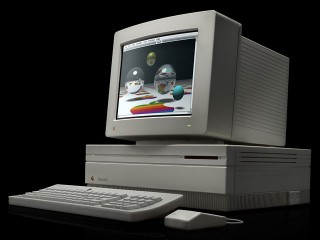
With the extra memory installed, applications and files that were 1 MB or larger in and of themselves could be used. Among these programs were color painting and desktop publishing. To better accommodate these tasks, the Mac II was created. The Mac II was revolutionary in that one could use a video board that could run either black-and-white or color monitors. Typical color boards gave the Mac the ability to view images in 16 or 256 colors. The former is useful to those creating items like 11" by 17" posters, while the latter was useful for viewing and modifying color photographs.
To accommodate the Mac II, Apple created a succession of Systems from 2.0 to 5.0 within about a year's time. By the time System 6 was created, all of the key features that were required had been perfected. System 6 could be run on just about any Mac from the Mac Plus with just a single floppy to the Mac II series that had one or two floppy drives and a hard disk.
Programmers who were into gaming (such as Cassady and Green) also took advantage of the Mac II and created arcade programs like Crystal Quest, Spaceway, and Glider. Others created games like Patriot Command and Space Junkie. In order to run some of these games, an additional part of the operating system called 32-bit QuickDraw was needed.
32-bit QuickDraw seems to be more of an item needed for games and some graphic programs. Workhorse programs like Canvas and UltraPaint ran quite nicely without it. The same applied to the generic word processor. 32-bit QuickDraw is the one System 6 accessory that is optional. This is especially true for Macs that were limited to black and white screens. The main reason for this is that System 6 with QuickDraw would require as much as 800 to 1,000 KB to run. System 6 without QuickDraw is about half that size.
In 1991, Apple issued System 7. The big features that System 7 had over System 6 were as follows:
- MultiFinder was run continuously
- Virtual memory (requires a 68020 with PMMU or 68030)
- Access to more than 8 MB of RAM using 32-bit addressing
- Color icons. One could alter the shape and color of folders with simple cut and paste procedures.
Given the recent release of Mac OS 9, System 6 seems to be a quaint
antique. However, there are many antique Macs out there, and for them
System 6 is the OS of choice.
Manuel Mejia Jr is familiar with Mac IIs, LCs, and older PowerBooks. He uses his Mac LC, PowerBook 145B, and PB 100 with System 7.1 on a regular basis and recently added a Mac Plus running System 6 to his collection. He's quite familiar with both System 6 and System 7. He also owns the Pina books on repairing compact Macs from 128k through the SE.
You can read more about Manuel's computers in Manuel Mejia Jr's Four Old Macs.
Not sure if you should upgrade your old Mac or replace it? Check the Mac Daniel index to see if we've already addressed your problem.
Recent Mac Daniel columns
- Bringing G3 iMacs and other G3 Macs into the Tiger Age, Dan Knight, 12.07. Tips on hard drives, memory, WiFi, and getting Mac OS X 10.4 installed on G3 iMacs and other older G3 Macs.
- Multiple users on the same Mac at work, Dan Knight, 11.15. How to set up a Mac so multiple users can log in and use it - and use the same pool of work files.
- 1 working eMac from 2 broken ones, Dan Knight, 11.14. A pair of matching eMacs, each with a different failure, results in one working eMac and lots of leftovers.
- More in the Mac Daniel index.
Recent Content on Low End Mac
- Time Machine can now backup to a shard hard drive, Alan Zisman, Zis Mac, 07.08. Earlier versions of Leopard didn't seem to allow backup to a shared drive on another Mac, but the 10.5.4 update allows it.
- More air: Expectations for future MacBook and MacBook Pro models, Dan Knight, Mac Musings, 07.08. Next generation 'Books are expected to include Intel's next generation Montevino processor, but wireless power and wireless USB could give Apple a leg up on the competition.
- Safari 3.1 Is the best browser for Macs and for Windows, Carl Nygren, Classic Macs in the Intel Age, 07.08. Apple's Safari browser is fast, lightweight, and compatible with pretty much any website that doesn't require users to run Windows and Internet Explorer 5.5 or later.
- Best iBook G3 deals, Low End Mac Deals, 07.08. Used clamshell, $100; 500 MHz CD, $169; 700, $279; 600 CD-RW, $240; 900 Combo, $299; 14" 700, $300; 900, $449.
- Best Power Mac G4 deals, Low End Mac Deals, 07.08. Used 450 MHz ACP, $79; 533 DA, $100; 867 QS, $200; 1.25 GHz MDD Combo, $375; 867 dual, $325; 1 GHz, $395; 1.25, $529; 1.42, $619.
- Best classic iPod deals, Low End Mac Deals, 07.08. Used 20 GB, $100; 30, $120; 40, $150; 60 color, $175; 30 video, $160; 80, $200; refurb 80 classic, $209; new, $229; refurb 160, $299; new, $319.
- Mac of the Day: 'Lombard' PowerBook G3, June 1999 - 'bronze keyboard' model is first PowerBook with USB, reaches 400 MHz, trims almost 2 lb.
- List of the Day: PowerList for those using Power Computing Mac clones.
- July 8 in LEM history: 02: Banned by Macworld - Window XS - OS X: More than just another Unix variant - 03: Hooked by the iBook - Panther and the beige G3 - 05: Future 'Book to use iPod as trackpad?
- Macintosh reliability improving since the shift to Intel, Kev Kitchens, Kitchens Sync, 07.07. For a while in the G3 and G4 era, Apple was plagued with logic board failures and analog board problems, but they seem to be a thing of the past.
- 1.8 GHz, SSD MacBook Air price cuts; Samsung vs. Hitachi notebook drives; Centrino 2 preorders; and more, The 'Book Review, 07.07. Also MacBook shipments up 61% over Q1 2007, Apple notebook redesign rumored, Santa Rosa MacBook Pro video failure, Mopar in-vehicle wireless Internet, bargain 'Books from $150 to $2,749, and m
- iPhone 3G service more costly in States, outrageous in Canada, and more, iNews Review, 07.07. Also long fingernails and the iPhone, future iPhone may include keyboard and Intel Atom CPU, voice control for iPods, Ringtons Studio for the iPhone, and more.
- Best MacBook deals, Low End Mac Deals, 07.07. Used 1.83 GHz Combo, $819; 2.0 SD, $975; refurb 2.1 GHz Combo, $949; 2.4 SD, $1,099; black, $1,299; new 2.1 Combo, $1,005 a/r; 2.2 SD, $1,205 a/r; more.
- Best eMac deals, Low End Mac Deals, 07.07. Used 700 MHz CD, $140; CD-RW, $150; Combo, $170; 1 GHz, $200; 1.25 GHz SD, $230; 1.42 GHz Combo, $300; SuperDrive, $439.
- Best Mac OS X 10.0-10.3 deals, Low End Mac Deals, 07.07. Mac OS X 10.0.3, $40; 10.1, $49; 10.2, $60; 10.3 DVD, $80; CD, $160; 10.1 Server, unlimited users, $80; 10.3 Server, unlimited, $130.
- More links in our archive.
About LEM | Support | Usage | Privacy | Contacts


