
1998 – Today’s Mac Daniel column looks at upgrade options for the Power Mac 7200 and 7500.
Can I Upgrade My 7200/75 to a G3?
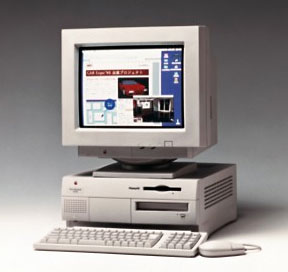 TJ writes: I thought I’d ask you for advice regarding whether or not it would be worth it to upgrade my Power Mac 7200/75 to a G3.
I know it probably sounds crazy, but I don’t see the use in spending $1,400 on a new G3 with a new hard drive and brand new memory when I can get a 7500 motherboard for $450 and drop in a G3 card for another $400. I already have 2.5 GB of storage (which I haven’t filled up yet) and 32 MB of RAM, which is fine for me.
So, what do you think? When I bought my Mac three years ago, it was the most Mac I could afford at the time (on a student budget). The price difference between my 7200 and a 7500 was on the order of $500, and I couldn’t afford that at the time. Anyway, I knew that the processor wasn’t upgradable, but I needed a Mac.
The question is, should I do the motherboard transplant or not, or wait until January when the new Macs come out?
Mac Daniel writes: Your 7200 was a nice computer in its day, but a limited one. To keep it from competing with the 7500, Apple intentionally designed it so you couldn’t upgrade the CPU.
Prices on used Power Macs are a moving target, but one generally moving downward. As Mac OS X approaches, I expect prices for pre-G3 models to continue dropping.
A look in the back of Macworld shows one dealer selling a used 7500/100 with 16 MB RAM, 1 GB hard drive, and CD-ROM for $695. The same dealer is selling a 7200/75 8/500/CD for $499.
In light of that, I wouldn’t recommend a motherboard transplant at $450, then another $400 for a G3 card. Instead, find a nice used 7500, drop your hard drive and memory into it, put the drive you remove from the 7500 into your old 7200, and then sell your 7200 for $400-500. Net cost: $200-300 depending on shipping and exactly what you buy and sell the computers for.
Now, instead of budgeting $400 for a slow G3 card, budget $600 for one with a faster CPU and larger and/or faster Level 2 cache. Spend the rest of your savings on memory to reach 48-64 MB total. (For more details on G3 upgrades, see our Guide to G3 Daughter Cards.)
Not only is this a good value for you, but it will give you the opportunity to help someone step up to a Power Mac with your old 7200.
Upgrading a 7500 for Graphic Work
RB writes: Got a user who has a Power Mac 7500 and says its running too slow for his graphics intensive applications development (Photoshop, Illustrator, Web stuff). He suggests a daughterboard and L2 cache additions vs. a new motherboard.
How about a whole new computer?
What do you think?
P.S. I’m not a Mac person, (PC) so I need all the help I can get to make an intelligent decision
Mac Daniel writes: The 7500 was a very nice computer, albeit slow. The original came with a 100 MHz PowerPC 601. It was a decent performer, but not a high-end machine. (I know – I used to have one on my desk.)
The 7500’s saving grace is the CPU slot that allows you to pull that ancient 100 MHz 601 and replace it with a 604, 604e, or G3. It can make a world of difference.
For instance, I’m using a 7600 at work. It came from the factory with a 256 KB L2 cache and 132 MHz 604 processor. This was a big improvement after my 7500 and made a much better computer for designing books (FrameMaker, Freehand, Photoshop).
We have a bunch of Power Macs in our design department – all but the newest with CPU slots. At this point, we’ve upgraded four of them with G3 cards. Two have Newer Technology 250 MHz G3 cards with 512 KB backside cache, which cost us about $1,200 when we bought them. Two more were just upgraded with 300 MHz Newer Tech cards with 1 MB backside caches.
The improvement is incredible, even for users who had 180 MHz and 200 MHz 604e cards.
Even though I’m not a power user (I’m an information systems manager and part-time book designer), I’ve managed to upgrade my 7600 with the castoffs from these older computers. For quite a while I had a 180 MHz 604e card, but now I have a 200 MHz card and a 1 MB L2 cache. Subjectively, this seems a lot more than 10-15% faster than the old 180 MHz setup.
What it boils down to is this: Your user is right, it makes more sense to put a faster CPU daughter card in the old 7500 than replace it with a whole new computer. Whether you drop in a $200 200 MHz 604e card or $2,000 400 MHz G3 card, you’ll see a huge and immediate jump in performance. And the G3 upgrades come with an onboard L2 cache, so you don’t have to make a separate investment. (For more details on G3 upgrades, see our Guide to G3 Daughter Cards.)
Best of all, you can invest some of the savings in other things that can increase productivity, like more memory and/or a larger, faster hard drive.
If the budget’s a bit tight, there is an active market in used CPU cards pulled during upgrades. Even a 132 MHz 604 (maybe $50) offers roughly double the throughput of the 100 MHz 601. (On the other hand, you’ll hear upgrade rumblings a lot sooner if you don’t at least triple performance.)
Keywords: #powermac7200 #powermac7500
Short link: http://goo.gl/RNv8WH
