
Mac Daniel's Advice

I Want to Upgrade My 7500; Burned by 7200 Upgrade Options

Low End Mac Reader Specials

Memory To Go Special: New 2008 iMac 2GB $42 / iMac Intel Core2 DUO & MacBook Pro 2GB $36 - 1GB $20. MacPro 8 Core Memory 4GB kit $154 / 2GB kit $94 -- Free shipping available.

Download Typestyler, still the Ultimate Styling Tool for Internet, Print and Video Graphics. Works great in Classic with a Native OS X Version on the way. Free Tryout: www.typestyler.com

LA Computer Company: Specials on AppleCare, iMac's, Apple Batteries and Apple A/C Adapters. Also Great prices on Used Apple Computers. Call 1-800-941-7654 Click Here.

OWC: Top Quality Memory for Faster Mac Performance 1GB/2GB/4GB Kits from $23.99/$47.99/$94.99 Expert Support, Free Installation Videos & Guides, Lifetime Advance Replacement Warranty - www.MacSales.com

Mac users can finally play Party Poker for Mac. Not only that, they can also learn how to play PokerStars for Mac.

Laptop Hardware Provided by TechRestore - Overnight Mac & iPod Repairs.

Compare products like desktop computers, laptops, and LCD TVs side by side! All the information and reviews to make the best purchasing decision for a new cell phone GPS products or MP3 players. The Ciao network makes searching products easy for you.

MacPro Memory 667Mhz With Apple Spec Heat Sink 2GB $ 82 / 4GB $128 / 8GB $256 - Click to Maximize your Macs...

Dan Knight - 1998.12.21

If you use a Power Mac or Maclone, consider joining the PowerMacs email list.

I Want to Upgrade My 7500

GS writes: I was interested to read your advice to a 7200 owner saying that he would be better off upgrading to a 7500. I have a 7500 and am mulling some upgrade questions.

  1. I have the built in 500 MB hard drive that came with the machine. I'm out of space (even using my external Zip). Do I replace the functioning internal drive I have? Do I go external? Should I make a long-term investment in the faster versions of SCSI my current system can't handle?
  2. Then there's that G3 chip. Boy, it's fast. I have one at work. Do I put one into the 7500?
  3. Lastly, when my machine came out there was a lot of talk about the fact that it didn't have an L2 cache. Is this something I should be looking at?

Like so many, I covet the new G3s, but I can't rationalize the expense when my 7500 is still performing adequately.
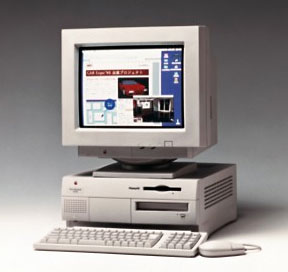
Mac Daniel responds: Thou shalt not covet thy neighbor's G3. ;-)

  1. You can add a second internal drive to the 7500, right below the current drive. I've seen some great deals on new drives that simply aren't as big as today's hot drives: 1.2 GB Apple drives for US$99, 3-4 GB drives for under US$200. And by putting the drive inside the computer, you take advantage of the faster internal SCSI-2 bus (external is SCSI-1, which has only half as much bandwidth).
  2. You haven't mentioned how fast your 7500 is today. If you have a 601 card and just find it a bit slow, there are great deals on 604 and 604e cards pulled to make way for G3 upgrades. And some of the G3 cards are now under US$400, making them very tempting.
  3. Yes, unless you're adding a G3 upgrade, you absolutely want to have an L2 cache in your 7500. You can probably pick up a 256 KB cache for under US$25, but a 1 MB will offer up to 50% more speed than that for around US$100. (I wouldn't have believed it, but then I put one in my 7600 at work. Wow!)

As a Mac user on a budget, I always recommend staying at least one step behind the state of the art (a.k.a. the bleeding edge). Computers are much more affordable and better values a step or two from the overpriced bleeding edge. Especially with a computer like the 7500, you have so many upgrade options that it's hard to justify replacing it.

I feel burned by 7200 upgrade options

JB writes: I have a question about upgrading the Power Mac 7200. I am rather irritated because, when I bought the machine in winter 95/96, the 7200 was advertised and promoted as upgradeable (to a 7300). Having been burned twice before with Macs that had no upgrade path, I thought I was making a wise decision.

Now it turns out that of all the Power Macs in the universe, the 7200 is the only one that is not upgradeable to G3. Every number before and after 7200 has a future except mine. And no one even talks about upgrading the 7200 to a 7300 anymore, so I assume that's no longer possible.

Do I have any options for getting more speed and performance out of the 7200? Anything approaching G3 speed and power? And am I justified in being rather angry about the situation?

Mac Daniel responds: I can sympathize. The only upgrade Apple offered the 7200 owner was to a 7500 or 7600 motherboard - plus a CPU daughter card. (The 7300 uses a different power supply.) However, that path is still open to you, although the motherboard may cost more than a used 7500 (US$550 and up).

In fact, it may even be possible to replace your 7200 motherboard with one from a Power Mac G3. (Nobody will tell me it's possible, but the case seems identical - and nobody says it can't be done, either.)

Finally, I know of no reason Vimage and others can't take the technology that created a cache-slot accelerator for several other "unupgradeable" Power Macs (6360, 6400, 6500, 4400, and some Maclones) and turn it to the 7200 cache slot.

The motherboard in the 7200 runs between 37.5 MHz and 45 MHz. The G3 can run at up to eight times bus speed, meaning a 300 MHz upgrade for a 7200/75 may be possible. Likewise, the 7200/90 with a 45 MHz bus could theoretically support a 360 MHz G3, while the 7200/120 and its 40 MHz bus could handle a 320 MHz G3.

The market is probably large enough to justify the accelerator, whether it runs at 200 MHz or anything faster. [Update: Sonnet did it. Their Crescendo 7200 offers 400-500 MHz G3 power using the first PCI slot and bus doubling technology.]

Not sure if you should upgrade your old Mac or replace it? Check the Mac Daniel index to see if we've already addressed your problem.

Recent Mac Daniel columns

Links for the Day

Recent Content on Low End Mac

About LEM | Support | Usage | Privacy | Contacts


Have a question?
Ask an expert!

Navigation

Used Mac Dealers
Apple History
Best Used Macs
Video Cards
Email Lists
InfoMac's Low
End Mac Forum

Favorite Sites

MacSurfer
MacMinute
MacInTouch
MyAppleMenu
InfoMac
Macs Only!
The Mac Observer
Accelerate Your Mac
RetroMacCast
PB Central
MacWindows
The Vintage Mac
   Museum

DealMac
DealsOnTheWeb
Mac2Sell
ramseeker
Mac Driver Museum
JAG's House
System 6 Heaven
System 7 Today
the pickle's Low-End
   Mac FAQ

Abandonware
   Petition

Mac vs. PC Info

Affiliates

The Apple Store
Mac Connection
MacMall
TechRestore
MacResQ
ExperCom
Crucial Memory
batteries.com

Advertise

Open Link