
What’s the best version of the Mac OS for your Mac? It depends on the hardware.
DR writes:
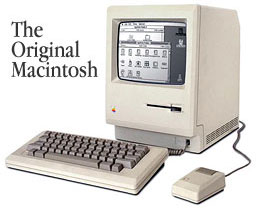
I enjoyed reading How Can I Prepare for Mac OS X?, especially about the different Macs that you’ve owned. I got a Macintosh (yes, just plain Macintosh) in February 1985. Upgraded to a Mac 512K, a.k.a. Fat Mac. Upgraded to a 512Ke (with 128k ROM and a double-sided disk drive!). Got a Mac Classic 4/40. Got a Quadra 605 8/160. Got a used Quadra 630 8/250. Got a Power Computing PowerBase 180 32/1.2. Got a Power Computing PowerCenter Pro 240 64/2. And what a fun ride it has been. : )
While the “How Can I Prepare for Mac OS X?” author is looking forward to Mac OS X, my feelings toward system software, as they called it in the old days, is a bit different. Whichever Mac I’ve owned has been a non-networked computer. A lot of times a newer version of a Mac OS would just run a little slower and take up more hard drive space. The question I like to answer which helps me decide whether to upgrade or not is, “What do I want to do on my Mac that I could do with the new OS that I can’t do with the old OS?” If I can’t find anything, then I stick with what I’ve got. Reason’s I’ve upgraded in the past have been: 1) newer OS required for certain applications 2) hope that the newer OS doesn’t crash as often as the older one (shades of 7.6.1 and the PowerBase 180) and 3) to get HFS+.
There are two possible computers that I may upgrade. Please tell me what you think is the best version of Mac OS to run on each and why. First, my computer. I have a Power Computing PowerCenter Pro 240 with 64 MB RAM, 2 GB hard drive, CD-ROM, Zip drive, Personal LaserWriter 300, external speakers, 56k modem, mic, and a Color QuickCam. I’m running Mac OS 8.1 and thinking about upgrading to 8.5. “What would I want to do on my Mac that I could do with 8.5 that I can’t do with the 8.1?” Also the potential hard drive problem causes me to hesitate upgrading as well.
The second computer: my sister has inherited the Macs that I didn’t sell. Currently, she has a Quadra 630 with 20 MB of RAM, 250 MB hard drive, inkjet printer, external CD-ROM, and a 33.6 kbps modem. She is currently using version 7.5.5. She’s not a power user. She just uses the Internet a little and uses WriteNow a little. She’s had some difficulty keeping her Internet connection. This could be related to the noisy phone lines in her rural area, but different system software may help her also. What version of Mac OS do you think is best for her?
During the day, I support a network of 70-some Macs. The oldest, sold about two years ago, was a 2.5 MB Mac Plus with 20 MB GCC HyperDrive. The newest are a Power Mac G3/266 and a PowerBook G3/233. And there are probably two dozen different models between those extremes.
To maintain my sanity, I have done my best to keep as many Macs as possible on the same version of the Mac OS. With few exceptions, that means System 7.5.5. (Or 7.5.3 for a few Macs that are not compatible with 7.5.5.) I find it complete and stable. At this point, I see no reason to ever change most users to Mac OS 8 or newer. None.
The only Macs I would hesitate to run 7.5.5 on are the old 8 MHz 68000-based ones. While they can run System 7.5.5, they feel a lot more responsive with System 6.0.8.
A couple machines need Mac OS 7.6, so that’s what they get. Just a few of us are using Mac OS 8.1 – some because it came with the computers, three others so we can be familiar with it (and we’re now testing 8.5.1). By choice, I don’t use HFS+, a choice I made before Norton Utilities 4, which has problems with HFS+.
Nice as HFS+ would be, the extra 100 MB it frees on my hard drive hasn’t been worth the struggles of getting it to work correctly. Twice I’ve invested over half-a-day in trying to make my system work with HFS+. Both times I’ve reverted to HFS. I’m sure I’ll go HFS+ soon, but I need to have the free time to troubleshoot any problems that may arise. (See HFS+ Nightmares and Beyond HFS+ Nightmares for the full story.)
Unless you work with a lot of small files on a large drive, I don’t see HFS+ as a compelling reason to upgrade. I’m happily using Mac OS 8.1 without it.
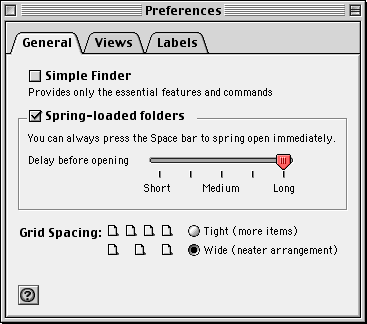 That said, I love the spring loaded folders, which really reduce desktop clutter. At home, I love the PPP stability – even better than FreePPP. Contextual menus are nice, but the main reason I switched at home was because I have 8.1 at work. It’s much easier to work on the same version of the OS than to go back and forth.
I haven’t run Mac OS 8.1 on a 68040-based Mac, but my son (who now uses my old Centris 610) did the upgrade and says it’s very stable – and faster than 7.5.5 was. I’ve heard similar reports from others. The ability to jettison pre-68040 code allowed Apple to make 8.1 more streamlined than earlier versions that had to support the 68000 and 68020 (through 7.5.5) and 68030 (through 7.6.1).
Update: Apple claimed they jettisoned pre-68040 code, but we have evidence from Scott Barber and the Born Again program that 68030-based Macs can run Mac OS 8.0 and 8.1. This is sort of like the way Mac OS X is “unsupported” on some Macs, yet XPostFacto allows it to install and run.
I’ve found Mac OS 8.1 stable enough and feature-laden enough to recommend it to anyone with a Quadra or Power Mac who is willing to spend $40 for the upgrade.
As for Mac OS 8.5, I must admit I’m a firm believer in Murphy’s Law: If anything can go wrong, it will. At work, we were approved to buy three copies and test it. The rare hard drive problem, estimated to trouble less than 1% of all systems, would almost certainly choose one of those three, trash a 1.2 GB to 4 GB hard drive beyond repair, and cost one or two days of down time.
Sure, we do daily backup. But if the drive is so seriously damaged that it must be replaced, even an overnight shipment means a day without a usable computer. It’s not a risk I’m prepared to take, especially since nobody seems to have pinned down the underlying cause of this problem. (Apple is collecting hard drives from the field.)
But Mac OS 8.5 was mostly a matter of when: After Apple discovered the cause of the problem and released a fix for it, we bought it and installed it on a few machines for testing purposes. I think it will be especially helpful in a networked environment (that includes using a modem to reach the Internet), since all the I/O drivers are now PowerPC native and Open Transport has been significantly upgraded.
So my vote is Mac OS 7.5.5 on pre-68040 models, 8.1 on 68040 and PowerPC machines, and either 8.1 or 8.5.1 on Power Macs and Mac clones.
Reader Feedback
Chik writes:
I had no problems installing Mac OS 8.5 on a Power Mac 6200. No hard drive corruption, etc. It was a clean clean install.
But it is so much slower than OS 8.1 that I can’t recommend anyone use it. I had to disable much of the OS to get it to speed up e.g. AppleScript, file sharing, etc.
Also have Speed Doubler 8.x.
BV writes:
Regarding problems in reformatting to HFS+: I wasn’t going to do it, because I didn’t think it was worth backing up and initializing my hard drive to save the space.
Surfing through Macworld I found a mention of an application called Plus Maker from Alsoft ($19.95; www.alsoft.com). I downloaded it and near-instantaneously reformatted the hard drive on my PowerMac 6500/250 (OS 8.1) without initializing, without backing up (I’m a home user – what have I got to back up a 4 GB hard drive with?), without losing data or any (more) stability problems than I had before. I saved over 1 GB of space on my drive.
If this sounds like an ad, I could damn sure write them a genuine, uncompensated endorsement (schmuck that I am).
Thanks for what you’re doing; I just bought Vimage’s PF G3/240-225 upgrade card on your say-so, since I’m apparently running the same system you are.
We used Plus Maker on all of our Mac OS 8.1 systems at work to convert the drives to HFS+. It was a bit risky, but only because at that time neither Norton nor any other hard drive utility could work with HFS+ drives. Mine was the only drive to have problems, which may have been due to file corruption or third-party software. As of last week, I am successfully using HFS+ on my hard drive at work.
Keywords: #bestmacos #bestsystemversion
Short link: http://goo.gl/YsoosU
searchword: bestsystemversion
