
1999 – I’ve never been able to do a prerelease column about a Mac OS update or upgrade, as either I’ve not had access to them before release or have been gagged by an Apple NDA. After reading that Tom McKenna of the G3 All-in-one Stop Shop had received his copy of Mac OS 9 on October 13, I was sure it was going to be different this time – and I’d have Apple to thank for it! I’d ordered the same day and way as Tom. Okay, Apple, here it is: “Blah!”
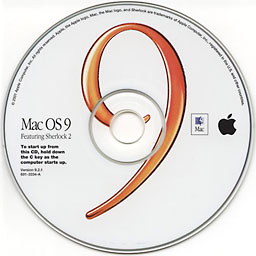 Without going into the gory details here, on Friday, October 29, I finally received one of the two copies of OS 9 I’d ordered. It only took two separate 40+ minute phone calls to begin to straighten things out. Having been so primed by Apple’s lackluster customer service, I wondered if I could really be objective in any column about OS 9. I suspect that I can’t because…
I think I really like this release of the OS!
I’ve never been an easy sell on system upgrades and have never been shy about expressing those views in print. I really haven’t even given the new features a thorough shakedown.
At this point Sherlock 2 leaves me just as unimpressed as I was with the original Sherlock. I find its QuickTime 4 type interface about as much fun as a trip to the dentist when Novocain is on back order.
I haven’t as yet activated the Multiple Users option at school, since I really want the students to become familiar with the complete Mac GUI. For that reason, I don’t use At Ease or any other “blocker” on the Macs in my classroom.
While Apple’s Voiceprint Password might just knock the socks off the “Evil NT techie” at school, I haven’t had time to play with it.
Keychain sounds intriguing, and I’ve opened it up a couple of times but haven’t yet found how to enter a password in Netscape. An Enter Site listing in the File menu might be nice.
If you’re beginning to get the idea that I just followed Apple’s features list, you’re right. While Auto Updating, Encryption, File Sharing over the Internet, AppleScript over TCP/IP, and the Network Browser may at some point become part of my daily Macintosh routine, they’re not what’s sold me on this upgrade.
The “state-of-the-art” technologies including Sherlock 2, AppleScript, QuickTime, ColorSync, Macintosh Runtime for Java, and Speech “raise Mac OS to a whole new level of intelligence” line on Apple’s Technologies page didn’t even quicken my pulse rate a beat.
Mac OS 9’s “ease” of installation certainly isn’t going to win many converts to the upgrade. My path to installation and use was as troubled as many others. There are tons of documented problems and incompatibilities elsewhere on the Web. I’ve found it necessary to keep a copy of Mac 8.6 on both my home Mac and the one at school.
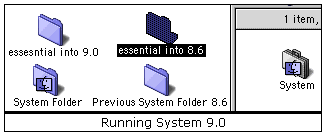
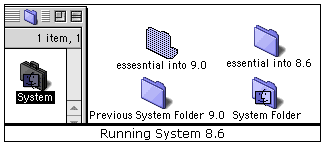
Since I have a single hard drive at home with just one partition, I kept the “Previous System Folder” created by the clean install and switched back and forth by renaming folders and removing the system from the one I didn’t want (see graphic.) I also found it essential to keep different desktop photos on each to remind me which version of the OS I was using at any given time.
 |
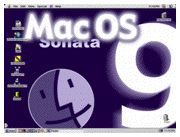 |
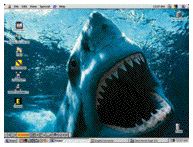
MacDesktops.com has a nice assortment of OS 9 desktop photos available for your free use. I selected the one above from Kildear Graphics for OS 9 and have used the Jaws desktop below for OS 8.6 for some time now.
 |
 |
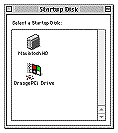 Obviously, if you have two drives (or two partitions on a drive), the better choice would be to place one version of the OS on one drive and the other version on the second drive. That’s exactly what I did at school with our Power Mac 7500, as it has a second drive reserved mostly for the “C drive” of the Orange Micro PC card. There was just enough space left for the Mac OS 9 install, plus a margin for various stuff such as the printer to mess around in. I did have to switch virtual memory over to the main drive for OS 9, however.
With this setup, I can change OS versions by simply going to the Startup Disk control panel and selecting the other drive.
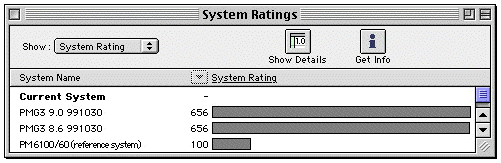
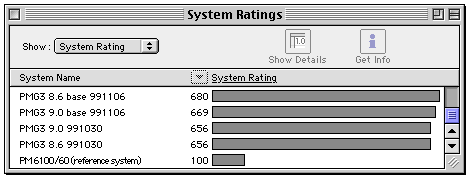
While the new OS felt a good bit quicker, especially when working on the Net, its speed certainly isn’t what has sold me on the upgrade. I really couldn’t find much numerical support for that observation. Testing with Norton’s System Info showed both 8.6 and 9.0 to be about even in speed on my machine at home. Nonetheless, OS 9 still feels a tad faster.
Then what is the attraction?
Mac OS 9, that is Mac OS 9.0, is stable. Let me restate that: Mac OS 9.0 is STABLE! Other than some annoying initial configuration and compatibility problems with MacsBug, Claris Home Page, and others when setting up the OS and shared items between OS 8.6 and 9, I’ve not seen a true crash. I’m sure there are bugs in the release, but with my setup, I’m finally getting the kind of stability with the Mac OS that I thought I’d have to wait until Mac OS X to enjoy. With the OS 8.5 upgrade, we had to go through 8.5.1 to 8.6 before we had a fairly stable version of the release. But Apple got this part of it right on the first try.
Forget the new features, forget the new technologies, forget all the typical Apple hype – the reason to upgrade to OS 9 is stability. It’s there for the taking. You may have to suffer without a few apps for a while, and you definitely will need to stroke and tweak the OS a bit, but the “Big S” is there.
Way to go, Apple!
Odds and Ends about OS 9
My short list of casualties of OS 9 currently on my Macs without updates or requiring paid updates:
- StuffIt Deluxe (What else is new. StuffIt breaks with every upgrade. The lateness and bugginess of the update are also assured.)
- Startup Doubler
- MasterJuggler
- Microsoft Office Manager
- Norton Utilities and Anti-Virus
- SpellTools (Please, NewerTech, give or sell us an update. I had to revert to OS 8.6 to do my final edit of this column, just so I could use SpellTools.)
I wondered about the blurry or doubled appearance of letters in OS 9, but found that was in Acrobat. The problem is cured by going to the Appearance control panel under fonts and unchecking “Smooth all fonts on screen.”
Both the “Browse the Internet” and “Mail” AppleScript’s from OS 9 work with either OS 8.6 or 9.
When running Mac OS 8.6, I found that the new Disk First Aid operates at startup after a crash, just as it does with OS 9!
My Reviews of Previous Mac OS Releases
- Veronica (Mac OS 8.6)
- OS 8.5: Time for Apple to Apologize
- The Name Game . . . or, playing with Sherlock
- Why Can’t Apple . . . thoughts while waiting out the OS 8.5 backorder
- Some Impressions of OS 8
Various OS 9 Info and Troubleshooting Pages
- Macs Only Hands-On Report: Mac OS 9 (With every OS release, I always look to Bill Fox’s report for a few things all the rest of us have missed!)
- MacFixIt Reports: Troubleshooting Mac OS 9
- MacNN Mac OS 9 Special Report
- Version Tracker OS 9 Updates
- Apple Technical Note TN1176: Mac OS 9
Keywords: #macos9
Short link: http://goo.gl/3zFf5f
