
LinuxPPC Chronicles, Part 2
Multiprocessing & Kernel Configuration
Low End Mac Reader Specials
Memory To Go Special: New 2008 iMac 2GB $42 / iMac Intel Core2 DUO & MacBook Pro 2GB $36 - 1GB $20. MacPro 8 Core Memory 4GB kit $154 / 2GB kit $94 -- Free shipping available.
Download Typestyler, still the Ultimate Styling Tool for Internet, Print and Video Graphics. Works great in Classic with a Native OS X Version on the way. Free Tryout: www.typestyler.com
LA Computer Company: Specials on AppleCare, iMac's, Apple Batteries and Apple A/C Adapters. Also Great prices on Used Apple Computers. Call 1-800-941-7654 Click Here.
OWC: Top Quality Memory for Faster Mac Performance 1GB/2GB/4GB Kits from $23.99/$47.99/$94.99 Expert Support, Free Installation Videos & Guides, Lifetime Advance Replacement Warranty - www.MacSales.com
Mac users can finally play Party Poker for Mac. Not only that, they can also learn how to play PokerStars for Mac.
Laptop Hardware Provided by TechRestore - Overnight Mac & iPod Repairs.
Compare products like desktop computers, laptops, and LCD TVs side by side! All the information and reviews to make the best purchasing decision for a new cell phone GPS products or MP3 players. The Ciao network makes searching products easy for you.
MacPro Memory 667Mhz With Apple Spec Heat Sink 2GB $ 82 / 4GB $128 / 8GB $256 - Click to Maximize your Macs...
2001.01.16 -
Low End Mac Reader Specials
Memory To Go Special: New 2008 iMac 2GB $42 / iMac Intel Core2 DUO & MacBook Pro 2GB $36 - 1GB $20. MacPro 8 Core Memory 4GB kit $154 / 2GB kit $94 -- Free shipping available.
Download Typestyler, still the Ultimate Styling Tool for Internet, Print and Video Graphics. Works great in Classic with a Native OS X Version on the way. Free Tryout: www.typestyler.com
LA Computer Company: Specials on AppleCare, iMac's, Apple Batteries and Apple A/C Adapters. Also Great prices on Used Apple Computers. Call 1-800-941-7654 Click Here.
Other World Computing has the Upgrades, Enhancements, and Accessories for getting the most from your Mac. Quality Products, Competitive Prices, Expert Support Staff - www.macsales.com
Mac users can finally play Party Poker for Mac. Not only that, they can also learn how to play PokerStars for Mac.
Laptop Hardware Provided by TechRestore - Overnight Mac & iPod Repairs.
Compare products like desktop computers, laptops, and LCD TVs side by side! All the information and reviews to make the best purchasing decision for a new cell phone GPS products or MP3 players. The Ciao network makes searching products easy for you.
MacPro Memory 667Mhz With Apple Spec Heat Sink 2GB $ 82 / 4GB $128 / 8GB $256 - Click to Maximize your Macs...
About two months ago, I received a DayStar Digital Genesis MP 600 with a quad 604 200 MHz CPU module and a quad 604 132 CPU module as a gift from some friends of mine. If you have never seen one in person, this is big, heavy, and loud. Its metal case could stop a bullet. Originally selling for $12,000, it was definitely made to take a beating.

For the first few days, I wasn't quite sure what to do with it, but like all systems I have laying around my apartment, I decided to make a server out of it. In my head it would make a nice all purpose server, and I could compress what I have spread across multiple servers into this one system.
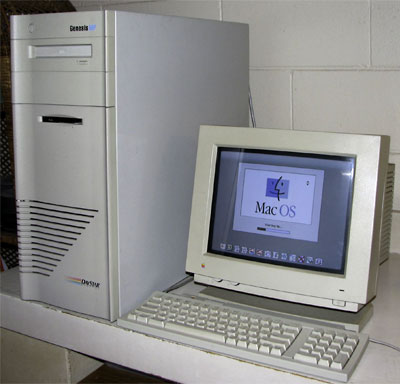
The first thing I needed to decide on was what operating system to run. I could use the Mac OS, but it doesn't make a very good server - especially when it comes to using four processors. If I were using Photoshop, that would be one thing, but I am not a graphics guy.
BeOS crossed my mind for a minute, because of it's excellent scaling on four processors, but the problem with BeOS is that it is not a server OS. It can't do NFS, DNS, email, file sharing, and so on.
I finally settled on LinuxPPC, which I didn't want to use at first because I had never had built my own kernel before. The reason for having to build your own kernel is that stock kernels that ship with the LinuxPPC distribution (and others) are compiled for only one processor.
You can go two routes when getting a new kernel: download a precompiled kernel or download the source code and compile it on your own. I prefer to build my own, because I have more control over what is and what is not going to be supported on my system.
Either way you decide to go, the place to get it is at kernel.org. One thing I did need to learn about was kernel version numbers and what they mean. Even numbered kernels are official, and odd numbered ones are development kernels. So 2.2 and 2.4 are official, with 2.1 and 2.3 being development.
The latest kernel right now is 2.4.0, which at this time does not compile properly on Macs and results in some sort of MMU error while compiling. There are some precompiled 2.4 kernels over at Linuxppc.org, but I cannot testify as to how stable they are.
In the meantime, the latest kernel (that works) for Macintosh's is 2.2.18, which compiles just fine. Ftp to kernel.org, grab the 2.2.18 kernel source (ftp://ftp.kernel.org/pub/linux/kernel/v2.2/linux-2.2.18.tar.gz), and while in Linux perform the following commands.
gzip -d linux-2.2.18.tar.gz tar -xf linux-2.2.18.tar mv linux /usr/src/linux-2.2.18 rm linux ln -s linux-2.2.18 linux
In a nutshell, what you have just done is decompress the source code and move it to the /usr/src directory, which is where it needs to be. You have also created a symbolic link from the linux-2.2.18 directory to point to /usr/src/linux, which is good to do, because if you get in the habit now you won't shoot yourself in the foot later if you ever deal with Linux systems on other platforms.
Once all that is done, go into the /usr/src/linux directory and type "make menuconfig." (You did remember to select your development packages during the Linux install right?) You will be presented with a menu of options ranging from "Platform Support" to "Block Devices." From there just select what you want and what you don't want your kernel to support with the space bar. In my case, I want "Multiprocessing Support" under the Platform support section. I will also be removing IDE support, because my DayStar doesn't use IDE and I have no intentions on adding IDE to it right now.
You may notice that certain options are marked with an M, which stands for module. Think of modules as Mac OS system extensions that can be turned off and on without rebooting. If something is marked with an M and you think you want it to always be on, just hit space bar until it has an asterisk like everything else you selected.
When you exit, you will be asked to save your new kernel configuration and will be brought back to the command line. Now it's time to compile your custom kernel with the options you selected by typing the following commands
make dep make zImage (takes awhile) make modules make modules modules_install
After everything is said and done, you will have two new files called vmlinux, and System.map. Rename your current vmlinux and System.map files to vmlinux.old and System.map.old. Then move your new kernel and System.map file to where the old ones where and reboot. You now are using the latest kernel.
If you enabled multiprocessing support and have multiple processors, you will see two penguins when you boot instead of one (the number of penguins equal the number of processors it sees). You can also find out additional processor information in the file /proc/cpuinfo.
Sadly, I have unable to get quad processor working under LinuxPPC. With the 132 MHz and 200 MHz CPU modules Linux sees only one processor. I have emailed LinuxPPC, Yellow Dog, SuSE, and Debian asking if at any time they had a kernel that booted with quad processor support. None of them have yet replied to my emails.
After searching multiple message boards, I have learned a few things. There was a website called quad.macdiscussion.com running a test 2.4 kernel with quad processor support. That site is currently down, and they never had any contact information when the page was up, but it at least let me know that quad support is out there.
There was also a reply to a request for information on quad processor support from Benjamin Herrenschmidt, who writes a good majority of the Macintosh related kernel code and wrote the LinuxPPC AirPort driver. Ben said that support was coming, and that it had not been merged into the 2.4 source tree yet. It may be in there now, but with 2.4 not being able to compile on Macs at the moment, I have no way to confirm if it's in there or not. Either way, at least I learned how to build my own kernels, which I needed to learn at some point.
Links for the Day
- Mac of the Day: Centris 650, Feb. 1993 - The replacement for the Quadra 700 has room for an internal CD-ROM.
- List of the Day: Old Mac MP covers 604-based multiprocessor Macs and clones.
Recent Content on Low End Mac
- Anticipation: New iPods Now, New Macs Later, Kev Kitchens, Kitchens Sync, 09.05. The season of new iPods is at hand, but new Macs may wait until 2009.
- Buy a MacBook Now or Wait?, MacBook touch Patents, Samsung X360 Takes on MBA, and More, The 'Book Review, 09.05. Also 20 years of portable Macs, data backup and preservation, universal U-Charge battery charger for Mac 'Books, bargain 'Books from $150 to $2,699, and more.
- Listen to Just the Music with the V-Moda Vibe Earbuds, Tommy Thomas, Welcome to Macintosh, 09.05. Well built, the noise canceling earbuds will let you hear all the nuances of your music without letting through background noise.
- Source of iPhone 3G Problems, Army Uses iPods as Field Translators, Gains with Business, and More, iNews Review, 09.05. Also UK bans iPhone ad as 'misleading', iPhone password easy to bypass, GM to offer radios with USB in 2009 models, weather tracking software, and more.
- Macs Gain Ground in August, Consumers Most Likely to Buy Macs, LaCie USB Speakers, and More, Mac News Review, 09.05. Also migrating Time Machine to a new drive and two new keyboards from Logitech.
- Best iPod touch Deals, Low End Mac Deals, 09.05. Refurb 8 GB, $199; new, $284; refurb 16 GB, $299; new, $370; refurb 32 GB, $399; new, $453.
- Best 15" MacBook Pro Deals, Low End Mac Deals, 09.05. Used 1.83 GHz Core Duo, $999; 2.16, $1,125; new, 2.2, $1,450 after rebate; refurb 2.4, $1,699; 2.5, $1,999; 2.6 Santa Rosa, $1,849; rebates on new.
- Best iMac G4 Deals, Low End Mac Deals, 09.05. Used 15" 700 MHz CD-RW, $279; 800 Combo, $300; 1 GHz $390; 17" 800 MHz SD, $439; 1.25 GHz, $449; 20", $569.
- Overclocking a Mac mini Got Me Hooked on Souping Up Macs, Adam Geller, My First Mac, 09.04. Stories of hot rodding iBooks, G3 iMacs, and PCI Power Macs on the cheap.
- Apple Will Not Abandon Optical Drives, the Mac Drought, Purposeful Mac Acquisition, and More, Dan Knight, Low End Mac Mailbag, 09.04. Also Mac OS X 10.5 on a G4-upgraded Blue & White G3 and problems using a flat panel display with a Quadra 700.
- Only Leopard Runs Routine Maintenance Tasks after Startup or Waking from Sleep, Charles W. Moore, Miscellaneous Ramblings, 09.04. Mac OS X 10.5 runs routine system maintenance scripts as soon as possible after starting up or waking up your Mac. Earlier versions of OS X do not do this.
- Tomorrow's Solid State Drives and Notebooks, Dan Knight, Mac Musings, 09.04. Flash drives are great but have some shortcomings. Some thoughts on building better SSDs and notebooks to use them.
- Best Mac mini Deals, Low End Mac Deals, 09.04. Used 1.25 GHz G4 SD, $549; 1.42 Combo, $409; new 1.83 Core2 Combo, $569 after rebate; 2.0 SD, $769 after rebate.
- Best 12" PowerBook G4 Deals, Low End Mac Deals, 09.04. Used 867 MHz Combo, no APX, $490; 1 GHz, $550; SuperDrive, $625; 1.5 GHz w/o APX, $660; w/APX, $675.
- Best 17" PowerBook G4 Deals, Low End Mac Deals, 09.04. Used 1 GHz, $779; 1.33 GHz, $799; 1.5 GHz, $859; 1.67 GHz, $910.
- 11 Mac Browsers Compared, Simon Royal, Mac Spectrum, 09.03. The latest versions of Internet Explorer, Opera, Safari, Shiira, iCab, Radon, Firefox, Netscape Navigator, SeaMonkey, Flock, and Camino tested in Leopard.
- Save Internet Radio, USB and Hard Drives, Hardware Manufacturers vs. Linux, and More, Dan Knight, Low End Mac Mailbag, 09.03. Also Mac won't book after cleaning, newer versions of OS X improve wake from sleep, downgrading to OS 8.6, unreadable pages on Low End Mac, and more.
- Another Free POP3 Provider, Recharging a Dead PRAM Battery, Current Kanga Value, and More, Charles W. Moore, Miscellaneous Ramblings, 09.03. GMX email now available in US, Panasonic UJ-841S drive won't burn discs, restoring a dead PRAM battery in a Pismo, and thoughts on Kanga value today.
- Best eMac Deals, Low End Mac Deals, 09.03. Used 700 MHz Combo, $120; 1.25 GHz SuperDrive, $150; 1.42 GHz, $349.
- Best Mac OS X 10.5 'Leopard' Deals, Low End Mac Deals, 09.03. Mac OS X 10.5, single user, $99; 5 users, $140; 10.5 Server, 10 users, $395; unlimited, $850.
- Best MacBook Air Deals, Low End Mac Deals, 09.03. Refurb 1.6 HD, $1,499; new, $1,690 after rebate; refurb 1.8, $1,699; new, $1,919 a/r; refurb 1.6 SSD, $2,099; new, $2,294 a/r; refurb 1.8, $2,299; new, $2,400 a/r.
- Psystar Strikes Back, Countersues Apple, Frank Fox, Stop the Noiz, 09.03. Psystar is trying to paint Apple as a monopoly and force it to license the Mac OS.
- More links in our archive.


