
2000: This week my DSL line is being put in. It has been a very long wait for me to get high-speed Internet service at home. This couldn’t be happening at a better time because when I quit my MIS Director’s job I gave up my T1 exploitation rights.
My new ISP, Speakeasy Network, is giving me a 768/384k connection with four IP addresses for $90 a month. I have been waiting a long time to put public servers on the Internet – plus some private servers for myself when I am on the road.
However, I ran into a problem. I was pulling a Microsoft. I was trying to keep everyone happy.
But you know what? I did it!
As many of you already know, I have Mac OS, BeOS, and Windows computers running in my humble apartment. My goal was to get them all to talk with each other on one level or another, so the first project I thought I would tackle is file sharing.
Initially, I was going to set up a BeOS file server. BeOS supports AppleTalk natively, and you can connect to Windows file shares through BeOS’ application WON (World O’ Networking). I thought everything was going to be groovy, but I later found out that you need to be running a Windows NT server acting as a primary domain controller in order to use WON. I don’t think I need to go into how bad Windows NT security is, so it’s pretty self-explanatory why I didn’t use Windows NT to being with.
My dilemma continued as I tried to find a way to do file sharing over Mac OS, BeOS, and Windows. I heard about a program called Dave, which is supposed to link together Windows and Macintosh PC’s. It has received very good reviews, but my main problem is that it runs over the NetBEUI network protocol (so I have read). NetBEUI is a very old protocol, which is way too talkative and creates way too much unneeded network traffic. Performance is key on my network.
Then I found the solution was staring me right in the face, and I wasn’t even paying attention to it: AppleShare IP 6.3. With AppleShare IP, I can use a Macintosh as a file server and connect my Windows PC’s to it. My BeOS computers will connect to the Mac OS file server via AppleTalk.
But that’s just the beginning.
With AppleShare IP, I can also use it for my Web, FTP, and mail server. Where has this thing been all my life? Secure, fast, file sharing, web, FTP, cross-platform – why isn’t everybody using this?
Unfortunately, to accomplish all this my S900 has to retire from being a desktop computer. It has served me very well as a desktop box, but the time has come for it to take its place on my server mantle. “Out with the old, and in the new,” they say. Well, I am doing just that. So my beloved S900’s replacement will be either a native G3 or G4.
In Other News
While I was in San Francisco working at Be headquarters, I had the chance to go out with some friends to see all the big name computer companies. It’s been something I have wanted to do since I was in elementary school, to just walk around and see what’s doing with these mythical, larger than life companies.
I felt like I was 10 years old again, seeing all these kick-ass computer companies. I grew up in New Jersey, and Digital just happened to have a couple of sites a few miles from my home. Every Saturday, Sunday, and even some days after school, I would ride my bike to Digital attempting to sneak in. I knew nothing about what they were doing; all I knew was that I belonged in that building. I felt it in my bones. A few times I managed to sneak in and look around for a bit, managing not to get caught by security. Most times, though, I would get caught and escorted out of the building screaming, “I just wanted to use the bathroom!”
So here I was traveling all over Silicon Valley at 1:00 a.m. taking pictures at various sites when my friend “Fury” (a fellow Mac user) suggested we stop by Cupertino. We had time, so we decided to take the trip – and 30 minutes later we were getting off at the Cupertino exit.
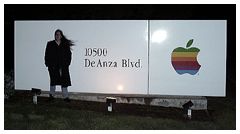 We spotted the Apple campus immediately. For a while we drove around just admiring the entire setup. Personally, I was in awe, because here I was looking around the headquarters of the company that kick-started my obsession with computers. I will always thank my mother for buying me my Apple II when I was five because had it not been for her, I wouldn’t be even close to the level of passion I have today for the computer industry. But again, to see where it all happened was a real honor.
Many years from now when I have kids, I only hope they get to make the same kind of expedition, where they finally get to see in person what to them at the time was mythical is reality right before them.
keywords: #beos #appleshare #appleshareip
