
Many Mac users from way back in the legacy era consider the old ADB Apple Extended Keyboard II to be the best keyboard Apple ever made. Others of us might debate that, but the Extended Keyboard II was certainly the biggest, heaviest keyboard Apple ever made, covering a vast expanse of desktop and weighing in at a hulking 5 pounds. It was considered a professional alternative to its lesser Apple Keyboard and Apple Keyboard II contemporaries – and to the truly mediocre AppleDesign Keyboard that succeeded them.
This was in turn superseded by the also somewhat mediocre (but likable, IMHO) Apple USB ‘board that debuted with the original iMac and was also supplied even with the Blue & White G3 and early G4 Power Mac towers.
Direct comparison with these less-than-stellar ‘boards helped reinforce the Apple Extended Keyboard II’s legendary status. Unlike the other keyboards mentioned above, which are membrane types, the Apple Extended Keyboard II had mechanical key switches that gave it a smooth and light, albeit hard-bottoming, action.
I like the soft landing and (usually) light touch and shorter key travel of membrane ‘boards and think the current USB Apple Pro Keyboard is the best Apple keyboard ever, both esthetically and in terms of feel. However, there are many folks who prefer the feel of mechanical key switches and like an IBM-style “click” in their keystrokes.
For this constituency, there’s now a way to have all that, plus the white & crystal esthetics of modern Apple peripherals all in one modern, USB unit.
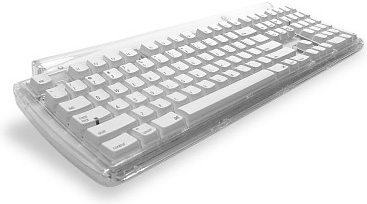
Matias Tactical Pro USB Keyboard
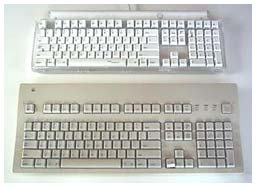
Tactile Pro (top) vs. Apple Extended
The Matias Tactile Pro USB Keyboard is hyped as the return of the Apple Extended Keyboard II in contemporary Apple-style livery. “The best keyboard Apple ever made rises again,” it says on the box.
Does the claim have objective substance?
This ‘board may be even better in some aspects. It’s certainly better looking. The original Extended Keyboard II presents a dull expanse of boring beige plastic. The Tactile Pro, on the other hand, is much more compact without sacrificing functionality, and to my eyes it’s very attractive in opaque white and crystal clear plastic with white keys.
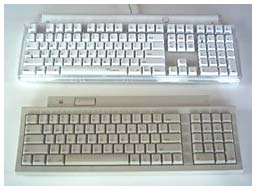
Tactile Pro vs. Apple Extended II
In form factor and size, the Tactile Pro is actually closer in appearance to the Apple Keyboard II that was the entry-level Mac ADB keyboard prior to the introduction of the AppleDesign keyboard, and of course to today’s Apple Pro USB keyboard.
Here’s a comparison of dimensions:
- Apple Keyboard II: 80 keys, 16″ x 6″
- Matias Tactile Pro: 109 keys, 18″ x 6-1/2″
- Apple Extended Keyboard II: 105 keys, 18-3/4″ x 7-3/4″
The Tactile Pro resembles the Keyboard II in having notched back corners with ports (respectively USB and ADB) for plugging in other peripherals, but it manages to include even more keys than the much larger Extended Keyboard II did – and it makes the key caps larger in the bargain, partly because the Tactile Pro is bigger than it looks.
With standard Eject and Volume control keys, the Tactile Pro keyboard has been designed to match the look and features of Apple’s Pro Keyboard.
For full access to CD Eject and Power button features, you will need to download the Tactile Pro Driver Software (Mac OS X only, 407 KB). Num lock and caps lock are indicated by a thin green light when active.
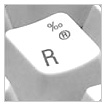 The Tactile Pro’s key caps are labeled with the international characters, accents, punctuation, currency, and other symbols that are available by holding down the Option or Shift+Option keys.
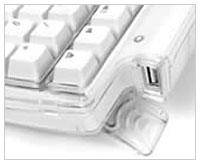 Two fold down legs can elevate the back of the Tactile Pro about 3/4″, and rubber pads back and front keep the keyboard from sliding around on the support surface.
As for the key switches themselves, Matias says that they are the same Alps mechanical units used in the Extended Keyboard II, but the action on my old Apple keyboard that I used for comparison is considerably smoother than that of the Tactile Pro. Perhaps that’s because the old keyboard switches are well worn in, but it pertains to the seldom-used keys as well as the heavily used ones. Maybe Alps switches aren’t quite the same as they used to be.
The Tactile Pro’s key switches are also significantly noisier than the ones on the Apple ‘board, but since some people profess to like a clicking sound (believe it or not, somebody makes a shareware application that simulates the sound of a keyboard clicking for folks to miss it with their quiet membrane ‘boards) that may not be a shortcoming, depending upon your noise tolerance.
The Tactile Pro’s key switches have the same relatively long travel as the ones on the Extended Keyboard II, and that is reflected in the thicker section of the Tactile Pro keyboard compared with today’s slimmer ‘boards like the Apple Pro or Macally iceKey.
The Matias Tactile Pro gives the impression of being ruggedly constructed out of top-quality materials and is covered by in impressive five-year warranty and 30-day money-back guarantee.
The Matias Tactile Pro Keyboard for Mac sells for $99.95, which is pricey as keyboards go these days, but if you like that vintage mechanical key switch feel, there are not many alternatives.
For another take on the Matias Tactile Pro, see Kirk Hiner’s review on Applelinks.
- For other perspectives on the best Mac keyboard ever, see The Best Mac Keyboard? I Beg to Differ.
Keywords: #bestkeyboard
Short link: http://goo.gl/hLgX96
searchword: matiastacticalpro
