
TopXNotes is Tropical Software’s solution for creating, working with, and managing text-based notes – another entry in the increasingly crowded field of Classic Mac OS Note Pad replacements for OS X. The program supports to-do lists, Web account information, software serial numbers, and just about anything else you need to store – another spin on the theme of a light-duty desktop database application.
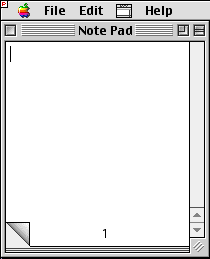
Note Pad desk accessory
There must be a dozen or more applications available themed closely or loosely on Apple’s old Note Pad desk accessory, which dates back to System 6 days (and perhaps before). It was there when I joined the Mac community with System 6.0.1.
Unfortunately, Apple abandoned Note Pad, first disabling its installation by default in Mac OS 9 (although it was still there in the Apple Extras folder) and then completely eliminating it in OS X in favor of the substitute enhanced Stickies feature – a Mac OS element I never warmed to in either Classic or OS X. Happily, third party developers have thronged to fill the void vacated by Classic Note Pad
TopXNotes organizes and provides convenient access to text information for fast retrieval with full styled and colored text, a wide range of fonts, and many other user-selectable text options.
TopXNotes lets you select font, font color, and font size, change note background color, and pick from a wide variety of text attributes, including underline, bold, italics, outline, shadow, condensed, and expanded text.
Happily, version 1.2 of TopXNotes now supports Apple’s basic F-key text editing commands for Cut, Copy, and Paste.
TopXNotes allows you to export selected notes and groups to an iPod, retaining the original order and structure, and includes link recognition, groups and categories, templates, MultiView (for displaying more than one note at a time), and NoteOrganizer, an advanced table of contents for navigating your notes, for creating a table of contents.
The program is pretty intuitive, but TopXNotes controls automatically display “tooltips” popups in addition to a graphical image on the button to assist in explaining the control’s purpose.
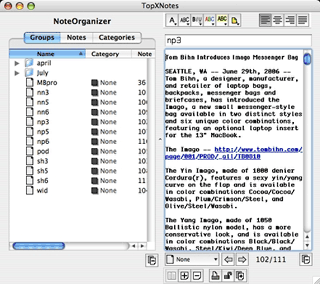
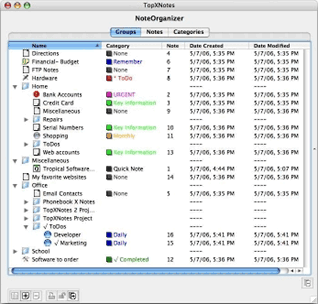 Another TopXNotes feature is the ability to assign categories to notes and use the NoteOrganizer Table of Contents window (right) to navigate your notepad and quickly find what you are looking for.
NoteOrganizer has two main features: Groups, which you can name and which look like folders in the Finder, and Categories, which have an icon, a color, and a name. Categories which can be used to further organize your notes, and you can create your own custom Categories.
There is also MultiView (image below), the convenient ability to display more than one note at once, which I find especially useful. You can display as many notes as you have room to show on your screen or telescope the note pad back to just one note or TOC (Table of Contents) page with button-clicks.
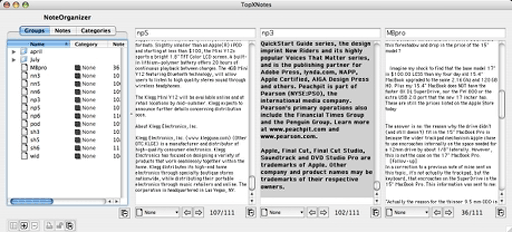
This is a very useful feature, but at least on my computer (a 1.33 GHz 17″ PowerBook with 1.5 GB of RAM), the program takes an annoyingly long time to refresh to an added note view, although they contract instantly.
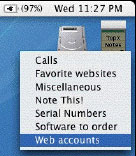 In addition to the main user interface window, an optional global floating window with a menu showing your top ten notes in a menu for quick access, dubbed QuickNotes, can be enabled or disabled in the TopXNotes preferences. The same QuickNotes list is also displayed in the Dock in a contextual menu.
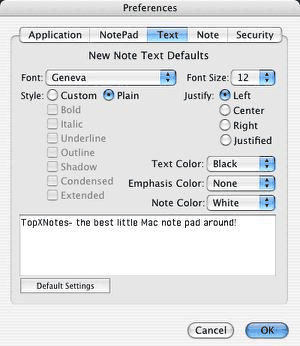 TopXNotes has a variety of Preferences settings so you can customize it to your tastes and needs.
When TopXNotes is first launched, a single blank note is shown in the main TopXNotes window. The main window also contains the controls that are used for the text in the active note including font name, font size, font color, and text style choices on the left. TopXNotes also uses contextual menus for choosing anything that can be done to a text selection.
 TopXNotes’ Read-Only Notes feature prevents accidental change or deletion of important notes, safeguarding notes that are not often changed, and each note created in the notepad can be set to Read-Only.
You can encrypt your TopXNotes by simply entering a password consisting of 25 or fewer characters in the Preferences Security tab. Individual notes may be encrypted so that only the user with the password can display and modify those notes.
Once a note is encrypted, the user will be prompted to enter the correct password every time the note is displayed. To allow this check to be made only on launch of the application, go to the Notes menu and choose Note Settings. In the Note Settings dialog, uncheck “Require password for every access.”
TopXNotes’ Find feature allows you to search one note or the entire notepad for a word or phrase. If matching text is found, that portion of the note is displayed in the current view. Otherwise, a message is displayed indicating no match was found.
One of the recent enhancements is new Import and Export options that allow you to export a Group as a TopXNotes “notepad data file” or import a “notepad data file” as a Group.
TopXNotes keeps improving with every version update. It’s now quite stable, but there are still some issues that need work, including:
You still can’t do multiple (group) selections in Groups/Notes/Categories NoteOrganizer windows.
The Trashcan has gone missing in version 1.2. I wasn’t a big fan of the way the Trashcan worked in earlier versions of the program (you couldn’t drag multiple items to the trash but had to select each item separately, then click the Trashcan icon, then confirm with a dialog box click – slow and cumbersome), but I still liked having the graphical option. With TopXNotes 1.2, you can select Delete Current Note from the Notes menu, or just use the Command > D keyboard shortcut.
You have to click within a text field to activate the scroll bar, and even then TopXNotes doesn’t support the scroll wheel on my mice.
Those niggles notwithstanding, TopXNotes is a likable little application with an attractive user interface and continues to be actively developed. It’s shareware, so you can try it out without making any cash commitment up front.
TopXNotes Basic Features
 MuitlView – view more than one note view at once, as many as will fit on your display
- NoteOrganizer – and advanced table of contents with category and group
- QuickNotes menu – keep your “top 10 notes” in a floater on your desktop always for easy access
- Note Level Encryption
- Read-Only notes
- Find in notes and notepad
- Many note back-up options
- Customize with many user Preferences – tune TopXNotes just the way you like it
- Color text, style, font and font size, all user selectable, all saved, all cut/copy/paste, internal drag & drop note view to note view, unlimited UnDo
- Cut/copy/paste and drag and drop to and from external applications
- Recognize links (ftp, web & email, other?) and launch from them by a single click
- Each note (page) can be identified by its number, full title, and organized by groups and categories you specify.
- Minimum 50 pages, theoretically unlimited
- Page turning arrows
- Save automatically on page turn
- Optional save on a time interval
- Optional basic encryption
- Export as either straight text or RTF
- Template pages for easily creating new kinds of notes
- A set of 10 templates installed as part of this release including Web Accounts, Financial Accounts, and Serial Numbers and various other lists.
- Provided a unique note pad for each system user
- New in version 1.2
- New import and export options
- Optional date and time columns in the NoteOrganizer
- Preferences control NoteOrganizer columns
- More Category icon choices
- New improved Note and View button icons
- Added cmd+M to minimize
- Note number now reflects note and total number notes (Example: note 1 of 11)
- There is also now Note-Level Encryption and Find
System Requirements: TopXNotes 1.2 requires a PPC Macintosh computer running Mac OS X 10.2 or higher. TopXNotes requires very little disk space (usually under 20 MB depending on the amount of notes stored). TopXNotes currently requires 20 MB of RAM.
TopXNotes is also available for the Classic Mac OS. Nathan Thompson reviewed the Classic version in February 2006.
TopXNotes is $25 shareware.
Keywords: #topxnotes #macnotepad
searchword: topxnotes
