
The new MacBook Pros and MacBooks run hot – almost hot enough to fry eggs. Indeed, Apple no longer advertises its portable computers as laptops, presumably fearing product liability lawsuits should someone singe their thighs.
But it’s not just the Macintel ‘Books. After OS X 10.4 Tiger was released in early 2005, I noted a significant increase in reader mail either mentioning or complaining about more frequent fan cycling on PowerBooks and iBooks as well, and my own machines ran noticeably hotter (although still relatively tepid compared with the Macintels) after I installed Tiger.
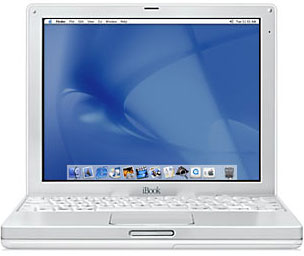 Prior to 10.4, the cooling fans in my 700 MHz G3 iBook and 550 MHz G4 upgraded Pismo had remained pretty much silent, even during hot summer weather. (The processor upgrade vendor, Daystar, retrofitted me with a replacement copper heat sink, replacing the Pismo’s original composite one, which helped keep the heat down to about the same as it had been with the original 500 MHz G3 processor.)
However, after I installed OS X 10.4, the Pismo’s fan began spinning up as much as three or four times a day – as opposed to virtually never – and the weather really wasn’t that warm here through the spring of ’05.
Under OS X 10.3 Panther, my little iBook’s fan had never come on, not even once, through the hottest stretches of two summers, so this was something new. My guess is that it probably has something to do with Tiger’s more intense video support demands, and perhaps stuff like Spotlight indexer running in the background.
I’m glad my iBook’s hard drive is very quiet, because there seems to be some thing or things keeping it busy much of the time in Tiger.
Daystar’s Gary Dailey says he has noticed that Tiger is putting more stress on the CPUs of the older systems, and he assumes this is due to the lack of a suitable GPU for offloading the Core Image and Core Graphics calls in these machines. The Rage Mobility 128 GPU with 8 MB of VRAM in the Pismo is really not up to dealing gracefully with Tiger. The iBook’s Radeon 7500 GPU supports Quartz Extreme (which the Pismo doesn’t) but is not programmable for full support for Core Image and Core Graphics, so some of the load that would otherwise be handled by the video processor is likely getting shunted to the IBM 750FX CPU in it as well.
The cooling fans are a lot noisier than even the most decrepit hard drives of my recollection, and once they cut in, they stay running for a long time before finally falling silent again. The Pismo’s fan does a passable impression of a 767 taking off, and I really don’t want to have to listen it on a routine basis.
Given the way things are going with laptop heat generation, I guess I should be thankful that I live in a relatively chilly part of the world.
Podium CoolPad
My new (to me) 17″ 1.33 GHz G4 PowerBook‘s fan runs a lot, perhaps half the time or more in summer weather, and that’s with the ‘Book sitting on a RoadTools Podium CoolPad, but at least it’s not as raucous as the Pismo and iBook fans. It cuts in at about 58.5° C and stays running until the processor temperature drops to 55° C.
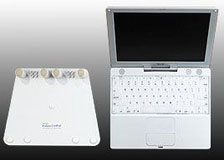 I like the Podium CoolPad because it’s small, light, and easy to stuff in a backpack or computer case. It’s still robust enough to support the 17″ PowerBook, and it comes in white to match the iBook, so it looks sharp.
It should be as efficient as any of the several laptop stand choices that aid cooling efficiency by raising the ‘Book off the support surface to allow air to circulate underneath. Most laptops – er, notebooks – dissipate some of their heat through the bottom and the more air that’s allowed to flow under the bottom, the better opportunity that heat will have to dissipate.
The Podium CoolPad measures 8-1/2 x 11 inches, weighs 1 pound. If your laptop has a contoured bottom (a first generation iBook, for example) you can remove the center supports and it will work just fine using only the two outer supports.
The Podium CoolPad’s price is $29.95.
Targus ChillMat
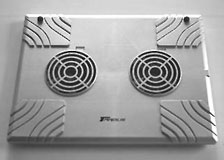 However, for the warm months, a more active approach may be required. Another solution I have in my arsenal is a Targus ChillMat, which is a laptop platform containing two large diameter, USB-powered fans that draw air through channels molded into the laptop support surface, exhausting it out the back of the unit.
“But won”t two fans be noisier than one?”, some might ask. Nope. The reason is that the ChillMat’s fans are relatively large diameter (about 3 1/2 inches), so they can turn slowly and quietly and still move the required volume of air (the rated capacity is 28 cubic feet per minute).
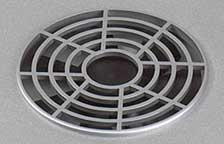 Targus claims 25 DBL, which coincidentally is the same amount of noise Apple says the G5 iMac makes with its three internal cooling fans. On the other hand, an internal fan has to fit inside the cramped confines of today’s laptop form factors, so has a be a small-diameter unit that runs very fast and very noisily in order to do its job.
The Targus ChillMat makes about the same amount of noise as a typical laptop hard drive of a few years ago. It’s not totally silent, but it is unobtrusive, a very subdued – almost soothing – sort of whispering sound, unlike the high pitched whine of the internal fans. There is also an inline switch in the USB power cord so you can turn the ChillMat’s fans off when they’re not required without unplugging the unit.
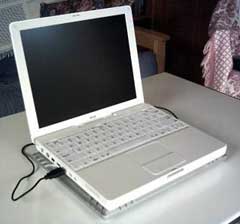 The ChillMat can also be inserted between the CoolPad (or most other laptop stands) and the “Book, so it does not need to alter your workstation dynamics very much, being only 11/16″ thick.
The ChillMat housing is made from a hard, ABS-type plastic, colored silver, which harmonizes nicely with metal, white, or even black Apple laptops, and is surprisingly light in weight at just 15 ounces (425 grams), and with dimensions of 11.75″ x 9″ x 11/16″ it should slip easily into most computer bags or backpacks.
It definitely cuts down on fan cycling with the 17” PowerBook. User testimonials are pretty much unanimous that the ChillMat works very effectively to cool hot laptops.
 ChillMat Technical Specs
- Color: Silver
- Exterior Dimensions: 11.75″ x 9″ x 0.8″
- Includes USB power cord with on/off switch
- System Requirements: USB port
- Technical
- Air Flow: 28 CFM (cubic feet per minute)
- Speed: 1500 RPM
- PC Power: USB: 5 V, 500 mA
- Power: 1.05 W
- Warranty: Limited One Year Warranty
- Weight: 15 oz
The Targus Notebook ChillMat sells for $29.99
Targus Notebook ChillHub
The Targus Notebook ChillHub is an enhancement of the of the Targus Notebook ChillMat, with four convenient USB 2.0 ports, which will more than compensate for the port used to power the unit’s own cooling fans, in addition to the two-fan cooling system.
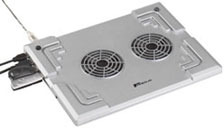 With two solutions in one product, you can free up space on your desk. The ChillHub also includes an AC adapter to power the USB 2.0 ports, as well as the two fans when you’re in desktop substitute mode.
Aside from the USB hub feature, the ChillHub functions similarly to the ChillMat.
ChillHub features:
- Prevents overheating: Two-fan cooling system pulls heat away from the laptop and prevents the CPU from overheating during use
- Protects your workspace: High-heat generating notebooks can damage furniture surfaces; the ChillHub protects furniture from heat damage
- Expands your capabilities: True plug and play for up to 4 USB 2.0 devices like mice, keyboard, memory drives, lights, PDAs, etc.
Technical specs.
- Color – Silver
- Exterior Dimensions – 11.75″ x 9″ x 0.8″
- Warranty – One Year Warranty
- Weight – 2 lb 5 oz
The Targus Notebook ChillHub sells for $49.99.
Laptop Desk and Laptop Desk Ultralite
The $30 Laptop Desk from LapWorks Inc. has been proved to cool laptops and reduce heat to the user’s lap.
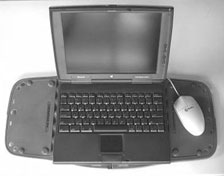 LapWorks PR rep. Bill Moody says: “Apple’s MacBook and MacBook Pro are many times faster than previous models. This is good news. Ergo, the processing speeds are generating excessive heat which is bad news. As a result, Apple is cautioning their laptop/notebook users by stating “Do not leave the bottom of the computer in contact with your lap or any surface of your body for extended periods. Prolonged contact with your body could cause discomfort and potentially a burn.”
“The Laptop Desk has been scientifically proven to reduce heat in notebooks by 8 – 10% on the lap, and 15 – 20% when inclined on a desk via its ventilation channels and heat-conducting polycarbonate plastic. Here are the thermal study results from California Polytechnic University at Pomona.”
The Laptop Desk is the market’s only dual-purpose – for lap or desk use – lightweight folding portable desk which:
- Again, cools a laptop by 8-10% (on laps) and 15-20% (on desks) via its built-in ventilation channels
- Spans the entire lap, creating a 21″ wide sturdy workspace thus preventing “hot leg” and burned thighs
- Folds into a wedge-shaped stand on a desk, elevating the screen closer to the eyes, and inclining the keyboard to 5 ergonomic typing angles to relieve neck, back and shoulder strain
- Is lightweight, thin and fits right next to the laptop in any computer bag when folded
The Laptop Desk fully spans the lap creating a sturdy, 21″ wide workspace which allows laptop-using males to sit in their natural position with legs apart. Competitive products lack the width to address the posture issue.
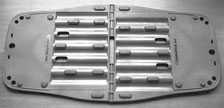 The Laptop Desk version 2.0 supports all notebooks while the Laptop Desk UltraLite is thinner, lighter and designed specifically for road warriors using notebooks of 5 pounds or less (although I have personally found that it works fine with a big, eight-pound, WallStreet PowerBook aboard).
In June 2001, LapWorks launched the Laptop Desk v1.0, designed enable safe typing on laps without slips or burns, and to cool the computer in the process. With the Laptop Desk v2.0, announced in April 2002, LapWorks launched a new product category with the industry’s first dual purpose lap desk that doubles as a desktop stand for ergonomic typing on desks. Calero launched his third product, the Laptop Desk UltraLite, in August 2004.
In 2003, Mr. Calero published an article on overcoming the hazards of laptop use. “How to Protect your Laptop and Lap from Heat Build-up and Other Hazards” is available on LapWorks’ website.
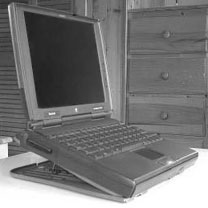 The Laptop Desk UltraLite’s weighs just 14.6 ounces, but in fully-open lap tray mode it creates a generous 22″ expanse of workspace . In its “wedge” desktop stand configuration, the UltraLite offers 5 adjustable angles with a maximum screen elevation of 3 1/4″, and increases cooling efficiency by a claimed 15 percent to 20 percent. When used as a desktop stand the Laptop Desk allows unimpeded access to front-loading optical drives, which some laptop stands don’t.
When folded, the Laptop Desk UltraLite measures 11″ x 11″ x 5/16″ and will slip easily into most computer bags or backpacks, and stores conveniently just about anywhere.
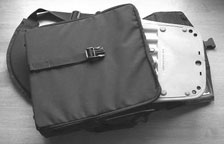 Our test Laptop Desk UltraLite feels very sturdy, notwithstanding its light weight and thin profile, and the hinges appear to be robust enough to withstand extended use and many folding cycles. As Mr. Calero notes, polycarbonate plastic is incredibly strong.
Both Laptop Desk models sell for a modest $29.95.
There are several other laptop cooling solutions that I haven’t personally tried out (yet), but Ill include some manufacturer-supplied information on a few of them for comparison and follow-up in case you’re interested.
Xpad Non-slip Laptop Cooler & Heatshield
Xpad is a completely new portable non-slip laptop pad product that cools the computer while protecting the user from laptop heat. It features an elegant lightweight design, thin profile, comfortable padding, and smart non-slip interfaces.
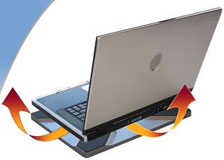 Xpad does not use any fans to cool your Laptop, but enhances natural convection airflow. There are rubber feet on the bottom of laptops that will sit on top of the ‘X’ pattern rubber pads on the Xpad, providing clearance between the bottom of the laptop and the ‘X’ pattern rubber pads.
Xpad will accommodate laptops with screen sizes up to 17 inches, and will work as long as some part of the rubber feet on the bottom of your laptop touches the ‘X’ pattern on top of the Xpad. The rubber feet do not need to completely cover the ‘X’ pattern for the Xpad to work. Also, if you have a laptop without ventilation holes on the bottom such as a PowerBook you don’t need to have the rubber feet come in contact with the ‘X’ pattern – the Xpad will work since the laptop casing is designed as a heat sink.
The Xpad is claimed to keep your laptop cooler by up to 20 degrees and shield your lap by up to 40 degrees – reducing laptop heat extends laptop life and keeping your legs happy.
Unique 3 layers of thermal insulation with trapped air pockets within its ABS composite structure makes Xpad an efficient laptop heatshield
The Xpad’s ABS composite structure design allows it to have a thin profile while providing an amazing structural stiffness.
iLap Laptop Stand
iLap is another stand designed to keep your laptop cool, and let you work comfortably with the machine on your lap as well as at a desk. Designed to match Apple PowerBooks and MacBook Pros, the iLap laptop stand is made of aluminum with sand-blasted and silver anodized finish. iLap is also suitable for other laptops, and available in five sizes: 12″, 13″, 14″, 15″, 15″ widescreen and 17″ widescreen versions.
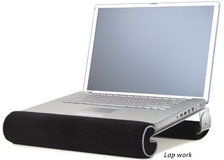 iLap keeps your laptop cool by using lightweight aluminum as a cool sink., and its all aluminum thermal conductivity is 13 times more than stainless steel, and thus the more surface it has in contact with the computer, the more heat that it draws away (in the same conceptual way that heat sink works on the CPU).
Aluminum is chosen for its light weight, elegant appearance, and higher heat conductivity (compared to steel or plastic), although the cost of aluminum is 4 times more than plastic and twice that of steel.
iLap raises your laptop to keep your lap cool, and is padded with velvetcushions for extra comfort. The front cushion is detachable for switching between lap work and desk work, but the back cushion should remain for either use.
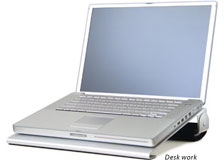 Unlike some tall laptop stands that are designed for desk use only and require an external keyboard, the iLap is specifically intended for lap use as well – with the convenience of typing directly on the laptop keyboard.
Pricing:
- 12 inch, $49.90
- 13/14 inch, $59.90
- 15 inch, $59.90
- 15 inch W (widescreen), $59.90
- 17 inch W (widescreen), $69.90
MacMice iBreeze Laptop Cooling Stand
The iBreeze is a very attractive, dual fan cooled, USB powered, clear acrylic desk stand for your Apple Powerbook or iBook. Its USB plug provides a passthrough port, so you don’t lose the use of that USB port when using the iBreeze — a nice touch, addressing the only significant gripe I have about the ChillMat.
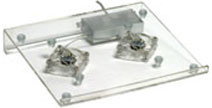 The iBreeze uses two 60mm/2 1/4″ fans, each operating at less than one-half their maximum rated speed, making he iBreeze much quieter than your internal Powerbook or iBook fan, and drawing power directly from the USB port of the connected “Book. A female USB passthrough port on the iBreeze gives you back the USB port used to power the fans. Any (low-power) USB device can simply be plugged into the rear of the iBreeze.
Constructed from clear acrylic sheet, the iBreeze is completely transparent (both its casing and its two fans), and it certainly looks great in photos.. even without a Powerbook sitting on top.
The iBreeze uses a clear coated, stainless metal braided USB cable to provide both maximum electrical shielding and sharp appearance. The clear polymer bumpers on the top face of the iBreeze are claimed to be gummy enough to securely hold even a 17-inch Powerbook in place, and tall enough to allow substantial airflow space between the iBreeze and your computer. There is also a convenient On-Off switch,
iBreeze Specifications:
- Width: 10.9″ (fits 12, 15 & 17″ “Books)
- Depth: 9.5″
- Height: 2.25″ (at rear)
- Voltage: 5.0V
- Current; 130mA
- Cooling: typically -5 to -15 Degrees F
Priced at C$45/US$29.99
Unfortunately, it appears that the iBreeze is no longer in production, but certain resellers still may have some in stock.
For more information, visit CoolUSB or The Maclaunch Store.
In summary, if your ‘Book’s cooling fan has started cycling frequently, one or more of the solutions mentioned in this column may help.
Keywords: #laptopcooling #notebookcooling
Short link: http://goo.gl/6BfqOM
searchword: laptopcooling
