Low End Mac Reader Specials
TypeStyler For Mac OS X is Now Shipping! Download The Free Fully Functional 60 Day Tryout at www.typestyler.com
OWC: Get the Right Memory / Ram for your Mac. Top Quality, Competitive Prices, Lifetime Warranty. Expert Support and Video Installation Guidies too! 4.0GB Matched Sets from $87.99, Options up to 32GB. Click here
Don't install Parallels to play poker online! Poker Mac will show you how
to download and install a native Mac poker application such as Full
Tilt Poker Mac.
Laptop Hardware Provided by TechRestore - Overnight Mac & iPod Repairs.
Compare products like desktop computers, apple laptops, apple macs, and LCD Monitors side by side! All the information and reviews to make the best purchasing decision for new mobile phones, sat nav systems, or MP3 players. The Ciao online shopping community makes searching products easy for you.
Miscellaneous Ramblings
Hands On: Griffin NE Mic
Does Griffin's NE Mic adapter deliver satisfactory audio input using cheap PC Mics?
6 Nov. 2000 - Charles Moore - Tip Jar
Apple's PlainTalk microphone is different from a standard mic in that incorporates a built-in preamplifier that supplies a line level audio input to the computer. This means that any microphone or other device you plug into your Mac's PlainTalk microphone jack needs to support line level input.
However, the PlainTalk microphone interface means that Mac users are
shut out of the majority of computer microphones on the market,
especially the vast array of inexpensive ones available for Wintel PCs.
And while Apple's own PlainTalk microphone is a very decent unit, it
must be either perched on top of your computer monitor or held, neither
of which is necessarily the most ideal or convenient solution. People
who use voice input a lot will probably prefer to have a headset or
boom microphone.
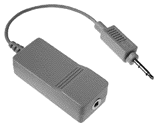
The solution for Mac users who want to use non-PlainTalk microphones is the Griffin Technology NE Mic audio adapter, which is compatible with most non-powered microphones that have a standard 3.5 mm stereo or mono jack.
This adapter is fully compatible with the PlainTalk audio port used on recent Macs. It works by amplifying the mic level signal that most microphones output and boosting it to the Mac's line level signal.
Designed for both professionals and hobbyists, the Griffin NE Mic adapter incorporates a low-noise amplifier and requires no SETI or drivers.
The NE Mic adapter plugs into the microphone port on Mac OS systems, giving you the option of using a wide array of inexpensive microphones, multimedia displays, communications devices, and headsets manufactured for both the PC and consumer market. "You will now be able use any microphone that you could buy at a computer or discount store," says Paul Griffin, CEO of Griffin Technology Corporation.
I decided to give the NE Mic the acid test, trying it out with a cheap PC mini-boom microphone that I picked up from a surplus mail-order house for Can $3.99 (that's about US $2.60), figuring if I got decent results with that, then performance with higher-quality PC mics should be even better.
My test procedure was unscientific: I basically recorded similar phrases several times using the Alert Sound recorder in the Mac OS Monitors & Sound control panel, and then subjectively compared the results produced by three microphones - the $3.99 cheapo; a presumably likewise inexpensive mic and speakers headset combo that Griffin sent along with the NE Mic test unit; and an Apple PlainTalk mic as a control.
To use the NE Mic adapter, I just plugged the adapter module into the test Mac - in this case, my son's PowerBook Lombard 333 MHz machine, and then plugged the two inexpensive microphones into it in turn.
Not surprisingly, the stock Apple PlainTalk mic supplied the cleanest audio input of the three. However, I was surprised at how good the cheap little boom mic was, and I got a very acceptable recording of my voice using it. The headset mic was disappointing, however. It had plenty of volume, but produced an unacceptable background hum or buzz no matter where I set its in-line volume control.
Having established that the cheap PC boom mic offered reasonable input quality, I decided to see how it would work with dictation software, in this case IBM ViaVoice. Here again, the results were surprisingly good. Dictation accuracy using the $3.99 a microphone did not appear to be much less accurate than it is with the Andrea headset mic that ships with ViaVoice or with the Apple PlainTalk mic.
However, I discovered to my dismay that after switching back to the regular dictation mic, using the cheap mic seemed to have corrupted my ViaVoice voice profile files, and recognition accuracy had deteriorated to default (pre training) levels. Fortunately, reading ViaVoice one of its training stories seemed to restore things to normal. Consequently, I suggest that when experimenting with different microphones, one should set up alternate voice profiles in dictation software.
At US$19.95, Griffin Technology's audio adapter offers a low-end solution for novice or aspiring Digital musicians, Audio/Video producers, Multimedia designers, and Voice Recognition users. The audio adapter's preamplifier outputs approximately a 100x gain on the normal mic level signal produced by unpowered microphones. This produces the professional industry standard line level signal used by Apple since the Quadra models. "With all the multimedia monitors with built-in microphones on the market today, the NE Mic audio adapter fills a great need," says Griffin.
The NE Mic adapter is compatible with all currently shipping desktop Macs and PowerBooks (but not iBooks), as well as all models made by erstwhile Mac cloners such as Power Computing, Motorola, Umax, Marathon, PowerTools, and APS. It is also compatible with most legacy Mac systems introduced since 1993.
I found that the Griffin NE Mic adapter works as advertised, and is an ideal accessory for adding more mic flexibility to your PlainTalk Mac. However, my encouraging test results with ViaVoice and the cheap mic notwithstanding, I strongly recommend that serious dictation software users invest in a high quality microphone. NE Mic expands the range of possible candidates.
For more information, visit the Griffin website.
Appendix: NE Mic Technical Specs
- Input Impedance: 900 Ohms
- Output Impedance: .1 Ohms
- Input Connector: 3.5 mm mono
- Output Connector: 3.5 mm custom
- Audio Gain: 40 dB
- Operating Voltage: 5 V
- Input Voltage: 1.6 V
- Power Consumption: 6.4 mW
- Bandwidth: 60 Hz-12 Khz
- Current Consumption: 1.3 mA
- Height: .73 inches
- Width: 1.03 inches
- Length: 2.37 inches
- Cord: 3.86 inches
Charles Moore has been a freelance journalist since 1987 and began writing for Mac websites in May 1998. His The Road Warrior column is a regular feature on MacOpinion, and he is a news editor and columnist at Applelinks.com. If you find his articles helpful, please consider making a donation to his tip jar.
Recent Miscellaneous Ramblings
- WiFi Paranoia, iMac-O-Lantern, Magic Mouse Does Click, Free Clipboard Managers, and More, 11.05. Also strange time stamps, problem with ColorIt on Intel Mac, and the story behind OS X 10.5.4 install discs.
- Google Chrome Mac Preview Has Made a Convert, 11.02. Officially a developer preview, Google's Chrome has finally made it to Intel-based Macs. It's fast, elegant, and could be your next browser.
- Fixing a Narcoleptic PowerBook G4, the Future of Tiger Support, Spam Filtering, and More, 10.28. Also installing Leopard, disappearing features, portable Thunderbird, and web page design issues.
- 2 Wireless Alternatives to Apple's Magic Mouse, 10.27. Whether you prefer buttons to buttonless, are still using Mac OS X 10.4, or don't like Bluetooth, Targus has mice to consider.
- More in the Miscellaneous Ramblings index.
Links for the Day
- Mac of the Day: 17" iMac G4/800 MHz, July 2002 - The iMac 'grows up' with a 17" 1440 x 900 display.
- Group of the Day: LisaList supports Lisa users.
- November 8 in LEM history: 99: OS 9: I think I like it - 01: The simplified Mac life - Soured on Windows - Flea market Mac - 02: Little room for improvement in new 'Books - Combo drive upgrade for iceBooks - 04: Re-Porter - 05: Fix the old iMac or buy a Mac mini? - Apple's Copland project - 06: MacBook Core 2 - MacBook value equation - Cheap is as cheap does - 07: Problems with Classic mode in Tiger - The G4 Power Mac that won't run Leopard
- Support Low End Mac
Recent Content on Low End Mac
- Quad-Core CPU Makes Sense in MacBook Pro, OS X 10.6 Causing Overheating, Overseas Power, and More, The 'Book Review, 11.06. Also Late 2009 MacBook reviewed, how to add RAM to new MacBook, 18.4in Acer notebook used Intel i7, and SanDisk SSD chosen for Sony VAIO X.
- Dumping Macs for Google Apps, SSD in iMac, Late 2009 iMac Performance Problems, and More, Mac News Review, 11.06. /newsrev/09mnr/1106.html
- IDE Is Dead; Long Live SATA!, Dan Knight, Mac Musings, 11.04. SATA has displaced parallel ATA. While IDE hard drives haven't disappeared, the best deals are in SATA hard drives.
- QuickTime X in Snow Leopard Imports, Trims, and Publishes Video Quickly and Easily, Alan Zisman, Zis Mac, 11.04. The long, slow process of importing video into iMovie to edit it, then render it to another format, is history as QuickTime X does that much more quickly.
- More links in our archive.
Recent Deals
- Best Mac Pro Deals, 11.03. Used 2.66 GHz 4-core, $1,300; 3.0 8-core. $2,299; refurb 2.66 4-core Nehalem, $2,149; 2.93, $2,549; 2.26 8-core, $2,799; 2.93, $4,999.
- Best iPhone Deals, 11.03. New 8 GB iPhone 3G, $$99; refurb 16 GB 3GS, $149; new, $199; 32 GB, $299.
- Best 12" PowerBook G4 Deals, 11.03. Used 867 MHz SperDrive, $348; 1 GHz, $499; 1.33 Combo, $298; SD, $559; 1.5 Combo, $448; SuperDrive, $589.
- Best Power Mac G3 and PCI Video Card Deals, 11.02. Used beige 300 MHz, $25; G4/366, $49; blue & white 350, $80; 400, $90; 450, $105; PCI video cards from $15; shipping additional.
- Best Power Mac G4 and AGP Video Card Deals, 11.02. Used 400 MHz, $50; 733 MHz, $69; 933 MHz, $209; 1.25 GHz dual, $299.
- Best 15" MacBook Pro Deals, 11.02. Used 2.0 GHz, $800; 2.2, $900; 2.4, $1,000; refurb 2.53, $1,449; 2.66, $1,699; 2.8, $1,949; 3.06, $2,169; new 2.53, $1,579; 2.66, $1,799; more.
- Best Mac mini Deals, 10.30. Used 1.33 GHz G4 mini, $379; 1.42, $389; 1.5, $419; 1.83 GHz Core Duo, $350; Core 2, $439; new 2.26 GHz nVidia, $580; 2.53 GHz, $770; Server, $990.
- Best G4 iBook Deals, 10.30. Used 12" 1.07 GHz Combo, $225; 1.33 GHz, $298; 14" 1 GHz, $349; 1.33 GHz, $398; 1.42 GHz SuperDrive, $498.
- Best Classic Mac OS Deals, 10.30. System 6.0.8 floppies, $10; 7.1, $12; 7.5, $20; 7.5 CD, $4; 7.6 $13; 8.1, $11; 8.5, $20; 8.6, $90; 9.0, $20; 9.2.2, $30.
- More deals in our archive.
About LEM | Support | Usage | Privacy | Contacts
Navigation
Used Mac Dealers
Apple History
Video Cards
Email Lists
Favorite Sites
MacSurfer
MacMinute
MacInTouch
MyAppleMenu
InfoMac
Macs Only!
The Mac Observer
Accelerate Your Mac
RetroMacCast
PB Central
MacWindows
The Vintage Mac
Museum
DealMac
DealsOnTheWeb
Mac2Sell
ramseeker
Mac Driver Museum
JAG's House
System
6 Heaven
System 7 Today
the pickle's Low-End
Mac FAQ
Abandonware
Petition
Mac vs. PC Info
Affiliates
The Apple
Store
Mac
Connection
B&H
MacMall
TechRestore
ExperCom
Crucial
Memory
batteries.com
Advertise
MacMinute
MacInTouch
MyAppleMenu
InfoMac
Macs Only!
The Mac Observer
Accelerate Your Mac
RetroMacCast
PB Central
MacWindows
The Vintage Mac
Museum
DealMac
DealsOnTheWeb
Mac2Sell
ramseeker
Mac Driver Museum
JAG's House
System 6 Heaven
System 7 Today
the pickle's Low-End
Mac FAQ
Abandonware
Petition
Mac vs. PC Info
Mac Connection
B&H
MacMall
TechRestore
ExperCom
Crucial Memory
batteries.com
