
Last week, Gadgets Page’s Michael Moncur posted Alternatives to Apple’s Aluminum Keyboard, a column about his search for a replacement for his iMac’s original keyboard, which had bitten the dust – more specifically, too many food crumbs from meals eaten at his workstation.
Finding himself underwhelmed by the Apple Aluminum Keyboard offered at the Apple Store, particularly its lack of tactile feedback, Michael embarked on a quest to find a more suitable replacement keyboard.
He ended up with a couple of remaindered previous-generation Apple keyboards – a wireless model and an Apple Pro USB Keyboard, both good catches.
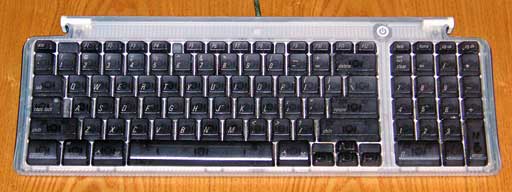
Apple’s first USB keyboard was color coordinated with tray-loading iMacs.
I’m a fan of the Apple Pro keyboard myself, and I liked the original Apple USB keyboard a lot better than many evidently did. I still have one that I have used as my main workstation keyboard for several years. I liked the key action, which I found quite comfortable; it’s most annoying shortcomings were its homely looks and truncated F-key row. The Apple Pro ‘Board addressed both of those issues more than satisfactorily, being both handsome and equipped with a full complement of keys.
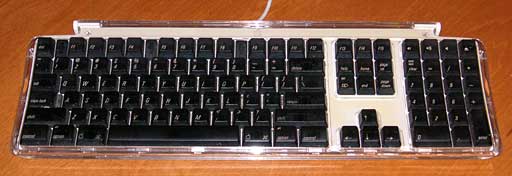
Apple Pro USB Keyboard
However, now that Apple’s Aluminum Keyboards have been in the channels for several months, it may be a challenge to find new examples of the older Apple ‘boards. Michael noted that the two he picked up were the last remaining stock at his local Best Buy and CompUSA respectively, and recommended as an alternative alternative to the Apple Aluminum ‘Board the Kensington SlimType keyboard, which I enthusiastically second.
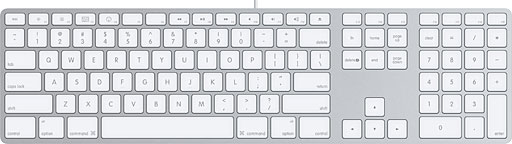
Apple Aluminum USB Keyboard
In fact, while the Apple Pro Keyboard is a great ‘board and I like it a lot, I think the SlimType is even better: I like mine best of any freestanding computer keyboard I’ve ever used.
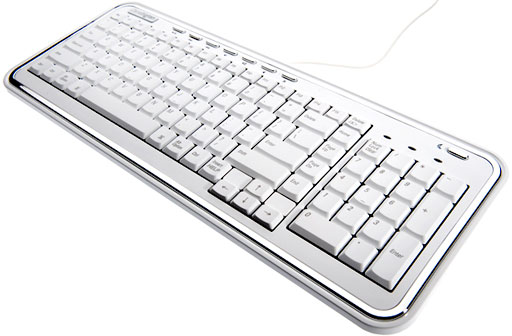
The Kensington SlimType doesn’t grab you as something exceptional immediately. It’s reasonably attractive in a somewhat quirky, 1950s/60s retro-evocative way, with bold chrome accents on white, but it’s not nearly as stylishly chic as the Apple Pro.
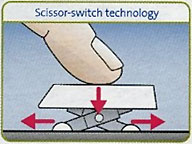 Similarly, the key action doesn’t feel especially wonderful at the outset. It’s pleasantly positive, with scissor-action keyswitches similar to the type used in most notebooks these days, including Apple’s (except for the MacBook).
However, the real beauty and virtue of the SlimType keyswitches is how they stay with you. I have chronic peripheral neuritis and fibromyalgia, and keyboard ergonomics are literally a deal-maker or deal-breaker for me. I like the built-in keyboards in my Pismo and WallStreet PowerBooks better for feel, but I can’t say that either is more comfortable than the SlimType keys for long typing sessions – and finger fatigue with any of these three ‘boards is less than I’ve experienced with any other computer keyboards by a substantial margin.
I can’t put my finger (so to speak) on precisely why this would be. The SlimType’s key action is relatively light, but not the lightest, but they do have a very positive, smooth action, short travel, a comfortably soft landing, and operate with a muted but satisfying click. I think the soft landing is especially important in avoidance of typing fatigue and repetitive strain. Whatever the reason, the Kensington SlimType is an extraordinarily comfortable computer keyboard.
It also seems admirably durable. Mine is about three years old, and I’ve had no problems with it. The keyboard still looks and works as new. Despite its compact dimensions, this ‘board is surprisingly heavy – much heavier than several other larger keyboards I have, which I take as an indication of quality and ruggedness. It’s backed by Kensington’s impressive 5-year warranty and free technical support.
 The Kensington SlimType Keyboard is, as its name implies, a slim and compact desktop USB keyboard – not as slim as the new Apple Aluminum Keyboards, but still just 3/4″ thick by 16-1/2″ wide by 6-5/16″ deep. It features a full complement of standard keys, including a numeric keypad and eight programmable multimedia hotkeys arrayed across the top of the ‘board behind the function key row.
The hotkeys allow you to launch and navigate iTunes, adjust sound volume, mute the sound, eject optical disks, and put the computer to sleep from the keyboard. While the main keyboard functions are supported by drivers built into the Mac OS, the multimedia hotkey features require Kensington’s proprietary drivers, which can be installed from the CD bundled with the unit or downloaded from the Kensington website. [Editor’s note: I’ve been using the long since discontinued Logitech Cordless Elite Duo with my Macs since 2002. One nice feature of recent Logitech drivers is that they’ll alert you when there’s a new version available for download. dk] I found that the version 1.3 Kensington Keyboard Driver on the CD was the latest version currently available, and installation took only a few seconds, although it required a restart in order to take effect.
The default hotkey functions are:
- Play: pressing Play will launch iTunes and begin playing the first available track in the Library. If there is no Library selected or no track available, iTunes will launch but not play.
- Forward: move to the beginning of the next track
- Back: move to the beginning of the current track. “Double – pressing” will move to the beginning of the previous track.
- Volume Down: decreases the sound volume.
- Volume Up: increases the sound volume
- Mute: Stop/Start the sound volume.
- Eject: ejects the optical disk.
- Sleep: displays the Sleep/Shutdown dialog.
The SlimType keyboard layout is fairly conventional, with a few distinctive elements. The function key row has a very welcome Forward Delete key to the right of the F15 key and at the top of a vertical row of navigation keys (Home, Page Up, Page Down, End). There is a pad of inverted-T arrow keys where you would expect them. On the bottom row, left to right, there are two side-by-side left Ctrl keys, a left Alt/Opt key, a left Cmd key, the space bar, a right Cmd key, a right Alt/Opt key, a right Ctrl key, and finally an Insert/Help key (which Apple keyboards don’t have in that location).
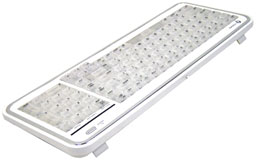 This is all quite functional, although the Cmd keys are smaller than I prefer (the same size as the regular letter keys), and the Return key is labeled Enter, as is the norm with PC keyboards. It’s also very easy to hit the Home key when you’re going for Delete, due to the unorthodox placement of the key.
There are a pair of fold-down feet at the back of the ‘board that facilitate the ergonomically incorrect angled orientation that some users prefer. There are three lights above the numeric keypad to indicate when Num Lock, Caps Lock, and Scroll Lock are activate. The ‘board also has a usefully long 5 foot USB cable. No wireless version is offered.
My main complaint about this ‘board is that it has no USB repeater ports, which is more than a little inconvenient. I suspect the USB ports were left out in order to help keep dimensions compact and the cost down, but I really miss them.
Aside from that, I really love this keyboard, and the longer I use it the more I’m smitten with it.
List price: $39.99. Street price about $30.
This keyboard has been discontinues and replaced by a black USB keyboard designed to work with both PCs and Macs. The layout of the K72357US keyboard is a bit different yet. You can order it from Amazon.com for US$16.99 as of mid 2014. Because we have not tried the new keyboard, we cannot say how it compares to the one reviewed here. This keyboard has also been discontinued.
i-Rocks KR-6810M Mac X-Slim Backlit USB Keyboard
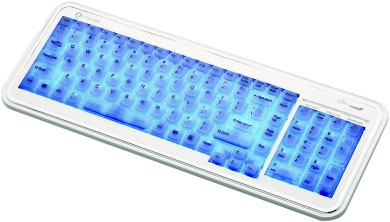
I also have to mention here the i-Rocks KR-6810M Mac X-Slim Backlit USB Keyboard, about which pretty much everything I’ve noted about the Kensington SlimType also applies. In terms of form factor and keyboard engineering, the two ‘boards are identical, with the main distinctions being the i-Rocks ‘board’s backlit keys, its lack of the SlimType’s multimedia keys, and the price.
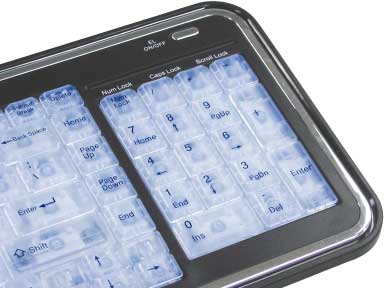 This keyboard is internally illuminated, which can be a tremendous convenience if you are using it in a low-light environment and are, like me, not a touch typist.
The i-Rocks Mac X-Slim keyboard backlighting is less subtle than the backlighting in 15″ and 17″ MacBook Pros and PowerBooks in that the entire keypad lights up rather than just the key labels, and I would prefer there to be a dimming function, as the backlighting is pretty bright. You can turn it off when you don’t need it, and when you do, it could mean the difference between continuing your work or waiting for better lighting conditions.
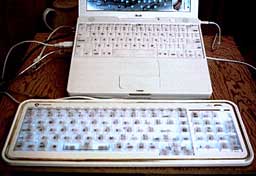 Aside from the brightness, another annoyance with the i-Rocks’ backlighting, at least for a silent computing freak like me, is that the keyboard emits a very irritating “humming” sound when the backlight is active, sounding a bit like a hungry mosquito. Fortunately, the sound goes away when you turn the backlight off, and it’s something I guess I can live with when keyboard illumination is required, but it’s also something the engineers should work on.
Aside from that, the goodness I extolled in my SlimType observations also applies to the i-Rocks ‘board. It feels just as reassuringly solid, has a claimed more than 10 million keystroke life, and if you want an illuminated desktop keyboard, there aren’t many other choices (at least I’m not aware of any) for the Mac.
The downside is that the i-Rocks X-Slim Illuminated Keyboard carries a list price of $65, or roughly twice what the SlimType sells for.
This keyboard has also been discontinued. and i-Rocks has two similar models. The black KR-6170M is a Mac-only USB keyboard. If you prefer a white keyboard, the white KR-6170M is a USB ‘board designed for PCs and Macs. Neither seems to be available through any major vendor – not even Google can find one.
Conclusion
As basic keyboards, they are essentially identical. The major choice is whether you think the i-Rocks’ illumination feature is worth the extra $30, or whether you would prefer the SlimType’s multimedia hotkey features.
If anyone on your Christmas list could use a new keyboard, either of these would make an appreciated gift.
Further Reading
- Charles W Moore Reviews the Kensington SlimType Keyboard for Mac, Applelinks, 2005.12.02
- Product Review: Kensington Slim Type Keyboard for Mac, Noah Kravitz, PBCentral, 2004.02.28
- Charles W Moore Reviews the i-Rocks Mac X-Slim Backlit USB Keyboard, Applelinks, 2006.01.06
Keywords: #bestkeyboards
Short link: http://goo.gl/r2eIn2
searchword: bestkeyboards
