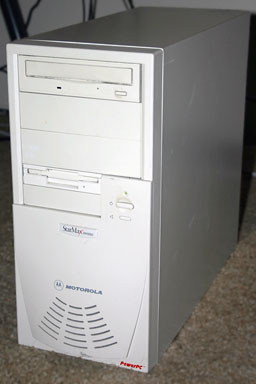
The 3000-series was Motorola's entry-level Macompatible. Based
on the Tanzania motherboard with a Power
PC 603e CPU, these provide good performance at a lower price than
the 604-based 4000-series. All models include an EDI hard drive, an
ATAPI CD-ROM player, and an unprecedented (at least in the Mac OS
Planet) five-year warranty.
Tanzania-based computers will not boot with a dead PRAM battery.
Try replacing the battery before attempting to replace the power
supply on a "dead" StarMax.
The most common complaints have been the quality of the case and
noisiness. Overall, the StarMax has proven itself very
reliable.
Variants
3000/160. 160 MHz 603e processor, desktop (DT) or tower
(MT)
3000/180. 180 MHz 603e processor, desktop or tower
3000/200. 200 MHz 603e processor, desktop or tower
3000/240. 240 MHz 603e processor, tower only
Details
introduced 1996.09.17
requires System 7.5.3 through 9.1, excluding 7.5.5
CPU: 160-240 MHz PPC 603e
bus: 40 MHz
RAM: 16 MB standard in desktop configuration, 32 MB in towers,
expandable to 160 MB using 3-volt 60ns or faster EDO DIMMs (older
5-volt DIMMs are not compatible). Peculiarly, RAM slot 3 addresses
only a single bank of memory, unlike dual-bank slots 1 and 2. While
you can use any DIMM up to 64 MB in slots 1 and 2, you should only
use a single-bank DIMM in slot 3. This limits slot 3 to 32 MB.
Except for the earliest towers, every StarMax ships with a
single-bank DIMM in RAM slot 3 (some early towers shipped with a
double-bank DIMM).
VRAM: 1 MB standard on desktops, 2 MB on towers. VRAM
replaceable with 2 MB 3.3-volt EDO DRAM or 4 MB SGRAM card.
(3000/240 ships with 4 MB VRAM.)
Video: 15-pin SVGA port; standard 1 MB VRAM supports thousands
of colors at up to 800 x 600, 256 colors at up to 1152 x 870.
L2 cache: 256k, expandable to 512k (512k standard on
3000/240)
hard drive: EIDE, 1.2 MB standard in desktop configuration,
2.5GB in tower
CD-ROM: 8x or 16x ATAPI drive, varies with configuration
ADB: 1 port for keyboard and mouse
PS/2 keyboard port
PS/2 mouse port
two miniDIN-8 GeoPorts on back of computer
SCSI: DB-25 connector on back of computer
PCI slots: 3 on desktop, 5 on tower
Accelerators & Upgrades
Vimage had a G3 upgrade for the 3000 and 4000
Online Resources
Low End Mac's
Compleat Guide to Mac OS 9, 2008 edition, Charles Moore,
Miscellaneous Ramblings, 2008.05.12. Declared dead by Steve Jobs 6
years ago, Mac OS 9 remains fast and stable, but Classic software
hasn't kept up with Web changes. What Macs support OS 9, where to buy
it, and how to update to version 9.2.2.
Hacking Mac OS 7.6.1 so many Mac
OS 8 apps will run, Max Wallgren, Mac Daniel, 2007.10.30. With a
little ResEdit work and a second copy of your System Folder, you can
run a lot of OS 8 apps with Mac OS 7.6.1.
Mac System 7.5.5 can do anything
Mac OS 7.6.1 can, Tyler Sable, Classic Restorations,
2007.06.04. Yes, it is possible to run Internet Explorer 5.1.7 and
SoundJam with System 7.5.5. You just need to have all the updates -
and make one modification for SoundJam.
Format any drive for older Macs
with patched Apple tools, Tyler Sable, Classic Restorations,
2007.04.25. Apple HD SC Setup and Drive Setup only work with Apple
branded hard drives - until you apply the patches linked to this
article.
SATA and PCI Power Macs: No OS
X joy, but you can boot OS 9, Nathan Thompson, Embracing
Obsolescence, 2006.11.17. Weeks of experimention find that while
you can't seem to boot a pre-G3 Power Mac into OS X from a SATA
hard drive, you can at least boot OS 9 from it.
Musings on low-end SATA cards
in PCI Power Macs, Nathan Thompson, Embracing Obsolescence,
2006.11.06. Thoughts on why the inexpensive SATA card might almost
work in a pre-G3 PCI Power Mac.
Old Power Macs and SATA not a
marriage made in heaven, Nathan Thompson, Embracing
Obsolescence, 2006.11.03. The PCI SATA card said blue & white
G3 or newer and Mac OS 8.6 or later, but maybe it would work in an
older pre-G3 Power Mac....
Mac OS 8 and 8.1: Maximum size,
maximum convenience, Tyler Sable, Classic Restorations,
2006.09.11. Mac OS 8 and 8.1 add some useful new features and
tools, and it can even be practical on 68030-based Macs.
Installing Linux on a PCI Power
Mac, Part 1, Larry Stotler, Linux on the Low End, 2006.09.05.
Preparing your PCI Power Mac (or clone) for Linux and getting
openSUSE Linux installed.
Customizing Mac OS 9,
Nathan Thompson, Embracing Obsolescence, 2006.08.01. Fiddling with
themes, picking a browser, and making the Classic Mac OS work just
the way you want it to.
The ins and outs of booting
Linux on the Mac, Larry Stotler, Linux on the Low End,
2006.07.31. "Old World" Macs can't boot directly into Linux. They
need to boot the Classic Mac OS first, then pass control over to
Linux.
Preparing your PCI Power Mac
for Linux, Larry Stotler, Linux on the Low End, 2006.07.26. How
powerful a CPU do you need? How much memory? Do you need a faster
drive controller? Are some video cards better than others?
Getting the Mac digital
jukebox up and running, Nathan Thompson, Embracing
Obsolescence, 2006.05.08. Connecting your PowerPC Mac to your
rstereo and remote control options for running a headless digital
audio jukebox.
System 7.6.1 is perfect for
many older Macs, John Martorana, That Old Mac Magic,
2006.03.24. Want the best speed from your old Mac? System 7.6.1 can
give you that with a fairly small memory footprint - also helpful
on older Macs.
Web browser tips for the
classic Mac OS, Nathan Thompson, Embracing Obsolescence,
2006.01.03. Tips on getting the most out of WaMCom, Mozilla,
Internet Explorer, iCab, Opera, and WannaBe using the classic Mac
OS.
The best browsers for PowerPC
Macs and the classic Mac OS, Nathan Thompson, Embracing
Obsolescence, 2005.12.16. Two browsers stand out from the pack:
iCab 3 is modern and remains under development, and WaMCom brings
Mozilla to older Macs.
Sonata SD,
Sonnet Tech, 2004.06.01. First new PCI video card for the Mac in
ages sells for just US$99, supports OS 7.5.3 and later plus OS X
10.1.5 and later, works with VGA or old Mac monitors, 16 MB
VRAM.
Value of a StarMax, Dan
Knight, Low End Mac Mailbag, 2003.05.28. "Over the past two years,
a lot has changed in the Mac world. Mac OS X is the biggest
change, and it's not supported on your StarMax."
StarMax-Talk,
Yahoo! Groups. An email list for Motorola StarMax and related
clones.
Upgrading the StarMax 3000,
Charles Moore, Miscellaneous Ramblings, 1/26/01. The upgrade
potential of the Motorola StarMax 3000 and 4000.
Apple has released patch for OS 8.1 only on Power Mac 4400,
7220, Motorola StarMax, and Umax Aegis (an Asia-only model). It
fixes problems with the HFS+ driver (which loads even when HFS+
volumes are not present) and the ATA Manager, which may result in
your mouse click not registering or problems switching from a PC
card.
Read me and
download.