
2007 – There’s no feeling like putting your foot down on home soil when returning from a trip abroad. I have the impression that this is what I’m doing by returning to Low End Mac on its 10th anniversary.
The last ten years have been a huge success story for the computing industry. While Dan Knight was crafting his valuable Mac site on the Internet – and he deserves credit for making it a great reference – he was able to witness how the industry has gone through an overhaul that made it go from geek-friendly to life-improving.
The Digital Lifestyle
Apple is a shining star at the heart of this transformation. Ten years ago, Steve Jobs returned as iCEO of the company he co-founded and paved the way for an incredible change: digital life and products that truly enhance people’s lives. The years that followed saw Apple innovating in all kinds of ways. The release of Mac OS X, adoption of technologies such as WiFi, and harnessing the digital revolution by making the computer a hub for photos and music are among the top achievements.
Some of us had big doubts about how good these transformations would be. I was among the doubters. Computer technology had often been an early adopter and geeky kind of thing. People who liked this stuff would be the ones spending all their free time learning to take full advantage of it. They loved typing DOS commands in the 1980s, and fighting with Windows 3.1 or 95 or crashes in Mac System 7.5 in the 1990s.
We, the non-geeks, didn’t. The computer was nothing but a tool for the rest of us – often the least annoying one among a bunch of annoying tools that were supposed to help us get work done. Sure, Steve Jobs sounded great when he told us how software such as iPhoto and a system such as Mac OS X would make life more enjoyable.
Toys, such as a great looking Mac and a digital camera, were tempting, and Jobs always sounds good. He could sell a fridge to an Eskimo and still sound convincing. It looks brilliant during the keynote, yet you can’t reproduce that magical result in your home.
How wrong were we.
Apple Innovation Benefits All
Steve Jobs was right. Apple’s innovation spread through the entire computing industry and made life much easier.
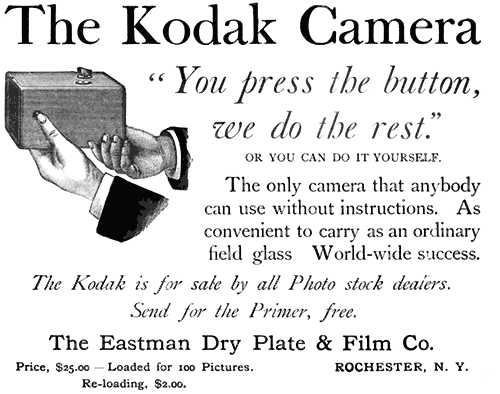 Let’s use digital photography as the prime example. Point-and-shoot cameras existed long before the digital camera took the market by storm, enabling those of us who didn’t want to master photography to take a decent picture and get large prints. [Publisher’s note: Kodak started the point-and-shoot trend in 1888!]
Digital life made it easier. With your camera, you gain flexibility, adjust more light settings on the screen, review your shots one second after they’re taken, and keep only the ones you like. You can shoot until you get it right and be sure that everything is perfect.
Meanwhile, you bought nothing but a memory card – no film, no processing and printing fees to see your results. Once you transfer your photos to the computer, you choose to print only the best pictures. You avoid the scanning step, and you can easily turn them into desktop pictures and share them with friends anywhere in the world within a minute.
I could write about many examples, but I will limit myself to two others: Mac OS X and digital documents.
Mac OS X
When Apple released the first version of OS X in March 2001, it dealt with the need for a robust, modern operating system installed on its computers. The comparison for life-improving changes stands, if you ask me. System 7.5 was plagued with an unacceptable lack of stability. Mac OS 8 and 9 were nice upgrades, but they didn’t improve the fundamentals enough to make the Mac an innovative platform again.
The first release of OS X was a bit timid. It was a slow, back-to-basics system. Many things changed, and the good old intuitive Mac feeling was missing. But since the release of Mac OS X 10.3 Panther in 2003 and OS X 10.4 Tiger in 2005, the system hit a comfort zone. Apple added great features, gave us back much of the intuitive feel, and made the overall performance stunning.
This forced the Windows world to take notes and follow.
Should we complain that Microsoft copies Apple? We could. But that changes nothing about Windows domination and Apple’s lucrative niche.
Yet it does change one thing: Windows, which many of us use at work, is now better than ever in terms of user-friendliness and overall quality. I used to hate working with Windows. Now I can tolerate it with XP and Vista – and I thank Apple for it.
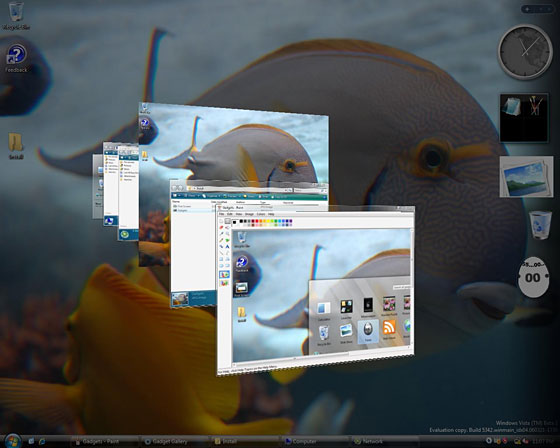
Although it’s not perfect, Vista is nicer than any previous version of Windows.
PDF Everywhere
Digital documents were another huge step forward, and Apple had the vision to steer the wheel before anyone else. They did it for digital music and system-wide adoption of the PDF standard. With that last measure, Apple certainly contributed to the standardization of PDF all around the computer industry.
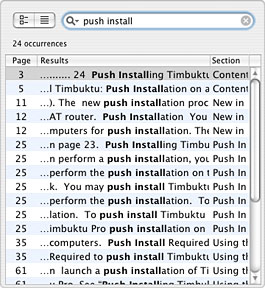
Finding information in a PDF takes much
less time than flipping a manual’s pages.
This helped software manufacturers stop printing manuals and start producing electronic documentation only. We complained at first, but many of us were quickly able to take advantage of this. For example, take a printed manual and start looking for something specific. Chances are that the table of contents won’t be precise enough to help you. You may have to flip through many pages and waste several minutes to find the information you need. In a PDF document, open a Search dialog, type a word or two, and hit the Return key. In a couple of seconds, you have the search results and can find the relevant information quickly.
A Decade of Progress
During Low End Mac’s ten years of existence, we also witnessed the rapid growth of the World Wide Web as an exchange platform. Again, the Web was first invaded by geeks and passionate users. Then businesses tried to take over. In the last few years, “Web 2.0” has helped average users claim their place.
During this whole period, information became easier to access. Think of Google News, of all kinds of press releases, and other information that became more accessible. Readers, investors, and individuals in general have more information available than they could ever handle. And by using tools such as RSS readers and site subscriptions, they benefit from increased power.
Today, it’s easy for anyone to get information in seconds or for an investor to access what he needs to make long-term investment decisions. A decade ago, you often had to be a specialist to gather that kind of knowledge.
While technology seemed to be an instrument to hook us and make us spend money on “toys” at first, it has become a cornerstone for an easier, more digital life. That’s why I changed my mind with time: Technology has become good for us, and we can embrace it.
Back to Low End Mac
What about Low End Mac?
Despite technological advances, long-term efficiency and value still have to hold their own in this consumer-friendly society.
While I’m saying that we should embrace technology, nothing says that it cannot be done at our own rhythm. Squeezing the most out of your Mac and taking advantage of innovation is possible. This is why resources such as Low End Mac (LEM) are extremely useful. They don’t yield to the idea that you will crash and burn or be unproductive unless you have the latest hardware and software. Despite technological advances, long-term efficiency and value still have to hold their own in this consumer-friendly society.
That’s why I’m happy to contribute to LEM again with my Macinthoughts column. I’m very happy to return, since I know how useful this site is. Whether you’re looking for tips, help, technical information, or opinions, LEM is among the best Mac publications you will ever find – even when you put print and the Web together.
I certainly think I brought a positive contribution during two stints (2001 and 2005) when I wrote the iBasics column. However, iBasics was too demanding for my schedule. Between a full-time business reporting job, a freelance gig for a business magazine, my passion for practicing sports, and buying a new home, there was little time left for the kind of research that would have kept iBasics up to my standards.
Having this Macinthoughts column, where I can write any kind of article, might make it possible for me to write for Low End Mac for the next ten years. Who knows – we may be celebrating a 20th anniversary together in 2017.
Keywords: #innovation #digitalhub
Short link: http://goo.gl/pZK7l7
