Mac Musings
Unleash Mac OS X with Dual Processors
Daniel Knight - 2005.09.29
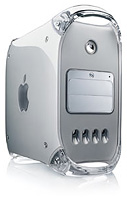
I just "downgraded" from my 2004 1.25 GHz eMac with 1 GB of RAM to a 2002 1 GHz Power Mac G4 with 768 MB of RAM - and boy is it fast!
I also have a Dell on my desk - and I love it!
Have I gone crazy?
Yes, I've gone crazy for dual processors. Ever since Apple released the first dual-processor Power Mac G4s back in July 2000, we've been extolling the virtues of dual processors under Mac OS X.
Yes, we were ahead of our time. Mac OS X wasn't even shipping yet, but we knew it would support multiple processors. And based on our research on dual processor systems, we knew that could make some things run up to twice as fast.
At the very least, dual processors won't make things any slower. Except for a few specialized programs designed for multiple processors, dual processors didn't do squat under OS 9. But at their best, dual processors can double performance, and under OS X we'd estimate you average 70-80% more power than a single CPU at the same speed.
That's part of the reason I love this newly acquired Power Mac. It's about the same as having a 1.75 GHz computer.
But there's a lot more to it than that.
The G4 CPUs in this model only have a 256 KB level 2 cache, half as big as the one the eMac uses. They also have 1 MB of level 3 cache running at 250 MHz dedicated to each CPU, something the eMac doesn't have.
There are some architectural difference between the eMac and the Power Mac. Both use a 167 MHz memory bus, but running Xbench on both shows the Power Mac is 20-25% more efficient. Whether this is because of the type memory used, a smarter memory handling scheme, or the size of the level 3 caches, it's noticeable.
Add that to a 70-80% gain from dual CPUs, and we're talking the equivalent of a 2.0-2.5 GHz eMac.
How It Works
A dual processor system is nothing without an operating system that supports multiple processors, and that's OS X in spades. The operating system handles distributing the load evenly among the processors, and even if there are tasks that can't be shared, it lets the one processor handle more threads while the other one is tied up by a more demanding task.
That's called load balancing, and it works. Most OS X applications can take advantage of multiple processors. For instance, Photoshop Elements 3.0 loads into memory and displays much more quickly. And iTunes rips faster than ever. And I can have my usual dozen or so programs open and not feel any slowdown at all.
You Can't Slow It Down
I've had this Power Mac for a week, and I've been playing with it using the stock 80 GB TravelStar hard drive and an older 17" Samsung monitor that wasn't happy working beyond 1024 x 768. I spent some time investigating monitors, seriously flirted with the idea of a 20" display, and finally decided that a 1280 x 1024 17" flat panel display would be good enough - and far more affordable.
When that came on Wednesday, I deauthorized the iTunes collection on my eMac, shut it down, pulled the 250 GB drive I'd put in several weeks ago, and transplanted it into the Power Mac. (It took some doing figuring out how to remove the hard drive cage, but I managed to find the instructions online.)
I've done everything I can to try to bog down this computer. Watch a DVD while running a QuickTime trailer with the Classic environment running and three browsers - you get the idea. It doesn't seem to faze this baby. I haven't had CPU usage pass the 80% mark, but I used to peg the 100% mark frequently with me eMac.
My biggest test was opening the master site file for Low End Mac in Claris HomePage. Everything I'd ever read said that Classic doesn't benefit from dual processors. True or not, I'd estimate this Mac is four times faster at sorting through the files that make up LEM. What usually takes 4-5 minutes was done in about a minute.
Dell No
With my Power Mac on the floor, looking at my desk you'd think I had a Windows PC. Separate speakers. A non-Apple keyboard. And a Dell monitor.
No, I haven't sold out to the dark side. I do have an Acer laptop - but I needed that to test the site so it worked with Windows XP and IE 6 (one-third of our visitors). I use a Logitech mouse and keyboard, complete with Windows keys, but they have good Mac drivers.
And now I have a Dell 1704FPV monitor connected to my Power Mac. I did my research, and this is one of the best rated and best value choices out there. Between a Dell special and an online coupon, I picked up this 17" 1280 x 1024 display for US$270 plus shipping.
It's a gorgeous display. Crisp. Colorful. And it has some really neat extra features you don't find on too many displays - a 4-port USB 2.0 hub and pivoting. I can turn the display 90° - I just need to remember to change the Displays system preference first. Otherwise it's very hard to mouse around with everything sideways.
The only drawback to the 4-port USB 2.0 hub is that this Mac has USB 1.1. This model comes from the "bad old days" when Apple refused to acknowledge the existence of USB 2.0, seeing at as a competitor to FireWire. Interesting that Apple now has some USB-only, FireWire-free iPods.
Noise
The first generation mirrored drive door models are perhaps the noisiest Macs ever made. They earned the "wind tunnel" moniker shortly after release, and this one lives up to that reputation. My research indicates that most of the noise comes from the two fans inside the power supply, so I'll be looking into replacing them. (Apple had a power supply replacement program for this model, but it expired years ago.)
Once everything is configured to my liking, this screamer of a computer is going behind a door in my computer desk. That should help muffle things a bit.
Value
I got the computer at a great price. The monitor, too. This setup cost less than a new SuperDrive eMac and runs circles around it. (Before anyone asks, I have a buyer lined up.)
Productivity
It's all about productivity, and my eMac had become a bottleneck. I often have a dozen apps running, including Classic. I have file sharing on, since it was the home network file server. And I may have 2 or 3 other people logged in (the boys love using the most powerful Mac in the house for World of Warcraft, and they like "Dooley" as much as I do - maybe more).
Even with just me, the eMac seemed sluggish much of the time. Uploading site updates, as I mentioned earlier, was a great excuse to make a pot of coffee, toast an English muffin, check the mail, etc. This dual CPU Power Mac has changed that.
I stand by my advice of five years ago. If you're a heavy computer user and want a Mac that gets out of the way and lets you be more productive, look at the dual processor models. You won't be sorry.