Mac Musings
Older Macs in the Age of Leopard
The Future of 'Quicksilver' Power Macs in the Age of Leopard
Daniel Knight - 2007.10.08, updated
In January 2001, Apple moved the Power Mac to a 133 MHz system bus and adopted AGP 4x for video cards while retaining the look of the original G4 Power Mac. Seven months later, Apple introduced a new look.
With Mac OS X 10.5 Leopard rumored to require an 867 MHz G4 CPU, these may be the oldest Macs that are officially supported. We'll know more when Apple ships Leopard later this month, and we're pretty certain that all versions of Mirrored Drive Doors Power Mac will be supported by Leopard.
Quicksilver 2001
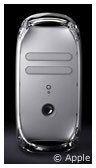 Released at the summer Macworld Expo, the
Quicksilver Power Mac
G4 has a much more streamlined look than the earlier graphite
models. In terms of hardware specs, not a lot has changed: four PCI
slots and an AGP 4x slot, and 1.5 GB maximum RAM ($125 nowadays).
Released at the summer Macworld Expo, the
Quicksilver Power Mac
G4 has a much more streamlined look than the earlier graphite
models. In terms of hardware specs, not a lot has changed: four PCI
slots and an AGP 4x slot, and 1.5 GB maximum RAM ($125 nowadays).
According to most sources, the 2001 Quicksilver suffers from the same 128 GB maximum hard drive capacity on its Ultra ATA/66 bus as earlier G4 Power Macs. However, we have heard from one Quicksilver owner who is successfully using 200 GB and 300 GB drives on the built-in hard drive bus.
New is a level 3 cache on the faster models - 2 MB per processor running at 1/4 of CPU speed.
After the messy situation with five different Digital Audio models, Apple streamlined the Power Mac line with just three offerings: a 733 MHz model with a CD-RW drive that sold for US$1,699, an 867 MHz model with a SuperDrive at $2,499, and a dual 800 MHz powerhouse at $3,499.
All three models shipped with Nvidia GeForce 2 MX graphics with 32 MB of video memory, providing full support for Quartz Extreme.
Quicksilver 2002
In January 2002, Apple moved the Power Mac forward another step, reaching the 1 GHz mark for the first time. The Quicksilver 2002 model was the first Power Mac to offer a Combo drive (DVD-ROM/CD-RW) as an option. The biggest improvement may have been that these were the first Power Macs to support drives over 128 GB in size on the built-in hard drive bus, as nowadays drives under 128 GB are considered small - and 160 GB drives are pretty cheap.
The base Quicksilver 2002 ran at 800 MHz, had a CD-RW drive, and included an ATI Radeon 7000 graphics card with 32 MB of video memory. It sold for US$1,599. In the middle was the 933 MHz model, which came with a SuperDrive and Nvidia GeForce 4 MX graphics with 64 MB of video memory. It sold for $2,299.
At the top was the powerhouse, a dual 1 GHz model that retailed for $2,999.
Approaching the Age of Leopard
The Quicksilver Power Macs looked fresh on the outside, but inside was more of the same reliable hardware that had already taken the Power Mac to 733 MHz. With L3 cache on all but the entry-level models, Apple managed to squeeze out a bit more performance, and dual-processor models were now the undisputed king of the hill.
All of the Quicksilver models support CPU upgrade, both single- and dual-processor ones, so they can do a lot of heavy lifting. Several vendors have dual 1.8 GHz upgrades available.
These 2001 Quicksilver models are limited to a maximum hard drive size of 128 GB on the built-in bus without the use of special drivers, and both Quicksilver revisions support "only" 1.5 GB of RAM (which shouldn't be much of a limitation for most users).
These haven't been obstacles to running Mac OS X well on these machines, and based on reports about the Developer Preview, we expect Leopard to be supported on all but the 733 MHz and 800 MHz single CPU models. Even if Apple doesn't support installing Leopard on those two models, someone is bound to hack the installer.
With the right AGP video card, you can have full Core Image support, and if you're willing to "flash" the Windows version of the Sapphire Radeon 9600, which you can buy refurbished for $27 on eBay.
Bear in mind that it's not always easy to find Mac video cards. One workaround is to flash the ROMs in a Radeon or GeForce card intended for Windows PCs, and The Mac Elite is a great resource for people who want to do that. They also have an article that explains how to get some AGP 8x cards working in older G4 Power Macs with nonstandard AGP sockets.
Closing Thoughts
We're Low End Mac, and although we're disappointed that it appears that all G3 Macs and a lot of G4 Macs are not going to be supported by Leopard, we think that the Quicksilver Power Macs should be good Leopard machines, even if some versions may not be officially supported by Apple.
For those interested in running Leopard on Quicksilver Power Macs, we recommend dual processors, lots of RAM, and an AGP video card that supports Core Image for best performance.
UPDATE: All Quicksilver models running at 867 MHz and higher are officially supported by Mac OS X 10.5; models below that speed are not supported by Apple, although Leopard will run on them. There are several ways to work around installer restrictions - see our article on Unsupported Leopard Installation for more info.
Further Reading
- Low End Mac's best used Power Mac G4 deals, updated biweekly
- Guide to Power Mac G4 Upgrades for Power Mac G4 with AGP Graphics
- Make AGP 8x video cards work in G4 Power Macs, The Mac Elite. Instructions for disabling pins 3 and 11 so Mac compatible AGP 8x video cards will work in most G4 Power Macs.