
With all due respect – what a wonderful phrase. Often used as a precursor to a negative reply, but equally useful for a compliment or a sincere statement. It is with all due respect that I write this article about my 70-year-old mother and her first computer and Internet experience.
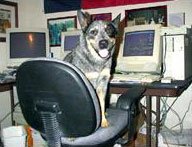
Cyberdawg and his Quadra 700
Rebuilding Macintosh computers as a hobby often creates a pile of parts and pieces stacked in the “computer room” of my house. Memory modules, hard drives, motherboards, and monitors adorn every available table top, couch, file cabinet, and empty chair in my computer room, casting a late 90s tech accent to my traditionally Southern decor.
Driven by curiosity and true desire, I chose several rogue pieces and assembled a Quadra 700 to send to my mother. I wanted to bring her out of the dark ages and allow her to correspond with her children and grandchildren via email. The more I thought about the idea, the more inspired I became. GooGoo, as she is affectionately known, was heading for cyberspace. What has the world come to?
My plan was simple. I wanted a simple machine with simple instructions for her to follow. I had already attempted to bring her into the twentieth century early last year with a riding lawn mower and thought I was going to be physically beaten (severely!) for my efforts. Luckily, I prevailed, and she is now somewhat receptive to modern machinery that postdates the wheelbarrow. Lawn mower last year, computer this year. We are now moving at light speed.
I placed several aliases on the desktop and titled them “start the Internet” and “close the Internet” for her browser and dialer. Since Macs will speak typed text, I also wrote directions that would speak to her, if she desired. I labeled those directions “start here.” Then it was off to the UPS office to ship the box full of electronic wizardry to Arkansas.
The box arrived safe and sound. I called long distance and walked her through plugging mouse to keyboard, keyboard to computer, monitor to tower, and power cords everywhere. Now for the modem. I guess since modem and monitor both start with the letter M, it was too much. I changed monitor to screen (as in TV), and we proceeded.
I had to stop here and reevaluate my perspective. It is a bit much to ask someone to come from the dark ages to our techno-cyber-webcrawling world in one phone call. We discussed the modem, its purpose, and how to plug it into the wall phone receptacle several times. Unfortunately, before I could say, “but do not do that now or we will be disconnected,” we were disconnected.
I sat in Texas with my mother in Arkansas, surrounded by partially assembled computer pieces and no telephone line to communicate through. Now that she had the modem plugged into the wall, I could not call her and tell her to take it out. I sat and waited. And I waited. And I waited a little more.
Finally she called me. She deduced that since the telephone was not plugged in, it wouldn’t work. Boy I am impressed! I can actually see some thought process starting to kick in on this whole deal! She may just make it into this century in time for the next one. We moved the phone line to the modem, and the modem line to the phone receptacle. We were off and running.
Since her only phone line is now dedicated to the modem, she must go to her cell phone to communicate. We started off getting her accustomed to the mouse. I started her moving it in small circles to get the feel of it. For some reason she had to put the phone down to do this. I waited and waited until she returned to the phone.
“This is very difficult,” she replied. Hmmmm, what is making this so difficult?, I asked myself, and why did it take two hands? I quizzed her about using the mouse on the mousepad that I sent along in the box. “Oh, it has to be on that thing?” she asked. I explained about the ball on the bottom and the friction of the pad. Silence on the other end of the phone. Finally I asked, “Mother, if you didn’t have the mouse on the pad, and it was taking both hands, how were you trying to use it?”
At this point, I realized the technological Grand Canyon that we were attempting to cross. She was holding the mouse with both hands, pointing it at the monitor, and clicking the mouse button as if it were a remote control on a television set or a VCR.
Visions of her standing there with the mouse in the palms of her hands clicking at the screen were more than I could handle. I had to excuse myself and pretend that someone was knocking at the front door to hide my laughter. Her only “gadget” reference point was a television remote control, and, after all, there was a screen involved in this deal.
“No, Mom, put it down on the pad and move it around,” I explained. Still a lot of silence.
“This is not going to be easy. When you move it left it goes right, and when you move it right it goes left,” she replied. I sat and pondered what was happening on the other end of the phone. Finally I snapped to her dilemma. “Mother, turn the mouse around – you have it backwards, the wire must go out the front of it, between your fingers.”
“Oh! Much better!” she exclaimed. “That is easier.” So we practiced making circles with the mouse and the arrow on her screen. She repeatedly told me that the arrow looked like a fly buzzing around her screen. “I know, Mom, I know.” I mean, what else do you say to your mother; she has come a long way in the last twenty minutes.
We practiced menus, dragging down, clicking, double clicking, and finally took the big step of sending an email. Fortunately the dial up numbers I preset for her worked, and she logged on at the first attempt. I had set up a home page for her from Texas, and it displayed a Welcome GooGoo message as it filled the screen. She liked that.
She made it through the initial email that I had sent her and sent me a reply. Mission accomplished. Now it was time for her to close her browser and disconnect her dialer, which she did without many obstacles. One-and-a-half hours later, she had completed her assignment.
The next day at the “stitch and chatter” crochet gathering, the conversations were abuzz with computer lingo. One friend in this bridge playing/sewing club also has a computer. Email addresses were exchanged. Several of these power knitters/power card playing women, made comments about their husbands using computers, but not many of the women had become acquainted with the newfangled machines. I was proud that my mother was now an Internet Grandma.
Since that time, she calls me at night to get instructions, which she writes down for reference. I have tried to explain to her about the capabilities of the tool she has at hand, but she seems content on using it strictly for email at this point. No need for search engines or instant messaging for now; she is satisfied with her progress. And so am I.
My mother was born 63 days before the stock market crash of 1929; survived the Great Depression, World War II, Korea, and the Cold War; and saw the invention of the television, the space program, nuclear devices, air conditioning, and modern medicine. She raised four children, lost both her husband and her mother this year, and is now navigating in cyberspace with much delight. She has come a long way.
Thanks to a bunch of assembled used computer pieces, my mother is now on the leading edge of technology – as far as she is concerned.
I cannot help but wonder what my five-year-old daughter will be doing 65 years from now. I just hope that her son derives as much pleasure as I did in his attempt to familiarize his mother with a new Macintosh whateveritis device. Heaven forbid that my descendants switch to the Dark Side after my demise. I would be spinning in my grave as my heirs were battling the blue screen of death from Windows machines.
Yes, I am predicting that in 65 years the bugs still won’t be worked out of those Wintel boxes.
Keywords: #humor #internetgrandma #johncfoster #johnfoster
Short link: http://goo.gl/Dlp9K6
