
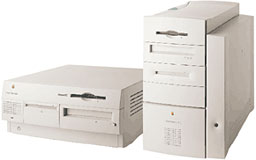
The Beige G3 is a third-generation Power Mac. It has a new motherboard with a faster system bus than earlier models, a third-generation PowerPC CPU, uses a completely different type of memory, has a different way of upgrading the CPU, and includes a personality card slot. The Power Mac G3 comes in desktop and minitower configurations and replaces the 7300, 8600, and 9600.
 The PowerPC 750 (G3) CPU was the first processor designed specifically for the way Macintosh works. Code compatible with the 603e, the G3 was tweaked based on the software Macintosh users ran. This moved the “entry level” chip past the previous powerhouse, the 604e, even at lower clock speeds. Macworld’s SpeedMark showed the 233 MHz is 22% faster than the 233 MHz 604e in the 9600/233.
The 233 MHz model usually comes in a similar desktop case to the 7200-7600. Because of the smaller motherboard, it has room for one more drive – mounted on the bottom of the desktop case itself. (The G3/233 was also available in a tower configuration, but only from the Apple Store.)
The 266 MHz version was available in either a desktop or tower configuration. The tower is a new design, essentially a shorter version of the well-received 8600 case. The G3 tower typically comes with a Zip 100 drive, leaving one free 5.25″ expansion bay for a removable media drive.
For the first time, Apple shipped a Power Mac with a top notch EIDE hard drive that holds its own against SCSI-2 drives. It was a bit of a paradigm shift, but one the Mac OS community eventually embraced, since it made buying bigger, faster hard drives much more affordable. (Although 16.7 MB/sec. IDE was fast in 1997, it’s a real bottleneck with newer drives. To really unleash their performance, consider a faster IDE/UltraATA controller that fits in one of the G3’s PCI slots.)
The CPU with backside cache plugs into a ZIF socket on the motherboard. Curious users have already found ways to boost performance by changing jumper settings.
Considering the cost of an upgrade daughter card plus a 6 MB SCSI hard drive on an older Power Mac or clone, buying a new the G3/233 was a viable alternative to upgrading an older computer. On top of that, it has a faster CD-ROM, handles more VRAM, provides an extra drive bay (vs. 7200-7600), has a faster system bus, uses less costly IDE/UltraATA drives, and supports less expensive G3 and G4 upgrades.
Oddities
Early Beige G3s could not support slave drives, as these machines (generally) had Rev. 1 motherboards and Rev. A ROMs. Later Beige G3s with Rev. 2 motherboards and Rev. B or C ROMs do support slave drives. Although the inability to support slave drives under the Classic Mac OS is inherent in the Rev. A ROM, OS X has a mechanism for supplementing the ROM code and allowing the use of slave drives.
You can use the Apple System Profiler to identify which ROM version you have:
- Rev. 1: $77D.40F2
- Rev. 2: $77D.45F1
- Rev. 3: $77D.45F2
Because of its issues, we consider the Beige G3 with a Rev. 1 motherboard a Limited Mac.
If you have an IDE hard drive larger than 8 GB, you should partition is so that the first partition is under 8 GB in size (for simplicity, we suggest 7 GB). Failure to do this could eventually result in an unbootable computer, as all system files must be within the first 8 GB of drive space. These Macs may work successfully with larger drives for a while, but once any system files goes outside of the first 8 GB of space, you’ll have nothing but problems. This applies to both Mac OS X and the Classic Mac OS.
Mac OS X
If you have a hard drive over 8 GB in size, you must partition it or you will not be able to install Mac OS X. If you are creating the partition within OS X, it must be smaller than 7.4 GB as reported by Disk Utility (because sometimes a GB is billion bytes and sometimes it’s 1,073,741,824 bytes); we suggest simply setting it at 7 GB to avoid having to redo the whole installation if the partition ends up bigger than specified (it happens). Mac OS X must be completely within the first 8 GB of space on your hard drive or you will not be able to run OS X.
You can only boot OS X from a “master” drive in the Beige G3. This applies to hard drives and CD-ROM drives. If the CD-ROM is set to slave, you will not be able to install OS X. If the hard drive is set to slave, you will not be able to boot from it.
Non-Apple upgrades and peripherals (such as unsupported USB devices, replacement drives, and third-party memory) may cause problems when installing or booting into Mac OS X, so you may need to remove them.
Be sure to read and follow Apple’s “Read Before You Install” instructions to increase the likelihood of getting OS X installed and running on the first try.
The Beige G3 is not officially supported under OS X 10.3 Panther, but it does work with 10.2.8 Jaguarand earlier. Panther can be installed using XPostFacto 3, although built-in video is not currently supported.
What You Need To Know
New on this model, data on the RAM Disk is lost during a restart. Apple also notes that the 100 MHz Pentium PC Compatibility card is incompatible, although this seems to be due to an audio cable problem. There are also early reports that the G3 will not stay asleep.
Other compatibility issues:
- GeoPort Modem not supported
- QTC and AMC not supported
- Must disconnect LocalTalk if using ethernet
- Needs updated drivers for StyleWriter 4100 & 4500
- Needs new ethernet driver for use on 10/100 autosensing hubs
- LocalTalk printing slow on busy networks
- Apple TokenRing card not supported
Some of these issues were addressed by later versions of the Mac OS.
When buying a G4 upgrade for the Beige G3, make sure it is compatible with this model’s 66 MHz bus. Pulled G4s from Apple’s Yikes! Power Mac G4 and some OEM G4s are specifically designed for a 100 MHz bus and will not work properly in the Beige G3.
Because of the case design, be sure to specify low profile (1.15″ maximum height) DIMMs when purchasing memory for the desktop version.
The Beige G3 supports 256 MB DIMMs, but they must be built using 128 Mb chips. DIMMs built with 256 Mb chips will work, but the memory controller will only see the first 128 Mb of each chip. Compatible 256 MB DIMMs will have 16 memory chips, 8 on each side.
- Power Macs earlier than the Quicksilver models do not have built-in support for IDE hard drives with capacities over 128 GB. Without a third-party solution, larger drives can only be formatted to 128 GB in these models. There are three options:
- Intech’s ATA Hi-Cap Support Driver
- A PCI IDE card that supports big drives
- A FireWire enclosure that supports big drives
- Upgrades Put Some Beige G3s in Jeopardy, Macworld, 2000.03.30. Macs with Royal Technology voltage regulator must replace that component before installing any CPU upgrade.
- Apple has discovered the cause of the dim video problem with the audio/video personality card in the Power Mac G3s. Contact Apple or your Apple dealer for a new card that fixes the problem.
- If you have a Revision 2 motherboard (one way to tell: the System CD is blue, not white), your G3 supports up to four IDE/ATA drives (two masters and two slaves). However, it cannot boot from an internal ATAPI Zip drive (which is what Apple installs with the Rev. 2 board) unless the disk has Iomega driver 6.0 or later with Enabler 777 in the Mac OS 8.1 System Folder or a later version of the Mac OS. Earlier Iomega drivers do not support ATAPI Zip drives.
- Macs with IDE hard drives do not provide SCSI termination power, depending on external SCSI devices to provide it. For more details, see SCSI Termination Power.
Details
- Announced November 10th, 1997
- Apple model number: M3979 (Desktop, 233/266 MHz)
- M4405 (Minitower, 233/266 MHz)
- Model ID: None
- Order Number: M6141LL/A (Desktop, 233 MHz)
- M6202LL/A (Desktop, 266 MHz, Zip drive, ATI 3D Rage II+ or Rage Pro)
- M6508LL/A (Desktop, 266 MHz, No Zip drive, ATI Rage Pro Turbo)
- M6431LL/A (Minitower, 233 MHz)
- M6142LL/A (Minitower, 266, 32 MB, 6 GB, 2MB VRAM, Zip, S-video + Comp.)
- M6459LL/A (Minitower, 266, 128 MB, 4 GB SCSI, 6 MB VRAM + 8 MB PCI VRAM)
- Code Name: Gossamer
- Gestalt ID: 510
- Discontinued on December 14th, 1998
How it stacks up in MacBench 5
- CPU performance
- 233 MHz: 4.5, relative to 7500/80
- 266 MHz: 5.0, relative to 7500/180; 826, MacBench 5
- See Power Mac G3/266 benchmarks for more in-depth coverage
Unsupported Mac OS X
- Although it is not officially supported, the Beige Power Mac G3 (1997) can run Mac OS X Panther or Tiger using XpostFacto 4. Upgrading to a PowerPC G4 CPU can also allow for Mac OS X 10.5 Leopard, and may possibly also allow PowerPC Mac OS X 10.6 Snow Leopard to run on here.
- Mac OS X 10.6.8 Snow Leopard using a MacRumors community developed build. It is currently still in development based off the Darwin 10.8.0 kernel compiled from source. See LEM Article.
Mac OS / Mac OS X
- Requires Mac OS 8 through Mac OS X 10.2.8 Jaguar.
Core System
These Power Mac G3s shipped with an IBM PowerPC G3 750 200nm CPU. CPU is on a daughter card, with L2 cache on the card rather than on-chip.
Legend: L1i = L1 Instruction Cache, L1d = L1 Data cache
- ($2400): 233 Mhz, 1 Processor, 1 Core, 1 Thread, 32-Bit, 66 MHz Bus
~4W TDP, 32KB L1i, 32KB L1d, 512KB L2 Backside @117 MHz, 6.35M Transistors
Price applicable to both Minitowers and desktops
. - ($2400): 266 Mhz, 1 Processor, 1 Core, 1 Thread, 32-Bit, 66 MHz Bus
~4.5W TDP, 32KB L1i, 32KB L1d, 512KB L2 Backside @133 MHz, 6.35M Transistors
Price applicable to desktop only, for M6202LL/A.
. - ($3000): 266 Mhz, 1 Processor, 1 Core, 1 Thread, 32-Bit, 66 MHz Bus
~4.5W TDP, 32KB L1i, 32KB L1d, 512KB L2 Backside @133 MHz, 6.35M Transistors
Price applicable to Minitower only, for M6142LL/A.
. - ROM: 4 MB Macintosh ROM
Video
Note: GPU models were replaced mid-cycle.
- ($2400): ATI 3D Rage II+, 2 MB EDO SGRAM, Mach, 64-Bit Memory
- 5 Million Transistors, 500 nm process size, PCI 33 MHz, 32-Bit @ 133 MB/s
- 60 MHz GPU clock, 83 MHz Memory clock, TDP Unknown.
- 1 Pixel Shader, 1 TMU, 1 ROP, DX 5.0, No OpenGL support.
- Single expansion slot supports additional 4 MB of VRAM (3.3V 83 MHz 144-pin SO-DIMM)
.
- ($2400): ATI 3D Rage Pro, 4 MB EDO SGRAM, Rage 3, 64-Bit Memory
- 8 Million Transistors, 350 nm process size, PCI 33 MHz, 32-Bit @ 133 MB/s
- 75 MHz GPU clock, 75 MHz Memory clock, TDP Unknown.
- 1 Pixel Shader, 1 TMU, 1 ROP, DX 6.0, OpenGL 1.1.
- Single expansion slot supports additional 4 MB of VRAM (3.3V 83 MHz 144-pin SO-DIMM)
- Replaced the 3D Rage II+ on May 1st, 1998 on 233/266 Desktop models
.
- ($3000): ATI Rage Pro Turbo, 4 MB EDO SGRAM, Rage 3, 64-Bit Memory
- 8 Million Transistors, 350 nm process size, PCI 33 MHz, 32-Bit @ 133 MB/s
- 75 MHz GPU clock, 75 MHz Memory clock, TDP Unknown.
- 1 Pixel Shader, 1 TMU, 1 ROP, DX 6.0, OpenGL 1.1.
- Single expansion slot supports additional 4 MB of VRAM (3.3V 83 MHz 144-pin SO-DIMM)
- Replaced the 3D Rage Pro on August 12th, 1998 on 266 Desktop models
- Replaced the 3D Rage II+ on May 1st, 1998 on 266 Minitower models
Memory
- (All): 32 MB PC-66 SDRAM Standard
- Desktop configurable to 192 MB
- Minitower configurable to 384 MB
- All Models are actually able to handle up to 768 MB of RAM using 3x 256 MB.
- Desktop version requires low profile DIMMs.
Drives
- ($2400/3000): 4 GB 40-Pin EIDE/ATA2 Hard Disk Drive
- 24x CD-ROM, DVD-ROM and Zip drive optional
.
- 24x CD-ROM, DVD-ROM and Zip drive optional
- ($4199 Minitower): 6 GB SCSI Hard Disk Drive (Internal Bus) + Ultra/Wide SCSI PCI card.
- 24x CD-ROM, Zip drive, but DVD-ROM drive was optional
Expansion/Misc
- 3x Internal PCI Slots
- 1x Personality Card slot (matches Comm Slot II; supports DVD, AV input/output, 128-bit graphics, and FireWire cards)
- 3.5 mm Microphone Jack
- Compatible with line-level input including Apple’s PlainTalk microphone
- 3.5 mm Headphone Jack
- 1x ADB port
- 2x DIN-8 GeoPorts
- 1x DB-25 SCSI connector (On rear)
- 1x 10 Mb/s Base-T Ethernet (RJ-45 style connector)
- CTO/BTO: 100 Mb/s Ethernet
- Minitower Wings Personality card:
- Composite Yellow/Red/White In, Out
- S-Video In, Out
- PRAM battery: 3.6V half-AA
- 1x standard 3-prong IEC C14/ IEC 63020 Power connector
- 1x standard 3-prong C13 female plug (For monitor)
- Kensington Security Lock
- 171-Watt Power Supply
Physical
- H x W x D (Desktop): 6.3 x 14.4 x 16.9 in/16 x 36.6 x 42.9 cm
- H x W x D (Minitower): 15.2 x 9.6 x 17.8 in/38.6 x 24.4 x 45.2 cm
- Weight (Desktop): 22 lb/10 kg
- Weight (Minitower): 33.1 lb/15 kg
Online Resources
- Full list of online resources for the Beige Power Mac G3 (1997) on a separate page.
Keywords: #beigeg3 #powermacg3 #8gbpartition
Short link: http://goo.gl/ewCX7L
searchword: beigeg3
Online Resources




