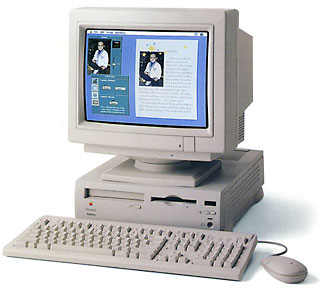
Performa 6300
a.k.a. Performa 6260, 6290, 6310
a Road Apple
- Got a Power Mac? Join the 1st PowerMacs email list.
- Mac OS 9 List is for those using Mac OS 9, either natively or in Classic Mode.
Overview
Low End Mac Reader Specials
Download Typestyler, still the Ultimate Styling Tool for Internet, Print and Video Graphics. Works great in Classic with a Native OS X Version on the way. Free Tryout: www.typestyler.com
LA Computer Company: LA Computer Company: Specials on AppleCare, Apple Displays, MacBooks, iMac's, MacBook Pros, Laptop and iPod accessories and more. Apple A/C Adapters for laptops starting at $25.00 Call 1-800-941-7654 or Click Here.
OWC: Juice up your iPod w/NewerTech High Capacity Battery from $19.99 Free Installation Videos for most models. Pro Installation Service w/FedEx Shipping From $57.95 (Battery Included). - www.MacSales.com
Mac users can finally play Party Poker for Mac. Not only that, they can also learn how to play PokerStars for Mac.
Laptop Hardware Provided by TechRestore - Overnight Mac & iPod Repairs.
Compare products like desktop computers, laptops, and LCD TVs side by side! All the information and reviews to make the best purchasing decision for a new cell phone GPS products or MP3 players. The Ciao network makes searching products easy for you.
New MacPro Memory 800Mhz With Apple Spec Heat Sink 2GB $104 / 4GB $172 / 8GB $338. Click to Maximize your Macs...
The Performa 6300 replaced the 6200's 75 MHz 603 with a faster 100 MHz 603e CPU. The 6300 was replaced with a 160 MHz version in October 1996.
Be sure to read Performa and Power Mac 5200, 5300, 6200, 6300 Issues. Then you'll understand why it's called a Road Apple.
Details
- 6300 introduced 1995.10.16; discontinued
6260 introduced 1996.06.19; discontinued
6290 introduced 1996.01.27; discontinued
6310 introduced 1996.02.14; discontinued - requires System 7.5.1 through 9.1
- CPU: 100 MHz PPC 603e
- bus: 40 MHz
- performance: XXX (relative to SE)
- ROM: 4 MB
- RAM: 16 MB, expandable to 64 MB using 70ns 72-pin SIMMs (two slots, each supports a 4, 8, 16, or 32 MB SIMM), installing RAM in pairs of identical speed gives slightly more efficient performance
- VRAM: 1 MB
- Video: 640 x 480 at 16-bits, 832 x 624 at 8-bits
- L2 cache: 256 KB
- hard drive: 1.2 GB IDE
- CD-ROM: 8x
- microphone: standard 3.5mm minijack, compatible with line-level input including Apple's PlainTalk microphone
- ADB: 1 port for keyboard and mouse
- DIN-8 serial ports on back of computer (modem port disabled when comm slot modem present; printer port disabled when comm slot ethernet card present)
- SCSI: DB-25 connector on back of computer
- video input slot
- comm slot, occupied by 28.8 kbps modem
- one LC PDS slot
- Gestalt ID: 42
- Size (HxWxD): 4.3" x 12.6" x 16.5"
- weight: 19 pounds
Accelerators & Upgrades
- Power Mac 6360 motherboard and power supply
- third-party video card will improve performance
Online Resources
- Low End Mac's best classic Mac OS deals. Best online prices for System 6, 7.1, 7.5.x, Mac OS 7.6, 8.0, 8.1, 8.5, 9.0, 9.2.2, and other versions.
- Low End Mac's Compleat Guide to Mac OS 9, 2008 edition, Charles Moore, Miscellaneous Ramblings, 2008.05.12. Declared dead by Steve Jobs 6 years ago, Mac OS 9 remains fast and stable, but Classic software hasn't kept up with Web changes. What Macs support OS 9, where to buy it, and how to update to version 9.2.2.
- Environmentally responsible retirement for old Macs, Rick Lawson, Pioneers in Mac Development, 2008.06.13. After you've scavenged what useful parts you can from your old Mac, what's the most environmentally friendly way to dispose of the rest?
- More G4 upgrade advice, secure disk wipes, 500 MHz iMacs with Tiger in action, and more, Dan Knight, Low End Mac Mailbag, 2008.05.09. The importance of securely clearing your hard drive before you pass on your Mac, Pismo and closed lid mode, G3 iMacs in the classroom, and more thoughts on upgrading G4 Power Macs.
- Vintage Mac video and monitor mania, Adam Rosen, Adam's Apple, 2007.12.17. Vintage Macs and monitors didn't use VGA connectors. Tips on making modern monitors work with old Macs.
- Getting inside vintage Macs and swapping out bad parts, Adam Rosen, Adam's Apple, 2007.12.14. When an old Mac dies, the best source of parts is usually another dead Mac with different failed parts.
- Solving Mac startup problems, Adam Rosen, Adam's Apple, 2007.12.12. When your old Mac won't boot, the most likely culprits are a dead PRAM battery or a failed (or failing) hard drive.
- The 10 worst Macs ever, Dan Knight, Mac Musings, 2007.10.23. The ten worst Macs of all time - and one of them came out just last year.
- Interchangeabilty and compatibility of Apple 1.4 MB SuperDrive floppy drives, Sonic Purity, Mac Daniel, 2007.09.26. Apple used two kinds of high-density floppy drives on Macs, auto-inject and manual inject. Can they be swapped?
- Apple's consumer Performa line, 1992 to 1997, Dan Knight, Mac Musings, 2007.09.14. Apple decided to pursue the average consumer by renaming existing Macs, bundling them with software, and putting their colorful boxes in regular retail outlets.
- Restoring PowerBook batteries, MB/GB confusion, upgrading a Performa 6300, Road Apples, and more, Dan Knight, Low End Mac Mailbag, 2007.08.20. Also information on Mac128k.com, the market for a midrange Macintosh, iBook reliability, an alternative to Name Munger, and thanks from a reader.
- Performa 6300 'the beginning of a beautiful friendship', Antonio Bunt, My First Mac, 2007.07.24. "...these machines really caught my eye and my heart. I never looked back, and I have been a Mac user ever since."
- Mac System 7.5.5 can do anything Mac OS 7.6.1 can, Tyler Sable, Classic Restorations, 2007.06.04. Yes, it is possible to run Internet Explorer 5.1.7 and SoundJam with System 7.5.5. You just need to have all the updates - and make one modification for SoundJam.
- Appearance Manager allows Internet Explorer 5.1.7 to work with Mac OS 7.6.1, Max Wallgren, Mac Daniel, 2007.05.23. Want a fairly modern browser with an old, fast operating system? Mac OS 7.6.1 plus the Appearance Manager and Internet Explorer may be just what you want.
- Format any drive for older Macs with patched Apple tools, Tyler Sable, Classic Restorations, 2007.04.25. Apple HD SC Setup and Drive Setup only work with Apple branded hard drives - until you apply the patches linked to this article.
- System 7 Today, advocates of Apple's 'orphan' Mac OS 7.6.1, Tommy Thomas, Welcome to Macintosh, 2006.10.26. Why Mac OS 7.6.1 is far better for 68040 and PowerPC Macs than System 7.5.x.
- Mac OS 8 and 8.1: Maximum size, maximum convenience, Tyler Sable, Classic Restorations, 2006.09.11. Mac OS 8 and 8.1 add some useful new features and tools, and it can even be practical on 68030-based Macs.
- Customizing Mac OS 9, Nathan Thompson, Embracing Obsolescence, 2006.08.01. Fiddling with themes, picking a browser, and making the Classic Mac OS work just the way you want it to.
- Floppy drive observations: A compleat guide to Mac floppy drives and disk formats, Scott Baret, Online Tech Journal, 2006.06.29. A history of the Mac floppy from the 400K drive in the Mac 128K through the manual-inject 1.4M SuperDrives used in the late 1990s.
- System 7.6.1 is perfect for many older Macs, John Martorana, That Old Mac Magic, 2006.03.24. Want the best speed from your old Mac? System 7.6.1 can give you that with a fairly small memory footprint - also helpful on older Macs.
- System 7.5 and Mac OS 7.6: The beginning and end of an era, Tyler Sable, Classic Restorations, 2006.02.15. System 7.5 and Mac OS 7.6 introduced many new features and greater modernity while staying within reach of most early Macintosh models.
- Web browser tips for the classic Mac OS, Nathan Thompson, Embracing Obsolescence, 2006.01.03. Tips on getting the most out of WaMCom, Mozilla, Internet Explorer, iCab, Opera, and WannaBe using the classic Mac OS.
- The best browsers for PowerPC Macs and the classic Mac OS, Nathan Thompson, Embracing Obsolescence, 2005.12.16. Two browsers stand out from the pack: iCab 3 is modern and remains under development, and WaMCom brings Mozilla to older Macs.
- Why you should use Mac OS 7.6 to get the most out of vintage Macs, Thomas Ahart, The Productive Mac, 2005.12.12. Although you may be able to run OS 8 or 9 on your old Mac, you'll generally find better performance using Mac OS 7.6.
- The 10 worst Macs ever built, Remy Davison, Insanely Great Mac, 2001.08.06
- Guide to LC PDS Video Cards. Includes Focus, Radius, and RasterOps cards for the LC processor direct slot.
- PDS Power Macs: Road Apples?, Adam Robert Guha, Apple Archive, 9/29/00. These Macs aren't bad, just limited. Here's how to make the most of them.
- Can I Speed a 6200 or 5200 on the Net?, Mac Daniel
- Performa 6300, 5200 questions, Mac Daniel
- Apple Specs for Performa 6300, 6260, 6390, 6310
- Performa and Power Mac 5200, 5300, 6200, 6300 Issues by Scott L. Barber
- Modem performance using FreePPP and OT PPP on at 5320, Adrian Winnard
Cautions
- Internal HD
Format: Cannot See IDE Drives (Apple Knowledge Base 18360)
notes that due to changes in the way modern IDE drives are
formatted at the factory, early versions of Apple HD SC Setup (ones
that come with System 7.5.1 and earlier) will not recognize them.
You should boot System 7.5.2 or later and use Drive Setup 1.0.3 or
higher with these drives.
- This highest PIO mode this model supports is Mode 3 (11.1 MB/s), Macintosh: Using Third Party IDE Hard Disks
- Macs with IDE hard drive do not provide SCSI termination power, depending on external SCSI devices to provide it. For more details, see SCSI Termination Power.
- On most models, the serial ports do not support hardware handshaking necessary for high speed (9600 bps or higher) modems. However, Global Village Teleport Platinum modems implement handshaking on the modem, providing 28.8 kbps and faster telecommunications. (The final revision of the motherboard does support hardware handshaking.)
About LEM | Support | Usage | Privacy | Contacts