
Despite the use of the PowerPC in other computers, such as the IBM RS/6000 and even TiVo digital video recorders, the Apple Macintosh dominates the world of PowerPC computing, and as such, it’s Macs that Yellow Dog Linux (YDL) 7.2 is squarely aimed at.
Despite the smaller potential market share than vendors of Intel-based distributions, Terra Soft Solutions, the developers of Yellow Dog Linux, have an extremely busy release schedule. The latest version comes only a few short months after the 2.1 release. Despite the relatively short space between releases, this version packs some extra punch.
So what exactly do you get for your money?
The boxed version of YDL comes on a seemingly slight two CD-ROMs. This did strike me as odd, as the last version of YDL that I tested, version 2.0, came on three CDs, yet this release was claiming extra features. So how is this possible? This time Terra Soft has omitted the source CD.
This move is bound to have the hard-core of the open-source fraternity up in arms. Far be it from me to disagree, but I can’t help thinking that from the Mac users’ point of view, this is no bad thing. YDL is in direct competition with Apple’s own Unix, Mac OS X, and despite now getting to grips with a Unix OS, most Apple users still want to steer clear of the complexities of their systems, including compiling their own software.
Die-hard Linux users probably find this mentality difficult to understand, but the Mac is much more appliance-like than a PC, and this is reflected in the attitudes of the user base. Linux advocates can take solace in the fact that YDL increases the general Linux user base and may even encourage a few Mac users to take up coding.
Documentation and Installation
In the box, Terra Soft include a minimal install guide. Unlike their major competitor on the Mac front, SuSE, there is no brick like manual. Again, there is a rationale behind this – YDL is easy to install. Extremely easy. Furthermore, if you wish to delve into the depths of Linux, there is plenty of documentation on the CDs, or you can buy Getting Started with Yellow Dog Linux, Terra Soft’s own comprehensive ten chapter book.
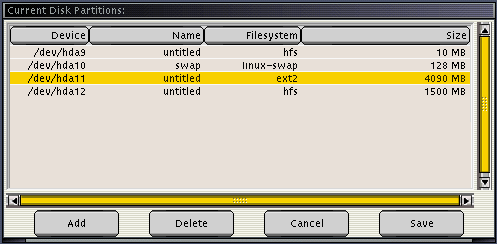
After partitioning your hard drive, which differs slightly depending on the age of your Mac, the next step is to install the Mac OS – unless, that is, you don’t actually intend to use the Mac OS anymore. Then reboot, insert the first YDL CD, holding down the ‘C’ key to boot from the CD-ROM drive, and you’re away.
A custom graphical installer program will ask if you wish to perform a default or customised installation. The recommended choice is default, which on the test machine ran like a dream. Just to make things awkward, I decided to go back and perform a customised installation, which also worked perfectly.
Here are the details.
The first major step is to select which partitions you intend to use for Linux and for swap, marking the mount points as required. Next comes package selection, which can be done by group or individual package, network setup, security, account creation, and X11 setup.
In other words, if you’ve installed Linux on any sort of machine before, you shouldn’t encounter an major problems. If you haven’t installed Linux before, then the default installation is completely hassle free.
Booting on a recent (post-1997, so-called New World) Mac is done with yaboot, a text based bootloader similar in use to LILO on Intel systems. Old World Macs instead use the BootX system, which interrupts the Mac OS booting process to offer a graphical choice of operating system.
It’s important to note that only New World machines can be used if you intend to ditch the Mac OS completely, as BootX requires the Mac OS to be present on the hard drive. However, it is possible to install a tiny Mac OS with no real features if you only intend to use it as a springboard for Linux. Both yaboot and BootX can handle Mac OS 9 and the new Unix-based Mac OS X, as well as Linux.
Applications
YDL 2.2 comes with a tonne (yes, a metric tonne) of applications. All of the Linux stalwarts are here, including OpenOffice, KOffice, and Gnumeric, which should be enough to keep productivity software users happy.
Media tools are also well catered for with the inclusion of not only the famous GNU Image Manipulation Program (see previous PPC Linux article) and also the XMMS movie player.
YDL comes with a wide range of networking and internetworking tools, and it is extremely easy to connect to Mac OS, Windows NT, Novell, and Unix networks. Now that Mac OS X uses standard TCP/IP networking, connecting to an OS X Mac is a doddle.
For Internet use, you get Mozilla, GAIM for AOL Instant Messaging, the LICQ ICQ client, and the rather good XChat IRC client. Of course, all of the standard Unix/Linux server tools are also included, notably the Apache Web server.
Developers will be pleased to discover that, despite the lack of a source CD, YDL comes with tools that can have you developing out of the box in Java, C/C++, PHP, Perl, Python, and Fortran, to name but a few. Standard Unix applications such as the gurus’ choice of text editors, VI and Emacs, are included.
One great reason to use any version of Linux is a piece of software called Broadcast 2000. Despite being free, Broadcast 2000 is no iMovie. It’s a fully featured professional application which competes in terms of features, and difficulty, with Adobe Premiere and Apple Final Cut Pro on other platforms. If you want to get the most out of this particular piece of software, you’ll need to invest a fair amount of time. Though the project seems to have ended, with a bit of searching it can still be found for download on the net.
Mac On Linux
Mac On Linux is a Mac OS runtime environment that allows you to run classic Mac OS applications within a window in X. Unlike previous versions, which needed to be manually configured, the version of MOL that ships with Yellow Dog 2.2 automatically finds a Mac OS ROM file from your system.
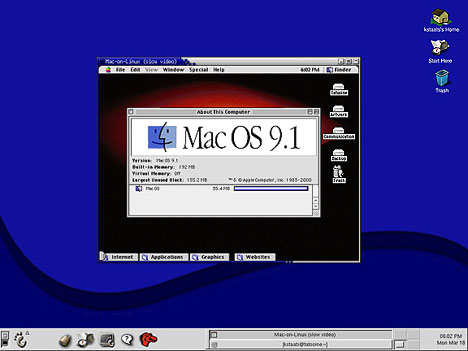
The only real “hands-on” work that MOL now requires is configuration of the video settings. From within KDE or Gnome simply launch a terminal and enter
molvconfig
Now select the appropriate monitor settings. Choose the appropriate monitor resolution and refresh rate for your screen. If you see red, press the y key to accept. The process is then repeated for the other two additive primary colours, blue and green. If, however, you’ve selected the wrong resolution and refresh rate, you will be faced with a black screen. Press the n key to return to the command line and select another resolution.
The next step is optional. Enter
pico /etc/molrc
to choose your preferred allocation of RAM for the Mac OS, whether or not your drives are read/write, and whether or not you prefer for MOL to launch within window or in full screen mode.
To boot MOl, enter
startmol
at any time.
Conclusions
Linux distributors have always had a difficult business. There is more than enough competition, and expanding the user base is difficult in itself.
PowerPC Linux vendors have faced an even more difficult problem. Many PC users have switched from Windows due to dissatisfaction with either Windows itself or of Microsoft in general. However, Apple users are typically a lot more loyal.
Linux was sold to Mac users as a way of harnessing the power of Unix on their favourite hardware. However, with the development of Apple’s own rather good Unix, Mac OS X, there is less of an incentive.
To combat this, Terra Soft Solutions have a two pronged strategy. Firstly, Linux has a lot more applications than Mac OS X. This is bound to be of interest to anyone who’s become frustrated waiting for applications to be ported to the new Apple operating system.
Secondly, Mac OS X, is, to use the vernacular, a resource pig. Certainly it looks good, but all of that transparency and other niceties of the user interface cost resources. Despite the X Window System being one of my least favourite computing developments, I have to say that Apple’s Aqua GUI is slower than a combination of X and GNOME or KDE. It’s all about trade offs – what is more important to you as an individual user, aesthetics or speed.
Closely related to this, Terra Soft have discovered a potentially huge extra market. In order to keep up with spiraling resource uses, Mac OS X requires a G3 processor and prefers a G4. There are literally millions of Macs that use older PowerPC chips like the 603e and 604e. The only way to use Mac OS X on these machines is to use an unofficial cheat, and when you do use it, it’s mind crunchingly slow. Running Mac OS X on a 604e based Mac feels like someone has poured molasses on your hard drive.
Linux, perhaps the most customisable desktop OS, is a much lighter load and will keep your Mac speeding along for years to come.
I can say without a doubt that Yellow Dog Linux is my preferred choice on the PowerPC. In fact, it’s my preferred Linux distribution, end of story.
However, this is a subjective choice, and I know from personal experience that the German Linux behemoth, SuSE, is also an excellent offering on the PowerPC. So, as they say, you pays your money, and you takes your choice. If you are thinking about Yellow Dog Linux, it’s reliable, fast, and works on a wide range of Apple hardware.
If you’re interested in running Linux or BSD on PowerPC Macs, consider joining our Linux on PowerPC Macs group on Facebook.
Keywords: #ppclinux #yellowdoglinux #ydl
Short link: http://goo.gl/y8NjJW
searchword: yellowdoglinux
