
The Mac LC has 2 MB of RAM soldered to the motherboard and two SIMM sockets for upgrading memory to as much as 10 MB.
 With the rear of the computer away from you, you will see two SIMM sockets on the right side of the motherboard. These can be filled with matched pairs of 1 MB, 2 MB, or 4 MB SIMMs. SIMMs must be 100ns or faster and of the 30-pin variety.
You can also upgrade video memory (VRAM) from 256 KB to 512 KB.
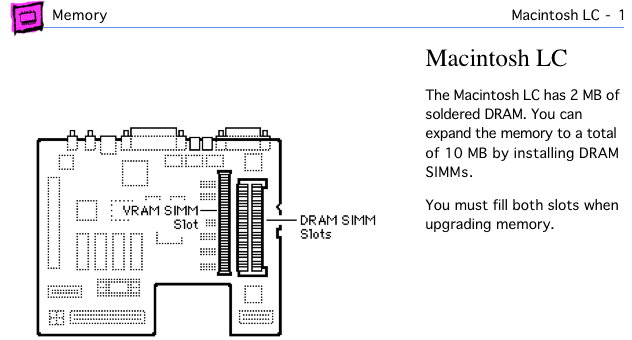
Mac LC page from Apple Memory Guide.
- To add 2 MB, insert 1 MB SIMMs in each socket for a total of 4 MB.
- To add 4 MB, install 2 MB SIMMs in the SIMM sockets for a total of 6 MB.
- To add 8 MB, put 4 MB SIMMs in the memory slots for a total of 10 MB, the most the Mac LC can access.
VRAM, Where More Memory Means Less Speed
The LC ships with 256 KB VRAM, which supports 8-bit/256-color video at 512 x 384 pixels (Apple’s 12″ color display), 4-bit/16-color video at 640 x 480 pixels.
You can upgrade this to 512 KB by replacing the old SIMM with a 512 KB VRAM SIMM, 100ns or faster. This will support 16-bit/65,000 color video at 512 x 384 pixels and 8-bit/256-color video at 640 x 480 pixels.
Recommendation
- If you have less than 10 MB installed, upgrade to 10 MB.
Keywords: #maclc #macintoshlc
Short link: http://goo.gl/h97pio
searchword: maclcmemoryupgrade
