Memory Upgrades

Mac II and Mac IIx

Low End Mac Reader Specials

Memory To Go Special: MacPro 8 Core Memory 4GB kit $192 / 2GB kit $109. MacBook Pro / MacMini / iMac Intel Core2 DUO 2GB $44 1GB $23--Free shipping available.

Download Typestyler, still the Ultimate Styling Tool for Internet, Print and Video Graphics. Works great in Classic with a Native OS X Version on the way. Free Tryout: www.typestyler.com

LA Computer Company: LA Computer Company: Specials on AppleCare, Apple Displays, MacBooks, iMac's, MacBook Pros, Laptop and iPod accessories and more. Apple A/C Adapters for laptops starting at $25.00 Call 1-800-941-7654 or Click Here.

Other World Computing: Go Longer Between Charges with a NewerTech NuPower Batteries! Not just another battery, NuPower available for PowerBook and iBook models, is built in the USA to offer the longest Run Time + the longest useful LifeTime too! In Stock at OWC from $99.95

Mac users can finally play Party Poker for Mac. Not only that, they can also learn how to play PokerStars for Mac.

Laptop Hardware Provided by TechRestore - Overnight Mac & iPod Repairs.

Compare products like desktop computers, laptops, and LCD TVs side by side! All the information and reviews to make the best purchasing decision for a new cell phone GPS products or MP3 players. The Ciao network makes searching products easy for you.

MacPro Memory 667Mhz With Apple Spec Heat Sink 2GB Kit $ 90 / 4GB Kit $140 / 8GB Kit $278 Click to Maximize your Macs...

The Mac II was Apple's first modular Macintosh. Using a 68020 CPU instead of the older 68000, it could address far more memory using a 32-bit addressing mode. Although it took System 7 to provide the 32-bit option and Mode32 to let the II run in 32-bit mode, this allowed users to have more than 8 MB in their systems. However, there were other limitations: without a PMMU or 68030 upgrade, the Mac II couldn't use 4 MB SIMMs, and without the SuperDrive upgrade, high density SIMMs couldn't be used in Bank A.

The IIx is essentially a Mac II motherboard revised to use a 68030 CPU. As a newer design, the IIx did not require any special upgrades before high density RAM could be installed.

The greatest drawback in upgrading RAM in the II and IIx is the location of the SIMM sockets. You need to remove the entire drive support assembly (holds floppy and hard drives) to access the memory sockets.

When upgrading, be careful not to damage the SIMM sockets, especially if you are removing memory. Although both machines shipped with 1 MB of memory, odds are pretty good they've already been upgraded beyond that point.

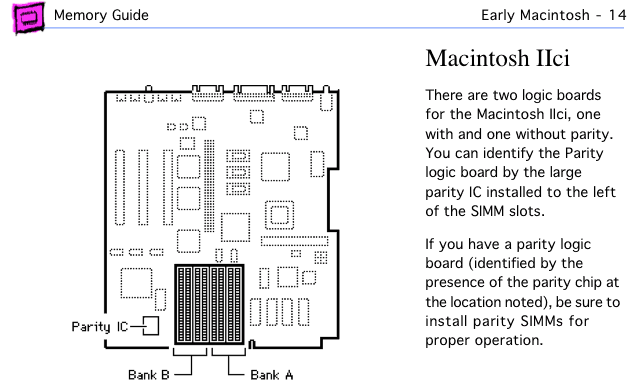
Looking at the motherboard with the connectors to the rear and power supply to the right, you will see eight SIMM sockets. The four nearest the right side of the board are Bank A. The other four are Bank B. Memory must be installed in sets of four 30-pin SIMMs rated at 120ns or faster.

A 1 MB configuration has four 256 KB SIMMs in Bank A; a 2 MB configuration has 256 KB SIMMs in all eight sockets.

A 4 MB setup has four 1 MB SIMMs in Bank A; Bank B is empty. For 5 MB, Bank A has 1 MB SIMMs and Bank B had 256 KB SIMMs.

The 8 MB configuration, which seems quite common, has 1 MB SIMMs in all 8 sockets. This is the most memory a Mac II can work with unless you have a PMMU or a 68030 accelerator.

Any configuration beyond 8 MB requires some version of System 7 and Mode32. You muse select 32-bit addressing in the memory control panel to address more than 8 MB of RAM. Finally, 4 MB and 16 MB SIMMs must be PAL SIMMs; conventional 30-pin SIMMs will not work in these computers.

Remember, a Mac II must have either a PMMU or 68030 accelerator and the SuperDrive upgrade before you can use 4 MB or 16 MB SIMMs in Bank A.

Special instructions for a Mac II with PMMU or 68030 but no SuperDrive. You can use 4 MB SIMMs in Bank B, leaving 256 KB or 1 MB SIMMs in Bank A. This provides either 17 MB or 20 MB total RAM. This is the most you can use without the SuperDrive upgrade.

For 16 MB, 17 MB, or 20 MB, you must place four 4 MB SIMMs in Bank A. Leave Bank B empty for 16 MB, populate it with 256 KB SIMMs for 17 MB, or with 1 MB SIMMs for 20 MB.

To reach 32 MB, insert a 4 MB SIMM in each SIMM socket.

Although the Mac II and IIx support 16 MB SIMMs, Apple's memory guide gives no details on installing them. I suggest you install the first bank of 16 MB SIMMs in Bank A, since that follows the pattern established with other configurations. Bank B can then hold 256 KB, 1 MB, 4 MB, or 16 MB SIMMs. The Apple memory guide states either model will support a total 128 MB.

After installing memory and reconnecting your drives, boot your Mac with extensions off (hold down the shift key) and check "About This Macintosh" under the Apple menu. If it doesn't give the expected number, you should reseat your memory.

Once you know the upgrade is a success, bolt everything back in place, attach the cover, and enjoy the extra memory. I suggest you increase the size of the disk cache for better performance.


<go to Macintosh Memory Guide, Mac II, or IIx page>

Entire Low End Mac website copyright ©1997-2008 by Cobweb Publishing, Inc., unless otherwise noted. All rights reserved. Advice presented in good faith, but what works for one may not work for all. Please report errors to .
  LINKS: We allow and encourage links to any public page as long as the linked page does not appear within a frame that prevents bookmarking it.
  Access our RSS news feed at http://lowendmac.com/feed.xml.
  Email may be published at our discretion; email addresses will not be published without permission, and we will encrypt them in hopes of avoiding spammers. If you prefer your message not be published, mark it "not for publication." Letters may be edited for length, context, and to match house style.
  PRIVACY: We don't collect personal information unless you explicitly provide it. For more details, see our Terms of Use.
  Low End Mac is an independent publication and has not been authorized, sponsored, or otherwise approved by Apple Inc. Apple, the Apple logo, Macintosh, iBook, iMac, eMac, iPod, PowerBook, MacBook, Mac Pro, Apple TV, and AirPort are registered trademarks of Apple Inc. Additional company and product names may be trademarks or registered trademarks and are hereby acknowledged.

Channels
 Power Macs
 iMac Channel
 iBook/PowerBook
 MacInSchool
Computer Profiles
 iMac
 Power Mac
 PowerBook/iBook
 Performas
 Mac Clones
 Older Macs
 LisaNeXT
Editorial Archive
Mac Daniel's Advice
Email Lists
LEMchat (uses AIM)
Online Tech Journal
Consumer
 advice, reviews
 guides, deals
Software
Apple History
Best of the Web
 Best of the Mac Web surveys
Miscellaneous Links
 Best Used Mac Buys
 Used Mac Dealers
 Video Cards
 Mac OS X
 Mac Linux
 Macspeak
 RAM Upgrades
About Low End Mac
Site Contacts

Open Link

Support LEM

Affiliates

The Apple Store
.mac
iTunes Store
Club Mac
MacMall
MacResQ
ExperCom
eBay
Amazon.com
PayPal
PCMall
PC Zone
Crucial Memory

Our advertising is handled by BackBeat Media. For detailed price quotes and advertising information, please contactat BackBeat Media (646-546-5194). This number is for advertising only.