
The Mac SE/30 shipped from the factory with 1 MB installed. It can be upgraded to 2, 4, 5, 8, 16, 17, 20, and 32 MB* configurations using 120ns or faster 1 MB or 4 MB 30-pin SIMMs – and as high as 128 MB using 16 MB SIMMs.
 Apple warns against using composite SIMMs; you should specify noncomposite SIMMs when buying memory for your Macintosh. SIMMs must be installed in sets of 4 matching modules per bank and may replace the 256 KB SIMMs already on the motherboard.
You will need a long (at least 6″/15cm) T-15 Torx screwdriver (such as the Craftsman Professional series T-15 Torx screwdriver, #47431) to remove the screws from the back of the case. Two are near the bottom, two more way down inside the handle. A case cracker is recommended for separating the front and rear of the case, but you can do it without one. Just be careful.
Before upgrading beyond 8 MB, be sure you have Mode32 on your hard drive. Without it, you will not be able to use 32-bit addressing or System 7.5 (or later). You should enable 32-bit addressing before boosting your SE/30 beyond 8 MB.
- Under no circumstances come into contact with the pins on the back of the video tube. It packs a real punch. Be very careful.
Carefully remove the power, drive, and other cables from the motherboard, then slide it out of its mount.
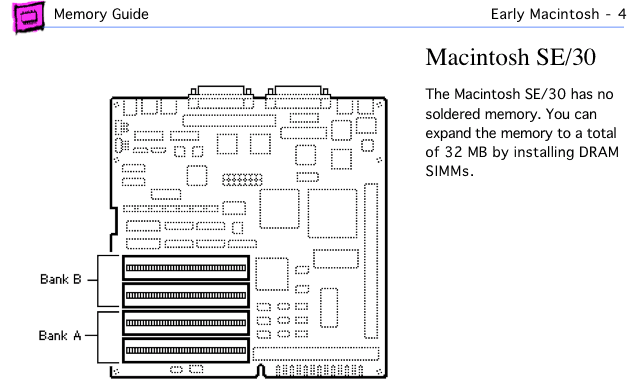
Mac SE/30 page from Apple Memory Guide.
The SE/30 motherboard has 8 SIMM sockets, two banks of 4. With the rear of the motherboard away from you, the front set of 4 sockets is Bank A. The rear set is Bank B.
In a 1 MB configuration, there are four 256 KB SIMMs in Bank A and no SIMMs in Bank B. A 2 MB SE/30 has 256 KB SIMMs in all 8 sockets. In any configuration using only a single bank, memory must be in Bank A.
When upgrading, be careful not to damage the SIMM sockets, especially while removing memory.
For a 4 MB configuration, remove all 256 KB SIMMs and install four 1 MB SIMMs in Bank A.
For a 5 MB setup, remove the 256 KB SIMMs from Bank A and replace them with 1 MB SIMMs. If Bank B is empty, place the 256 KB SIMMs there.
An 8 MB configuration has 1 MB SIMMs in all 8 SIMM sockets. A 16 MB SE/30 has four 4 MB SIMMs in Bank A, and no memory in Bank B.
The 17 MB configuration is unusual, in that Apple wants you to install the 256 KB SIMMs in Bank A and 4 MB SIMMs in Bank B, because the SE/30 uses the first 1 MB of RAM for video memory, so this will have less impact on overall performance. In all other instances, the larger SIMMs are installed in Bank A.
To reach 20 MB, you must have 4 MB SIMMs in Bank A, 1 MB SIMMs in Bank B. The 32 MB SE/30 has 4 MB SIMMs in all eight sockets.
- Beyond that, you’re on your own – Apple has not provided instructions for more RAM. The easy thing would be to use four 16 MB SIMMs in Bank A for 64 MB or eight 16 MB SIMMs for 128 MB. This eliminates the question of whether the lower capacity SIMMs should go in Bank A or Bank B.
Now reseat the motherboard in its mount, reconnect all cables, and test it. (Careful of exposed wires, but nothing worse than getting the whole thing back together and discovering you have a bad SIMM or have not seated the memory correctly.) Boot your SE/30 with extensions off (hold down the shift key) and check “About This Macintosh” under the Apple menu. If it doesn’t give the expected number, you’ll need to reseat your memory.
- If you haven’t installed Mode32 and enabled 32-bit addressing, any memory beyond 8 MB will be reported as allocated to the system. You must have 32-bit addressing enabled to use more than 8 MB RAM.
Once you know the upgrade is a success, put the back on your SE/30, tighten the screws, and enjoy the extra memory. Some suggestions:
- If you have a hard drive, increase the size of the disk cache.
- If you are floppy based, create an 800KB or 1.4 MB RAM disk – it’s much faster than floppy disks or hard drives.
- If you are using System 6 and haven’t used MultiFinder, learn to.
- If you haven’t used System 7, get a copy and see how much you like it. (I have links to System 6.0.8 and 7.0.1.)
- * The SE/30 can support up to 128 MB of RAM, although Apple does not officially support more than 32 MB. This is because 16 MB SIMMs were not available when the SE/30 was introduced.
Keywords: #macse30 #macintoshse30
Short link: http://goo.gl/dEAwzR
searchword: se30memoryupgrade, macse30memoryupgrade
