
A long, long time ago – back in the days when Outpost.com had an affiliate program – I got my first laser printer. The HP LaserJet 2100TN was fast for its day (10 pages per minute), solidly built, and sharp (1200 dpi output). I used it for about 8 years, and it probably would have lasted 20 if I had been the only user.
But it wore out from excessive use. My first wife used it for her business, which meant printing lots and lots of lengthy reports. All originals. No photocopies, because her business didn’t have a copier. Tens of thousands of pages per year.
At the end, I had to manually feed paper a sheet at a time, and there was always excess toner showing up on the printed page. It was time to look for a replacement.
Wow, That’s Cheap!
The 2100TN was a networked laser printer with Postscript, and it sold for about US$1,000 when I obtained it. I knew that I wanted the new printer to work with both OS X and the classic Mac OS, have an ethernet port for network printing, and output at 1200 dpi.
I already had a color laser printer, the Konica-Minolta Magicolor 2430DJ, and while it is a decent color printer, black -and-white output is dark and not crisp. (If you’re looking for a good, low cost, networkable color laser, it’s a good option. Mine cost just US$350 after coupons and mail-in rebates. But color toner isn’t cheap, and I’d rather do as much printing with the lower operating costs of a black & white laser printer.)
Update: Later versions of OS X had much better print drivers for the Magicolor 2430DJ, but over time the fuser/feed roller mechanism went bad and was too expensive to bother with a replacement.
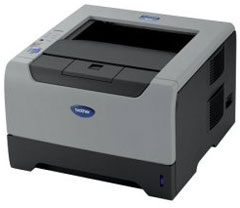 I asked to advice on our Mac OS 9 List, and the Brother HL-5250DN was recommended as a good US$250 or so printer. I checked out the online reviews, saw that it was well respected, and then used Froogle to search out the best deal. I ended up getting it from Amazon.com for under US$200 before shipping. (Alas, it didn’t qualify for free shipping.)
An Excellent Choice
For about one-quarter the cost of the LaserJet 2100TN (when I acquired it), I have a 30 page-per-minute laser printer with 1200 dpi resolution that can print on both sides of the page. It’s on my network and can be used with USB. It’s smaller and lighter than the HP. And the only thing it lacks is Postscript, which I really don’t need.
Output is excellent, on a par with the HP before it started to wear out. Toner is affordable – US$70 for a cartridge rated at 7,000 pages. And it may be years before I even need a new cartridge. (I don’t print a whole lot.)
The HP-5250DN is quick and quiet. As with most laser printers, it takes a little while for the first page to print, but once it starts printing, it’s fast.
I can’t speak to long-term reliability, but at under US$250, I could replace this every three years and be happy.
Why Not an Inkjet?
If I don’t print a lot, why did I choose a laser printer instead of a much less costly inkjet printer?
Two reasons: cost per page and because I don’t print a whole lot.
Laser toner is about 1¢ per page. Inkjet ink, even if you do refills, is a lot more costly than that. And ink cartridges dry out if you don’t use them regularly.
Like I said, I don’t print a whole lot. I’ve sometimes gone weeks between print jobs, and when I used inkjet printers (I’ve owned at least four over the years), the ink would invariably be clogged, and I’d waste time, ink, and paper cleaning the print head.
Finally, 1200 dpi laser output just puts the best inkjet output to shame. It’s worth a bit more to have a printer that outputs better quality, costs less per page to operate, and is pretty quiet compared with most inkjet printers.
Buying Advice
There are a lot of low-end laser printers on the market. I think they’re a much better choice than inkjet printers unless you only print a bit and do it regularly. Under heavy use, laser will save you money.
Compare output. Way back when, 300 dpi was state of the art (am I dating myself?), and the original LaserJet and LaserWriter just wowed people. Then came 600 dpi, and it was just shy of typeset quality. At 1200 dpi, it’s hard to tell laser output from typeset output.
Look at your needs. If you don’t need ethernet or Postscript or duplex printing or multiple paper trays, you may be happy with a less costly Brother (or Samsung or HP, etc.) printer.
For my needs – ethernet, classic Mac OS and OS X support, and 1200 dpi output – the Brother HL-5250DN fits perfectly. If you’re looking for a new printer, I can recommend that you check out Brother’s offerings.
Update: It’s December 2014, and the printer has long since been discontinued – and continues to perform well day in and day out. At my full time job, they have a lot of these printers as well, and outside of the dusty warehouse environment, they are doing a great job year after year. As I said when I wrote this review, a great value – and current Brother printers are probably an even better deal.
Manufacturers and distributors: Interested in having your product reviewed? Please read our review policy.
Keywords: #laserprinter
Short link: http://goo.gl/oQXRes
searchword: brotherprinter
