
Yesterday I received my eagerly-awaited Presto Plus from Sonnet; I promptly canceled my other plans for the evening and started playing with it in my Color Classic. To make a long story short: “Oh BABY!”
 It’s a winner in my book, well worth the wait (it was announced in July 1998 for May 1999 delivery, but the first production run is just now shipping).
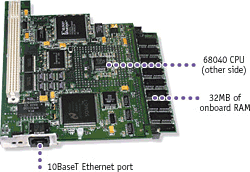
The Presto Plus is an upgrade for a variety of 68020 and 68030 machines with LC Processor Direct Slots (PDS) on their motherboards; it adds a 66/33 MHz 68040 with or without a floating-point unit (I bought the version with one), 32 MB of memory, and 10Base-T Ethernet.
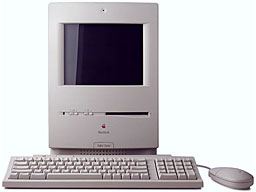 For machines like my Color Classic that have a built-in restriction on the amount of memory the computer can use (10 MB, in my case – even if you install 12 MB and have 32-bit addressing turned on), the extra memory and the hacks Sonnet came up with that enable the machine to use it are especially welcome.
I had understood that the 32 MB SIMM would be soldered to the expansion card, but to my relatively unsophisticated eye it looks like it is in a perfectly normal slot and could be swapped for a bigger one. One complaint about Sonnet’s discontinued Presto accelerator card was that it wouldn’t work with extra VRAM in a Color Classic, so if you had upgraded from 256 KB to 512 KB (no Rage 128 Pro here!) to get 16-bit color on the 512 x 384 screen, it would cut you back to 8 bits; however, this problem is fixed with the new card, and it also has no trouble with my enhanced-resolution 640 x 480 screen (hacked by MicroMac), though of course the extra VRAM gives me only 8-bit color (instead of 4-bit) at this higher resolution.
Installation was a breeze, helped by the fact that the Color Classic’s motherboard slides right out the back door. The card comes with two floppy disks of software (and a cool little front-panel little front-panel sticker!); the first disk installs two enablers and one extension in your System Folder and then puts a hardware-identification application called Metronome into your Apple Menu Items folder. Then you just shut down, plug the card in, reboot, and you’re off and running!
The only complaint I had was that the standoff on the card is a little too tall and pushes the ethernet port out of alignment with the rear-panel opening, but not enough that I couldn’t get an RJ-45 connector in there with a little force (though its latch is squeezed enough that it won’t lock in place). If I hadn’t stopped to take a few photos (which I’ll post on my website tonight or tomorrow) and screenshots, the process wouldn’t have taken more than five or ten minutes!
What did take a few hours was installing Mac OS 8.1, though I did end up finishing the job about 2 A.M. The second disk that comes with the card is a special boot disk that fools the Mac OS 8.1 installer into accepting your machine as a target. You have to buy OS 8.1 separately (I got mine from MacResQ), and you have to be able to read the CD-ROM, so Sonnet alerts you to put your driver on the boot floppy if you have a third-party drive that doesn’t work with the supplied Apple CD-ROM extension. The disk has 53 KB of free space; you can get another 30 KB by deleting the Apple CD-ROM driver and 14 KB by removing the ReadMe file (read it first!), and fortunately the Adaptec Toast driver for my APS 4x4x16 CD-RW drive was able to fit into this space. However, if you need to use a driver that’s bigger than about 97 KB, the instructions tell you to copy the contents of the floppy onto a removable drive like a Zip and boot from that (after installing your CD-ROM driver, of course!).
Next, you boot from the floppy (or your modified copy) into a small version of System 7.5.3 that runs on your original processor, not the card’s new 68040. (Oddly enough, I found that when booted this way, choosing About This Macintosh from the Apple Menu showed that my full 12 MB of RAM was being recognized instead of what I thought was the stock motherboard’s hard limit of 10 MB; however, when I have the Presto Plus card running I see 32 + 10 = 42 MB rather than 32 + 12 = 44 MB. Oh well…) Then you run through a fairly ordinary Clean Install of Mac OS 8.1, but at a 68020/68030 pace; on my “Road Apple” Color Classic, this took two or three hours! You then drag the above-mentioned enablers and extension into the new System Folder, and then you’re ready to boot Mac OS 8.1. When I first did so, Virtual Memory (VM) was activated; shutting this down and rebooting sped things up quite a bit – and after all, I now have 42 MB of RAM, so who needs VM?
Actually, before being able to boot Mac OS 8.1, I encountered another quirk, which may have nothing at all to do with the Presto Plus. I have a 700 MB hard drive in my Color Classic, with 500 MB for System 7.5.5 and a separate 200 MB partition into which I installed Mac OS 8.1; however, while both partitions showed up in the Startup Disk control panel and I could select either, the machine would always boot up from the System 7.5.5 partition. Eventually I “de-blessed” the System Folder in that partition (by dragging the System file from its folder into my Documents folder) so that the only bootable partition was the one with Mac OS 8.1, and that worked fine. (I was able to “de-bless” the System Folder while booted from it, but I didn’t much like the idea; I re-booted to the other partition immediately after doing so, rather than risk screwing something up by continuing to run on it, and then “re-blessed” it once I had booted into Mac OS 8.1.) This may have something to do with the limitations of the Color Classic’s boot ROM, or it may have to do with the fact that my disk is formatted with a non-Apple utility (FWB Hard Disk Toolkit PE); I have no way of knowing without swapping and reformatting drives, so I’m certainly not laying any blame at Sonnet’s feet!
Sonnet advertises the Presto Plus as being six-and-a-half times as fast as a stock Mac LC, tested with MacBench 2.0 (the graph on their webpage for the Presto Plus is an early estimate, but the PDF product info sheet and the package itself show the 650% figure). I don’t have MacBench 2.0 (or an LC!), but here are the results of some runs with Speedometer 4 (a Quadra 605 is 1.00 in all tests). The first two columns are on a freshly-defragmented hard drive, and System 7.5.5 with basic extension set; the third column is for MacOS 8.1, newly installed with VM off, and the base extension set (the second and third columns, of course, also include the Presto extension).
| Speedometer 4.0 |
Stock 68030 | Presto Plus | Presto Plus, Mac OS 8.1 |
| CPU | 0.246 | 1.166 (4.7x) | 1.126 (4.6x) |
| Graphics | 0.227 | 0.555 (2.4x) | 0.522 (2.3x) |
| Disk | 0.889 | 1.194 (1.3x) | 1.413 (1.6x) |
| Math | 0.806 | 19.735 (24.5x) | 19.699 (24.4x) |
| Benchmark Mix | 0.205 | 1.699 (8.3x) | 1.647 (8.0x) |
As you can see, my little old Color Classic has grown wings! I can’t wait to try out WarCraft and SimCity Classic this weekend. Since I finished the Mac OS 8.1 installation at about 2 A.M., I didn’t take a lot of time to test real-world applications, but just watching the Finder windows open and close I saw a substantial speedup! I also tested the Ethernet portion of the card by using a crossover cable to my LC II?
No, the all-in-one compact Mac is the proper, the canonical, the Platonic-ideal Macintosh; the later all-in-ones and the iMac just don’t have the same feel. People have said, “The iMac is cool, but not as cute as the old compact Macs.” More than that, though, the tiny form factor built around that little 9-10″ screen just somehow feels complete in a way that no larger machine -even an iMac – ever could.
Well, I’m a rocket scientist, not a poet; I’ll leave it to others to explain why, but the Color Classic, being the only compact Mac with a color monitor that most of us will ever see (just try to find a Color Classic II!), is the culmination of a lineage worthy of the affection many of us have for them. Being able to ditch its “Road Apple” characteristics (slow speed, limited RAM), and letting it talk to my other Macs via Ethernet rather than Sneakernet, is going to give me much more satisfaction than anything else computer-related that I would be able to do for that amount of money. Now that I think of it, the folks at a company named Sonnet are probably pretty well equipped to understand the poetry of a reborn Color Classic!
As I mentioned, I will post some photos and screenshots on my website in a day or two when I get the chance.
Manufacturers and distributors: Interested in having your product reviewed? Please read our review policy.
Keywords: #lcpdscpuupgrade
Short link: http://goo.gl/hPEVZH
Searchword: sonnetprestoplus
