
Let’s face it: High voltages are scary. When someone says “kilovolts”, you usually hear “killovolts”, right? And if you fire off a quick search on the Web, you find dire warnings everywhere that reinforce your natural fears. The warnings are so numerous and frightening, in fact, that it’s easy to believe that a CRT can vaporize humans and entire herds of cattle with a single discharge.
If you try to delve deeper into the subject, though, you find mainly strong opinions and assertions delivered with great passion, but precious few facts (do a Google search and see for yourself the ratio of emotion to knowledge).
It turns out that most of these warnings are delivered by people with little or no expertise in electronics. Would you accept advice from a gardener about brain surgery, or might you do a little more research?
It’s important to counter the misconceptions spread by well-meaning (but essentially ignorant) people about the potential of a CRT discharge to do lethal harm. If you don’t want to read the whole thing, here’s an executive summary:
Fear of death by a CRT’s discharge is irrational and misdirects people’s attention away from a potentially much more dangerous (and exposed) part of a CRT-based Mac’s circuitry. It unnecessarily terrifies people who’d otherwise fix their broken Macs, consigning perfectly fine computers to an ignominious end as toxic waste in a landfill.
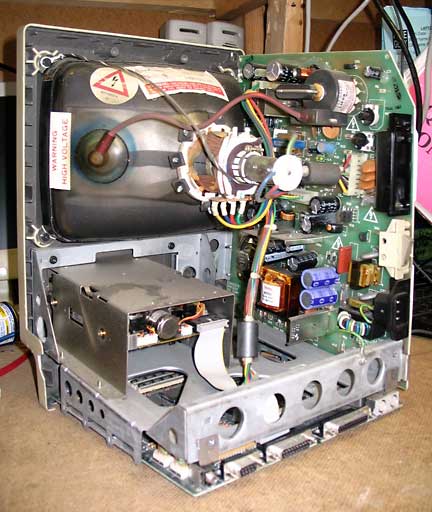
So here’s what we’re going to do: First, we’ll estimate the total energy stored in a CRT. Then we’ll try to get calibrated on what that means, and then we’ll evaluate what the risks might be. Throughout this article, we are assuming that the unit is not only turned off, but that the power cord is unplugged from the wall. Working on a unit that’s plugged in is most certainly extremely dangerous, with a real danger of lethal harm, even if the power switch is in the off position.
To estimate the stored energy, we need to know both the voltage and capacitance. As a crude rule of thumb, you can assume that a typical CRT high voltage supply will provide roughly 1kV (kilovolt) per inch of diagonal measure. So for a compact Mac’s 9″ CRT, we expect about 10kV (let’s keep the numbers round; what we’re doing doesn’t justify more precision than that).
The capacitor in a CRT’s high voltage (HV) system is actually part of the CRT itself. There is a conductive coating on the inside and outside that forms the plates of a parallel plate capacitor. The glass is nice and thick in the first place (remember, atmospheric pressure is almost 15 pounds per square inch, so the glass of a CRT has a couple of thousand pounds bearing down on it). Since the glass is thick, it has a high breakdown voltage, just perfect for building a high-voltage capacitor.
To estimate its value, you can use any number of methods (estimating it is much more fun than just looking it up or measuring it). An easy one is to pretend that the CRT is a half-sphere (even if it isn’t, exactly). If we guess that the glass is 5mm thick and has a relative dielectric constant of 4, you can estimate the capacitance as several hundred picofarads. Again, to keep the numbers easy (and conservative), we’ll round upward to 1000pF (or one nanofarad). That way, even if the glass is really 3mm thick, or the dielectric constant is actually 5, we’re still overestimating the capacitance.
The equation for the energy stored in a capacitor is 0.5 x C x V^2. This equation spits out energy in joules with capacitance in farads and voltage in volts. If we plug in 10kV and 1nF while paying attention to the correct powers of ten, we get an energy of 0.05J (50 millijoules).
What’s a Joule?
Okay, we’ve got an estimate of the total peak energy (and it’s an overestimate at that, for a compact CRT). But what’s a joule? And could 0.05 of them harm the family jewels?
On the way to the answer, it might be helpful to know that a single food calorie (which is actually 1,000 “scientific” calories) is equivalent to 4,200 joules. That’s four thousand, two hundred joules. A single food calorie doesn’t usually inspire terror (even if you’re on a diet), and that’s 4,200 joules.
We’re talking about 0.05 joules from a CRT. That’s 1/84,000 of a calorie. Twelve millionths of a calorie – does that sound dangerous?
Now, a rhetorical question is not proof (but the calculation is pretty revealing), so let’s look at another calibration point: The “stun gun”. Designs vary, but a typical stun gun generates perhaps 50kV and delivers about 0.5J per pulse. And it typically delivers 10-20 such pulses each second.
Look at those numbers carefully. The voltages are perhaps 5 times higher, the energy per pulse 10 times higher, than the corresponding CRT discharge numbers. And many pulses are typically delivered from a stun gun. The total energy delivered is hundreds of times greater than what a CRT discharge provides.
The reason a stun gun is non-lethal is that it delivers its high voltage as high-frequency AC (each of those 10-20 stun pulses per second is actually many cycles of a high-frequency AC waveform), rather than as DC. There’s a very well-known phenomenon called the “skin effect”, which describes the fact that the current flowing in a conductor tends to concentrate on the surface at high frequencies.
If the frequency is high enough, the interior carries very little. So if energy is delivered to your body at a sufficiently high frequency, it doesn’t penetrate to your heart. And that’s the key. You might have heard the old saying, “it’s not the volts that kill, it’s the amps.” Well, more precisely, it’s the current that flows through your heart that matters (and its frequency and waveshape). If the discharge is fast, hardly anything flows there. So there are two reasons not to fear CRT discharge: The energy itself is embarrassingly puny to begin with, and the discharge occurs so fast that little of that minuscule energy makes it to the heart.
You might counter with news reports of some deaths after stun guns are used, but these deaths are associated with compounding factors, such as drug use, ill health, and physical restraints that inhibit breathing. And again, we’re talking about stun guns whose energies are hundreds of times greater than that delivered by a CRT. Unless you work on your CRT-based Mac on serious drugs while heavy law enforcement officials sit on your chest, you don’t have to worry.
Even Less Danger
The danger is typically even less, because if the Mac/monitor is working well enough to have any kind of a light on the screen, the current drawn from the HV supply helps to discharge the CRT capacitance quite rapidly as soon as you pull the plug. And discharging to just half of the peak voltage cuts the energy down by a factor of four.
In the end, it boils down to this: Getting shocked by a CRT is certainly unpleasant, but as long as you’re in good enough health that you don’t go into cardiac arrest when someone surprises you with a “boo!”, you’re not going to have a problem with a CRT discharge. There’s no need to be terrified of the CRT. You won’t be vaporized.
What About CRT Implosion?
In a second level of fearmongering, it’s also been argued that even if the shock itself doesn’t kill or maim you, you might accidentally bang the CRT hard enough to break it, causing a catastrophic implosion.
No pun intended, but that’s another overblown fear. The glass is very thick, and very, very hard to break. I’ve done it, and it took a huge amount of work (I threw large rocks at a CRT from what I hoped was a safe distance). And the implosion/explosion that did result was a disappointment, by the way.
Show respect for a CRT, certainly, and exercise care when working around one (it actually has more to fear from you than the other way around). There’s no need to be paralyzed with fear.
So Why Are We Advised to Discharge the CRT?
Okay, if the danger is so low, why do Apple and others recommend always discharging the CRT as the first step of a troubleshooting/repair operation? Simple: If Apple didn’t give this advice and someone simply claimed injury from a shock, then they’d have a problem, regardless of the facts. Juries are made of your peers, and your peers are scared of HV. Plus, if you get zapped, maybe you’ll slice your hand on something in reaction (which has happened to me).
It’s a simple act of CYA to recommend always discharging the CRT.
However, a reasonable case could actually be made for why you should advocate not discharging a CRT routinely. If you require that everyone do so, then you’re maximizing everyone’s risk of exposure to high voltage. One slip of the ground clip, and they become the discharge path.
If HV is really so deadly, does this sound like good advice? And if implosion is such an imminent threat, then does it make sense to require everyone to scrape a tool under the anode cup, potentially scoring the glass and weakening it to the point of causing an implosion?
Even if a proper discharge itself causes no bodily harm, it sure can cause delicate components on the circuit board to fry, depending on the particular path the discharge current happens to take.
Don’t Touch It
So, here’s a perfectly rational, safe policy: If you don’t have to work on the high voltage supply, keep your cotton pickin’ mitts off of the high voltage circuitry. All the components there are incredibly well insulated by design. And again, always work with the AC power disconnected (not just switched off – pull out the cord). If you want to minimize the chance of getting an unpleasant jolt, just let the thing sit overnight. If you follow these rules, you can safely work on your Mac without fear.
If it turns out that you do need to discharge the CRT (because you’re going to replace it or the flyback transformer, say), you’ll occasionally find advice that you should do so through a resistor rather than simply ground the anode button with a piece of wire. But most of the online advice only mentions an ordinary resistor (of whatever value).
Again, ignorance of high-voltage practice is evident. High voltage will simply arc (jump) across small resistors (and for 1/4 watt resistors, arc-over can occur at just a few hundred volts), making their presence a joke. True HV resistors are physically long (inches long, for example) to prevent just this problem.
The Real Danger
Finally, one last warning: The most dangerous part of a CRT-based Mac is actually the low-voltage power supply. There are big capacitors charged to nearly 170V, and these are large enough to discharge slowly through you (and your heart). And, unlike HV, these voltages are sometimes found on exposed circuit board traces or terminals.
There are bleeder resistors in the circuit to rapidly discharge the capacitors, but resistors can fail. Touching those caps before they’ve discharged has a much higher potential for bodily harm.
But from the online advice, you’d never know it.
Prof. Thomas H. Lee is at the Center for Integrated Systems, Stanford University. This article, which we have edited slightly, was originally published on Applefritter, but it disappeared during a site update. It is published with the author’s permission.
searchword: crtdanger
