
There’s a real danger in web design – the desire to have too much control over what your site visitor sees. There are webmasters who construct their site using very complex style sheets, JavaScript, or separately coded pages for different browsers. And as each new browser ships, the designer has to figure out how to make the site work identically.
I don’t work that way on Low End Mac or any of the other sites I’m involved with. I don’t try to control the exact type size, screen width, or much else. My site exists to make information available, not to show off my design or programming skills.
Not that I couldn’t do that or haven’t made misguided attempts to take more control over site appearance. But through trial and error, I’ve discovered that the page that I make look great in Internet Explorer has real problems in Netscape, or vice versa. That’s the danger of wanting too much design control.
Typefaces
I learned early on that if you want to control what font your pages appear in, you can’t simply use a <FONT FACE=”Verdana”> command. If the visitor doesn’t have Verdana, they’ll see it in their default font, which is usually something like Times. (As a book designer, I prefer a serif typeface such as Sabon when designing for the printed page. However, on the computer screen, a sans serif font such as Verdana is superior.)
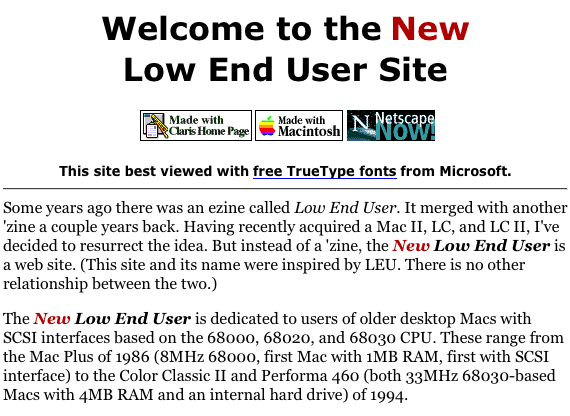
Looking at the Low End Mac home page from April 1997 (above), I see that I was already using the conventional solution: listing a set of alternate fonts. The command <FONT FACE=”Verdana,Arial,Helvetica”> means that the visitor would see my site in Verdana if it was available, then try for Arial, and then go to Helvetica if both were missing. In retrospect, I should have concluded with Sans Serif, letting the browser to use whatever sans serif typeface the user or programmer had set as the default. That’s a lesson I learned a bit later.
The great drawback of using so many typefaces is HTML bloat: each and every line that I wanted to appear with these fonts contained the instruction <FONT FACE=”Verdana,Arial,Helvetica”>. That’s about 30 bytes of extra code for each paragraph on a page.
There had to be a better way.
Cascading Style Sheets
There is a better way. It’s called Cascading Style Sheets (CSS). There’s a huge standard with lots of variables that should give the web designer a lot of control – except that different browsers handle CSS differently. You have to carefully choose what command you use and which variables you use with them or all your work will create a great IE page and a terrible Netscape one. I know; I’ve done it.
Cascading Style Sheets allow you to create a master set of type instructions for a document. You might specify that all type use “verdana, geneva, helvetica, arial, sans-serif” as available, that certain headers appear centered or in a specific color, and a whole lot more.
Font Size
By trial and error, I discovered that the safest way to specify font size so it works across platforms is to use <FONT SIZE=”xx”>, where xx is a number between -2 and +4. Attempts to specify size in points, pixels, or even the absolute sizes of 1 through 7 didn’t work consistently across different browsers.
Indentation
The worst thing I ever did, though, was trying to decrease the indentation of bullet lists from 2 picas to one. I believe my code looked great in Internet Explorer, moving everything to the left one pica (one-sixth of an inch), but on Netscape it moved the text one pica to the left of the regular text column. It was not pretty.
Hover/Mouse Over
For a while I experimented with having the hover command (where your mouse is over a link) reverse the text on a colored field – until a site visitor told me that had a tendency to blow up Netscape. Oops.
Customization
At this point, I use CSS heavily. Every page on the site is linked to an external style sheet. The beauty of this system is that by modifying a handful of individual files, I can quickly change the appearance of Low End Mac or any subsection of the site. In fact, I did that most recently on March 15, when I switched from the deep blue accent color with blue links and a blue logo to a deep green accent color, green links, and a St. Patrick’s Day logo (to be replaced with a plain logo on March 18.)
No, I didn’t make all those changes using CSS, but I did use CSS to change the color of the links. For the rest, I used BBEdit Lite to go through the entire site and change each appearance of the dark blue color (#000066) to deep green (#006600). BBEdit Lite is an invaluable tool for things like this. I also redid the logo, making sure it was the same size as the previous one and giving it the same name.
Not counting the time it took to find a decent shamrock for the St. Patrick’s Day Low End Mac logo, I’d guess I spent under 30 minutes creating a holiday logo, choosing the best web-friendly shade of green to work with it, creating a shamrock-free logo for later, updating my pages and style sheets with BBEdit Lite, uploading the changes (I love my new cable modem), seeing a few rough spots, fixing them, and uploading the fixes.
Thirty minutes to a fresh look at Low End Mac thanks to CSS, BBEdit, and Photoshop.
However, at this point I use CSS lightly. There are a lot of things it can define, but because of cross-platform issues, only a handful work reliably and consistently. As long as you want to create a site that’s friendly to Mac, Windows, and Unix users on Netscape, iCab, Internet Explorer, or Opera, you are very limited in what you can do.
An Example
Here’s one of my style sheets (with comments in blue):
BODY, H1, H2, H3, H4, H5, H6, P, OL, DL, UL { font-family: verdana, geneva, helvetica, arial, sans-serif }
This defines the typeface for almost every standard style. The instruction says to use Verdana if available, then go to Geneva, Helvetica, Arial, or the system’s default sans-serif typeface as available and in the order listed.
A:link {
text-decoration: none;
color: #060;
}
This says unvisited links should not be underlined (text-decoration: none) and should appear in a deep green. The code #060 is shorthand for #006600. When all three pairs of digits are matching numbers, you can do that to slightly reduce code size.
A:visited {
text-decoration: none;
color: #609;
}
This makes visited links purple and eliminates the underline. (I really like the look of links without underlines.)
A:hover {
text-decoration: none;
color: #C00;
}
This tells the browser to change the link color to red when the mouse hovers over it. I believe this only works in Internet Explorer.
A:active {
text-decoration: none;
color: #C00;
}
This makes the link red when you click on it.
PRE { font-family: monaco, courier }
This line tells your browser to display preformatted text (monospaced type) using Monaco when available, Courier otherwise.
H4 { color: #060 }
Finally, this line sets the level 4 header to deep green.
In different parts of the site, I use different colors: a strawberry iMac inspired magenta on the iMac Channel, a tangerine iBook inspired orange on the iBook & PowerBook Page, and different sets of colors in yet other areas.
By the way, I use a different style sheet for the “printer friendly” version of pages on Low End Mac. It does use underlines for links and doesn’t use any color at all – minimizing the use of color ink when printing out an article while still clarifying where the links are on the printed page.
The Benefits of CSS
The benefits of CSS are many, but the key ones from my perspective are these:
- It degrades very nicely. If the visitor’s browser doesn’t support CSS, they still see a well designed page. It may not look as pretty, but it’s fully functional. For instance, iCab still has no CSS support, but Low End Mac looks just fine in iCab.
- It reduces page size. Designing for an audience that includes people who surf with SE/30s and 14.4 modems, eliminating that string of text in front of every line listing Verdana, Arial, and Helvetica cuts about 30 bytes per paragraph. That adds up quickly. Switching to CSS probably reduced page size by an average of 10-15%. For low-end users, that counts for a lot.
- It makes global changes easier. By linking to the same style sheet from dozens or hundreds of pages, I can change their appearance by simply changing the style sheet.
- It gives me enough control over my site’s appearance that I can assure every visitor an attractive site without controlling every aspect of presentation. By carefully choosing my code for cross-platform consistency, I achieve just enough control over the look without going overboard.
I’m sure there are other advantages. And I know there are some excellent resources on the Web that can tell you exactly how to implement CSS, the difference between inline CSS and linked files, and a whole lot more.
My intention here is only to expose you to a powerful tool that can simplify your work as a site designer. To really learn them, you’ll need to read and experiment, avoiding the dangers of creating a site that only looks good on one or two browsers.
Our Web Design Series
- Using Include Files
- Site Organization
- Cascading Style Sheets
- Site Graphics
- Web Content To Go
- Reading Your Web Log
- Redirects, Naming Files, and Some Rants
Keywords: #webdesign #cascadingstylesheets
Short link: https://goo.gl/AJgmxs
searchword: cascadingstylesheets
