
“You can’t run a 9600 modem on a Plus.” “You’re wasting your money buying a 56k modem for that old Centris 610.” “Those old Macs don’t do handshaking.”
If you have a low-end Mac and a modem, odds are pretty good that you’ve heard these Mac myths. Fact is, every Mac ever made supports 230.4 kbps over the serial port. It has to – that’s the speed of the LocalTalk connector.
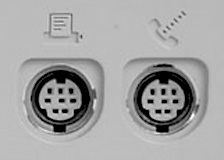
Mac serial ports
But LocalTalk isn’t the same as working with an RS-232 serial device such as a modem. Performance depends on several factors, including the CPU and its speed. Serial throughput is a moving target – and published data is often contradictory. Develop magazine (No. 9, Winter 1992, pp. 86-88) notes, “no official testing has been done to identify the exact limit of each platform.” (Inserting a floppy disk can reduce serial throughput.)
This article attempts to distill various published articles and real world testing to provide the best overview of Macintosh serial performance.
Apple has three different types of serial ports:
- Simple serial ports (all pre-PPC Macs except IIfx and Centris/Quadra AV)
- Input/output processor ports (IOP) on Mac IIfx, Quadra 900, and Quadra 950
- Direct Memory Access (DMA) serial ports (a.k.a. GeoPorts)
One chip manages both the printer and modem serial ports. Having LocalTalk active, which is CPU intensive and ties up the link between the CPU and I/O (input/output) chip, will reduce serial port throughput in relation to the amount of LocalTalk data sent and received. (DMA serial ports help here, since DMA allows the I/O chip to access memory directly.)
Please take the serial throughput with LocalTalk active as a minimum figure. Real throughput will be between that and the maximum the serial port supports. Also keep in mind that just because your modem connects to another at a certain speed doesn’t mean that your serial port is moving data at that speed.
Simple Serial
Instead of embracing the industry standard RS-232 serial port, Apple embraced the RS-422 standard. This standard is different from RS-232, but it can be configured to work with RS-232 devices. This makes it easy to attach regular serial peripherals to your Mac. RS-422 also allows networking – the standard we know as LocalTalk. In Apple’s implementation, the printer port supports serial speeds up to 230.4 kbps, but the modem port may be limited to a lower speed.
Mac serial ports have two speed options, one controlled from the motherboard and a second speed set by an external clock. With external clocking, serial speeds of 500 kbps to 1 Mbps are possible.
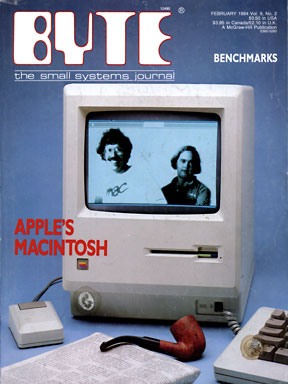 Before ethernet became inexpensive and popular, there were external LocalTalk adapters with high speed clocks that could drive the serial ports on 68020– and 68030-based Macs to 920 kbps. Unfortunately, the companies that made them didn’t standardize, so different brands could only communicate with each other at the 230.4 kbps LocalTalk speed. Still, it was a clever hack – and something Apple designed into the system, as indicated in the Byte preview of the Macintosh in February 1984. (8 MHz 68000-based Macs are limited to 500 kbps with external clocking – the CPU can’t move the data faster than that.)
Farallon used external clocking in its EtherMac and EtherWave PowerBook adapters to push data through the serial port roughly three times faster than usual. This is an excellent way to add an older PowerBook to an ethernet network. (These adapters do not support Open Transport.)
An interesting problem with the Macintosh serial port is that when the modem is going too fast, the Mac will pull the line down to tell the modem to “shut up” while it pushes the data into the OS. When it does this, the modem sees the DTR line go down, interprets this as “hang up”, and you hear a “click”.
Your serial port should be capable of handling data at least double the “modem speed” in order to work efficiently. For a 56k modem, you should run the serial port at 115.2 kbps or faster, which the standard Apple serial drivers don’t allow. (FreePPP does support 115.2 kbps and 230.4 kbps serial port speeds.)
If you are having clicking or hang-up problems, make sure you turn off DTR Hangup in the modem. This is pretty universally controlled by &D0 to turn it off, and &D2 to turn it on. (Thanks to Maury Markowitz for the information in the three previous paragraphs.)
LocalTalk Is Processor Intensive
Macworld reports (April 1996, p. 47) that the 68000 CPU can reliably run the serial port at 19.2 kbps with LocalTalk off, but this can be reduced to as little as 2400 bps when LocalTalk is active. (Apple’s own Tech Q&A reports that performance beyond 9600 bps is “dicey”.) Macworld reports the 68020 through 68040 support 57.6 kbps with LocalTalk off, but can drop as low as 9600 bps with heavy LocalTalk activity. 68040-based Macs tend to do a bit better (Macworld, Develop).
Slower CPUs may restrict serial performance to 38.4 kbps or less despite serial driver support for 57.6 kbps. (The processor load required by onboard video on the IIsi and IIci can further reduce performance – a good argument for adding a video card to these Macs.)
Note that LocalTalk is a hardware standard that uses the Mac’s printer port. If you are networking via ethernet, you are not using LocalTalk (except for ethernet adapters on the printer port, such as the Farallon EtherWave and EtherMac adapters). Thus you don’t have to worry about the LocalTalk performance hit.
Input/Output Serial
The Mac IIfx was nonstandard in many ways. It used a different type of SIMM, supported direct memory access (DMA), required an oddball SCSI terminator, and ran like the wind. (Yes, there was a time when 40 MHz was wicked fast.)
As with simple serial ports, the IIfx managed 230.4 kbps for LocalTalk and could be driven to 900 kbps from an external clock. Because the IIfx has a dedicated I/O processor, which reduces the workload on the CPU, serial performance with LocalTalk off can reach 115.2 kbps, although Apple’s serial driver only supports speeds to 57.6 kbps. Throughput can drop as low as 28.8 kbps with LocalTalk enabled and busy – a big improvement over the simple serial port.
The Quadra 900 and 950 used the same type of serial architecture.
GeoPort, DMA Serial
Introduced with the Centris 660av and Quadra 840av, the GeoPort became a standard feature when the Power Mac was introduced. The GeoPort design permits 230.4 kbps performance on either serial port, but using LocalTalk may reduce performance on the second port to 115.2 kbps. Still, that’s within the comfort range for 56k modems, even factoring in data compression. Thus, you don’t need to disable LocalTalk to get good serial throughput with a GeoPort Mac.
With an external clock, the GeoPort is capable of 2 Mbps performance.
Other Modem Connections
Of course, this assumes you are connecting a modem to a serial port. These limitations do not apply to PowerBook modems or Comm Slot modems.
Summary
Any Mac can be set to run the serial port at 57.6 kbps; newer Macs can go even faster. However, you may not get reliable results if your computer can’t move data to and from memory quickly enough. Unless you have a GeoPort-equipped Mac, the CPU manages all memory access, so a faster, more efficient CPU will provide better throughput than a slower, less efficient one. (The IIfx, Quadra 900, and Quadra 950 have “helper” chips to reduce load on the CPU during I/O. The GeoPort allows moving data directly between RAM and the serial port.)
Precise performance between the minimum with LocalTalk and the maximum depends on how busy LocalTalk is. The more data you’re sending or receiving over LocalTalk, the worse your performance will be. Your results may vary – faster CPUs may produce better results; slower ones, worse.
CPU                serial   LocalTalk min.
68000             19.2 kbps     2.4 kbps
68020-030         57.6 kbps     9.6 kbps
680040           115.2 kbps    19.2 kbps
IIfx, Q900/950   115.2 kbps    28.8 kbps
GeoPort*         230.4 kbps   115.2 kbps
   * 660av, 840av, Power Macintosh
If possible, test for overall throughput and dropped packets at several different speeds. Because of lost data packets when running a serial port too fast, using a lower serial port speed may result in higher throughput.
Bypassing Apple’s serial port routines, FreePPP overcomes the 57.6 kbps ceiling. It is a good tool for testing your serial port. Use the More Details option in FreePPP Setup to see if you’re losing data by trying to run your serial port too fast. I would be very interested in hearing from those using FreePPP. Let me know how fast you can reliably drive your serial port, your actual throughput at this setting, which Mac you are using, whether it is accelerated, etc. I’ve creates a follow-up page sharing user feedback, which shows the kind of information I’m after.
Conclusions
When moving data over a network, LocalTalk takes a significant toll on serial performance. For maximum modem performance, pre-GeoPort Macs should avoid using LocalTalk while online. This is a good argument for switching to an ethernet network. (Since the EtherMac and EtherWave ADB use the serial port, I cannot predict what they will do to serial performance. My guess is that they will make things worse.)
Even with LocalTalk off, the serial port on a 68000-based Mac (512Ke, Plus, SE, Classic, Portable, PowerBook 100) is limited to 28.8 kbps. It makes no sense to buy a 56k modem for these Macs unless you intend to upgrade to a more powerful computer in the future.
If you have a 68020- or 68030-based Mac (other than the IIfx), the serial port may limit you to 57.6 kbps. This doesn’t mean buying a 56k modem is a bad idea, only that the serial port may limit throughput more than the modem does. Be sure to avoid using LocalTalk for maximum serial throughput.
If you have a IIfx or non-AV 68040-based Mac, you can expect decent performance even with moderate LocalTalk traffic.
The GeoPort on the 660av, 840av, and Power Macs should see us comfortably until DSL (digital subscriber line) and cable modems become common with throughput of 1 Mbps and beyond. These will probably connect via ethernet, universal serial bus (USB, a new protocol capable of 12 Mbps throughput), PCI slot, or Comm Slot II.
As for hardware handshaking, which is necessary for every modem 9600 bps or faster, every Mac since the Plus supports it.
Looking Ahead
As current serial ports run out of steam, anticipate Apple moving to FireWire or USB (universal serial bus) as replacement technology. Read more about that in Macintosh Makes the Connection.
(Many thanks to Rowland for new data and constructive feedback that have made this a better page.)
Other Resources
- Low End Mac’s GeoPort Guide
- Modem performance using FreePPP and OT PPP on at 5320, Adrian Winnard
- Introduction to FireWire
- USB: Okay for the low end
Keywords: #serialthroughput #rs422 #localtalk #geoport #macserialport
Short link: http://goo.gl/RCP0jE
searchword: serialthroughput
