
Low End Mac Reader Specials
TypeStyler For Mac OS X is Now Shipping! Download The Free Fully Functional 60 Day Tryout at www.typestyler.com
Don't install Parallels to play poker online! Poker Mac will show you how
to download and install a native Mac poker application such as Full
Tilt Poker Mac.
Compare products like desktop computers, apple laptops, apple macs, and LCD Monitors side by side! All the information and reviews to make the best purchasing decision for new mobile phones, sat nav systems, or MP3 players. The Ciao online shopping community makes searching products easy for you.
Fruit-Flavored Slot of Death?
- 2000.05.31
Apple's use of easy-to-use (and downright cool) slot-loading CD- and DVD-ROM drives in their iMac line shows that Apple has come a long way since using those awful CD caddies on their early CD drives. Those frustrating and easy to lose caddies actually helped Apple sell the smart but lethargic PowerCD, which was a single-speed DiscMac look-alike designed for PowerBooks (it's now a hot collector's item).
Steve Jobs seemed obsessed with the new slot-type design
when he demonstrated it at Apple Event 1999, where the new iMacs
were introduced. It replaces the standard tray with a grabbing
mechanism, that inhales the disc when it is inserted. I've had a
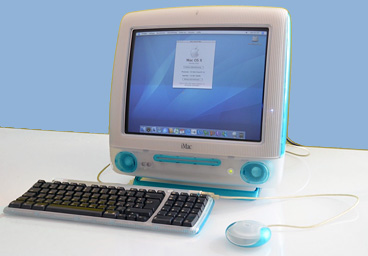
blast showing it off to my friends on my iMac DV. Well, annoying
them might be a better way to put it. I've found but one problem
with the current design, one that doesn't really affect the iMac,
but rather possible the future iBook and PowerBook models.
The iBook was designed to be rugged, to be flung across the room while in operation and still work. (An episode of NBC's hospital drama "ER" proves this.) It was also made so that there would be no flimsy parts and no way that foreign objects - like stray staples and potato chip crumbs in a student's backpack--could get inside the case. And that's the flaw with slot-loading drives.
Even with the iMac's current protective felt-like flap, such paraphernalia could still easily get lodged inside the drive in a backpack-type environment, and that could be a serious problem. The fragile laser lens and positioning mechanism is a prime target for that type of crud, which is nearly impossible to get out, and the damage resulting from it could net a hefty repair bill. While this is great for the repair shops, it's a big headache for users, who expects their Macs to be flawlessly designed.
There are several solutions to this. One is to not use slot-loading drives, but to continue with the laser-on-tray type on the current models and earlier iMacs. This design is harder to damage, but lacks the coolness factor that a slot has. Another is to utilize a protective cover flap. Not only is this no niftier than using a tray, it would be easily broken, just like the port covers Apple began to abandon with the iBook.
One last variation is an internal, automatic flap. This is how it would work:

When the computer is booted up or awakened from sleep and there is no disc inside, the flap opens. When a disc is inserted, the flap closes to protect it. As you probably guessed, the flap reopens to eject the disc. When the computer is put to sleep or shut down, the flap once again slides shut, protecting the mechanism. The flap itself would be made of color-coordinated plastic, that would be strong, yet very laterally flexible so it could curve around the drive as it opens, keeping it from taking up extra space. The paper clip hole in the drive could also open the flap manually when necessary.
The only problem would be making the design as reliable as possible, which should be easy. Since there are no exposed moving parts, as the flap is recessed in the slot, the chance of anything breaking off is very slim, not much greater than the current iMac's drive.
Apple may not want to sell an ultra-ruggedized notebook computer. The iBook's ports and ventilation holes allow grit to get in, although the damage would be much less significant. Also, the nominal cost of the flap mechanism may be too much for volume sales. Still, I think it would be even cooler than the current drive, and for a manufacturer who sets the standards for durability and innovation. Frankly, we could all say with confidence that Apple's got its slot-loading optical drives, well, covered!
Links for the Day
- Mac of the Day: MacBook Core Duo, May 2006. The iBook's replacement has a 13" widescreen display and a 1.83-2.0 GHz Intel Core Duo CPU.
- Group of the Day: StarMax List is for anyone using Motorola StarMax Mac clones.
- Support Low End Mac
Recent Content
- CardBus WiFi, the Shiira Browser, Ridding the Web of Flash, and Macs vs. PCs, Charles W. Moore, Miscellaneous Ramblings, 03.18. Mac longevity, Shiira speed, ambidextrous Mac and Windows use, and how Flash benefits Apple.
- How to Zoom Your Browser for a More Readable Web, Steve Watkins, The Practical Mac, 03.18. Instructions for zooming text and pages in Safari, Firefox, Camino, and Opera.
- How Ad Blocking Hurts Your Favorite Websites, Charles W. Moore, Miscellaneous Ramblings, 03.18. Ad income keeps the Web free. Blocking online ads hurts your favorite websites.
- Taking Apart the 12" PowerBook, John Hatchett, Recycled Computing, 03.17. There are a lot of steps involved in disassembling a 12" PowerBook. Proceed with caution.
- Why I Plan to Stop Using Google Docs, Jason Walsh, Mac Life, 03.16. Jason Walsh continues his search for the perfect word processor and explains why he uses Google Docs - and why he will stop using it.
- Ubiquitous Computing: Tabs, Pads, Books, and Clouds, Adam Rosen, Adam's Apple, 03.16. "Ubiquitous computing names the third wave in computing, just now beginning . . . when technology recedes into the background of our lives."
- More links in our archive.
Recent Deals
- Best Intel iMac Deals, 03.17. Used 17" from $600; 20" from $750; 24" from $825; refurb 21.5" nVidia, $999; new, $1,099; refurb Radeon, $1,299; new, $1,399; refurb 27" 3.06, $1,499; more.
- Best G5 iMac Deals, 03.17. 17" 2.0 GHz, $380; 1.9 GHz iSight, $479 shipped; 20" 1.8 GHz, $509 shipped; 2.1 GHz iSight, $549 shipped.
- Best Time Capsule Deals, 03.17. Close-out 500 GB, $140; new 1 TB, $279; used 2 TB simultaneous dual-band, $400; new, $455. Shipping included.
- Best iPad Deals, 03.16. 16 GB iPad, $499; 32 GB, $599; 64 GB, $699; 16 GB with 3G, $629; 32 GB 3G, $729; 64 GB 3G, $829. Free ground shipping.
- Best iPod classic Deals, 03.12. Used 20 GB, $119; 40 GB, $139; 60 GB, $159; 30 GB video, $129; 60 GB, $159; 80 GB, $169; refurb 120 GB, $189; new, $214; 160 GB, $228 shipped.
- Best G3 iBook and AirPort Card Deals, 03.12. 366 MHz 12" clamshell, $89; 466, $125; 500 white CD, $100; 600, $199; 800 Combo, $239; 14" 900, $225.
- Best Xserve Deals, 03.12. Used 1 GHz dual G4, $499; 2.0 dual G5, $599; 2.3, $749; refurb 2.26 4-core Nehalem, $2,499; new, $2,699; 8-core, $3,449; refurb 2.66, $4,299; new, $4,799; more.
- More deals in our archive.
About LEM | Support | Usage | Privacy | Contacts
Navigation
Used Mac Dealers
Apple History
Video Cards
Email Lists
Favorite Sites
MacSurfer
MacMinute
MacInTouch
MyAppleMenu
InfoMac
Macs Only!
The Mac Observer
Accelerate Your Mac
RetroMacCast
PB Central
MacWindows
The Vintage Mac
Museum
DealMac
DealsOnTheWeb
Mac2Sell
ramseeker
Mac Driver Museum
JAG's House
System
6 Heaven
System 7 Today
the pickle's Low-End
Mac FAQ
Abandonware
Petition
Mac vs. PC Info
Affiliates
The Apple
Store
Mac
Connection
B&H
MacMall
TechRestore
ExperCom
Crucial
Memory
batteries.com
MacMinute
MacInTouch
MyAppleMenu
InfoMac
Macs Only!
The Mac Observer
Accelerate Your Mac
RetroMacCast
PB Central
MacWindows
The Vintage Mac
Museum
DealMac
DealsOnTheWeb
Mac2Sell
ramseeker
Mac Driver Museum
JAG's House
System 6 Heaven
System 7 Today
the pickle's Low-End
Mac FAQ
Abandonware
Petition
Mac vs. PC Info
Mac Connection
B&H
MacMall
TechRestore
ExperCom
Crucial Memory
batteries.com
