
Although After Dark got its start on the Macintosh, this wonderful screen saver also found its way to the Windows side through the help of two equally talented, artistic souls, Bill Stewart and Ian MacDonald. I recently interviewed Bill Stewart.
Tommy: It’s quite a pleasure to talk with you. How did After Dark see the light of day?
Bill: After Dark came into being because some people made some experiments for themselves, showed them to other people, and correctly observed the incredible wave of positive reaction.
It’s like Star Wars. George Lucas made Star Wars for himself, and fortunately his sense of story, mythos, and visual design resonated with millions of people.
 Only when the creators truly satisfy their own yearnings can a really great product be made. After Dark was of this ilk. When you love your product, it’s completely different than working to spec. The graphics, the interface, the attention to detail. We took it as our personal mission to make it the best possible experience for users.
After Dark for Macintosh had a slow start, but the Windows version took off like a rocket as soon as it was released. By the 2.0 version of each, they were dual blockbusters.
Tommy: What and who were the creative forces behind After Dark?
Bill: Primarily, Jack Eastman, Ian MacDonald, and myself.
Ian MacDonald and I created a software experiment that we felt like sharing with the world on the primitive 1988 Internet. We named it the Magic ScreenSaver. We didn’t ask anyone to pay for it. A lot of people thought it was so cool that they sent us money without us even asking. They also sent ideas and bug reports.
It’s hard to describe how nice it is to be paid for something you offer freely. We concentrated on the screen saver as a full time gig and resolved every technical issue while adding effects and features and formalizing how people could pay us. It took off like wildfire, and I knew at that moment we could sell millions with a commercially marketed version.
 While this was going on, Jack Eastman created an experimental screen saver for himself on the Macintosh so he could write programs to assist his grad studies in physics. His really cool experiment turned into After Dark 1.0 for Macintosh, and ours turned into After Dark 1.0 for Windows.
There were many developers and artists who did excellent work. We all worked hard. Patrick Beard and Nick Rush were significant contributors to early software design, visual look, and marketing.
Tommy: In my mind, After Dark 2.0 had a “darkness”, a sense of the modules actually portraying the idea of “After Dark”, through many of the modules such as Nocturns, Zot, Starry Night, and others. Was this how you all envisioned After Dark and any future versions?
Bill: You’re right, After Dark 1.0 and 2.0 had a clear artistic point of view which conveyed the idea of “After Dark”. This was lost in later versions – it was just a collection of stuff, sometimes good, sometimes way off track.
Every product needs a clear vision, and things which are in sync with that vision are good, but if you stray, you might as well make a different product with a different name.
Tommy: On Dynamic Karma’s website, it mentions that they lost control of After Dark to Berkeley Systems. Do you feel they changed the direction and the creativity behind After Dark? If so, in what way?
Bill: Once you start making a lot of money at something, things change. A lot more people get involved, and sometimes people lose track of what the product was really about in the first place, spending too much time chasing markets to maximize return.
After Dark 3.0 proved the point that maximizing return doesn’t always work. Berkeley Systems tried to save money by removing Ian and I from development. Once you start making product decisions on that basis, it all falls down. When a product is about making money more than serving and delighting users, it loses the magic.
Tommy: In your mind, did you see the versions following 2.0 as being better or worse in terms of creativity? What you had hoped it would be?
Bill: Not as good, but not entirely bad. Unfortunately, there was too many problems as well.
Tommy: Have you or any of the other original team ever thought of releasing another screen saver in the spirit of After Dark 2.0 with the same “darkness” aspect?
Bill: I’m asked about this by fans every so often. I don’t think so. First, I wouldn’t even consider it with a different product name, and the time for the product is past. There was a time when the world wasn’t filled with eye candy, when most user interfaces were crude; in short, a time when something like After Dark could blow people away. I have many great ideas for screen savers that never saw the light of day, but the time when a screen saver could capture the public imagination is gone.
I created two different screen saver engines and about 90 modules myself, so it’s okay that I have some stuff I didn’t get to.
I’m more interested now in creating products that today’s audience of sophisticated users would be as startled and amazed by as people were by After Dark. After Dark was influential; it showed that software could be really fun and functional and robust. Expanding the bounds of what is possible and blowing away today’s audience is more interesting now.
Tommy: What, in your mind, was the defining feature or part of After Dark that made it unique?
Bill: Ian and I understood what After Dark was about, and I think that was lost when we weren’t involved.
People didn’t really need After Dark. They were paying for that rarest of experiences, a product that could please, delight, and surprise you without crashing.
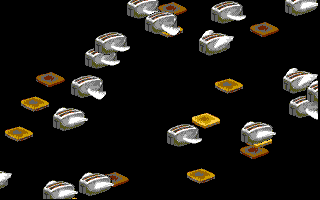
 How many software programs ever do something unexpected that’s a good thing? Generally, unexpected results mean a crash or error, but millions of people would laugh and be surprised at toasters that could fly or setting the darkness of the toast or inside jokes or the rather fast graphics.
Remember, After Dark showcased compelling computer animation when almost nothing else did. For the time period, it was state of the art, considering it worked on 386 and 286 computers at 10 MHz. The key thing was that it had to be incredibly solid and excellent for a user or the magic would be gone. Without solid engineering, a user will no longer be receptive to wonderful things it can do.
Tommy: In your mind, will After Dark go down as the best screen saver in history?
Bill: For sure. It was robust and cool and tons of fun when hardly anything was. There are much more interesting graphical animations nowadays, but no screen saver will ever capture the imagination the way After Dark did.
Tommy: What was your favorite module of all time?
Bill: Hmm, tough call. Starry Night most purely expressed the idea of “After Dark”, but when you make this stuff, you have different reasons for liking them.
Personally, I liked the idea of modules you could play with, like the MultiModule that allowed you to layout multiple modules to play at the same time on different parts of the screen. It’s nice to give the users room to express themselves instead of just handing them what we’ve created.
After staring at and debugging Flying Toasters and other modules for a couple of years, 14 hours a day, 7 days a week, it’s not quite as thrilling for me as it is for a user who gets to experience it fresh. I kind of liked Puzzle, because it took me an afternoon to write and debug it, and it was about 20 lines of code (with liberal comments) while another programmer wrote 10 times as much code to do the same thing and it was hard to follow. Kind of made me feel smart at the time.
Tommy: What do you want those who are reading this article to know about After Dark that they may not know already?
Bill: Two things. I have always been thrilled to hear from happy users. It vindicates an artist’s work when people enjoy it. Sometimes people can’t put their finger on what they like so much, but After Dark just made them feel good. I like to see sales figures so I know lots of people like my work and I can afford to keep working on it, but I also like positive feedback from individuals.
The other thing people should know is that I am hard at work on something new that should amaze and delight the world, possibly even more than After Dark did.
Unofficial After Dark Updates and Replacements
When I finally [entered] the Mac world in 1999, the first program I looked for was After Dark 2.0. Thanks to the kindness of a Mac fan, I found 2.0 for Macintosh. It was truly wonderful to see my favorite program paired up with my favorite computer! I eventually bought my last After Dark screen saver, the 10th Anniversary Edition, in 2001.
Sadly, Sierra did not fix After Dark to work with OS 9. But there are plenty of dedicated After Dark fans out there, and thanks to one of them, After Dark for OS 9 was born. After Dark for OS 9 fixed the After Dark 4.0 engine so most modules would work in OS 9. It was released on the Macintosh Garden. A Google search should pull it up for you.
For OS X users, fear not – even you can get in on at least some of the After Dark goodness, in the form of After Dark X + Fish. Sadly, it’s limited to only a handful of modules. This package is available as shareware from Infinisys.
For those who have Tiger and just want the classic Flying Toaster screen saver, thanks to a company called Uneasy Silence you can download Retro Flying Toasters for free.
For those who loved Lunatic Fringe, which was a part of More After Dark, you can get your fix from Sealie Software. A Word of caution: it will only work in the Classic environment under OS X, and you need the actual Lunatic Fringe module to run it.
There were two books published about After Dark, Cool Mac After Dark and Art of Darkness, both released in 1992. They include the basics on the early After Dark modules and give a little account of the history behind them. For a more in-depth look at these books, check out After Dark: The Books, published on TidBITS in 1992.
The wonder didn’t end on the computer screen or in books. There was plenty of After Dark goodness packed within a catalog of After Dark merchandise (included with the different versions of After Dark) that included neckties, mousepads, hats, and T-shirts, all emblazoned with the After Dark logo and mystique.
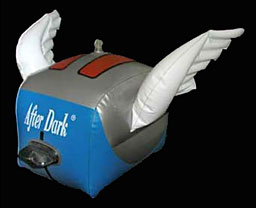 Best of all – drum roll – the inflatable Flying Toaster you could put anywhere. A true testament to the spirit and creativity that flowed through the veins of the After Dark creators and many others who worked countless days and nights, coding and creating away to bring us an unforgettable world of wonder.
Every time I see the Flying Toasters or hear the thunderous anthem that proudly reverberated around the world, singing the song that only a squadron of Flying Toasters could harmonize, I’ll remember that ol’ time feeling of wonder and amazement.
To Jack Eastman and Patrick Beard, the creators of After Dark for Macintosh, to Bill Stewart and Ian MacDonald, the creators of After Dark for Windows, and to the countless others who added their creative magic and awe-inspiring genius to After Dark throughout the years, thank you for creating a truly wonderful screen saver that will go down in history as the best. Along with Toaster-heads across the nation and around the world, I salute you with burnt toast in hand.
To Ian MacDonald and others who had a hand in After Dark, if you’re reading this, give me a ring at thomas (at) lowendmac (dot) com so you can tell your story. To the dedicated legions of After Dark fans, email me your fond memories and stories of After Dark. All emails (providing their authors give permission to publish) will be included in an upcoming Welcome to Macintosh article.
Go to the After Dark Interviews index.
Keywords: #afterdark #screensaver
Short link: http://goo.gl/4IVRKH
searchword: afterdark
