
PowerBooks don’t look or feel like “regular” Macs, but they are just as powerful as desktop Macs, sound like desktop Macs, and even smell like desktop Macs.
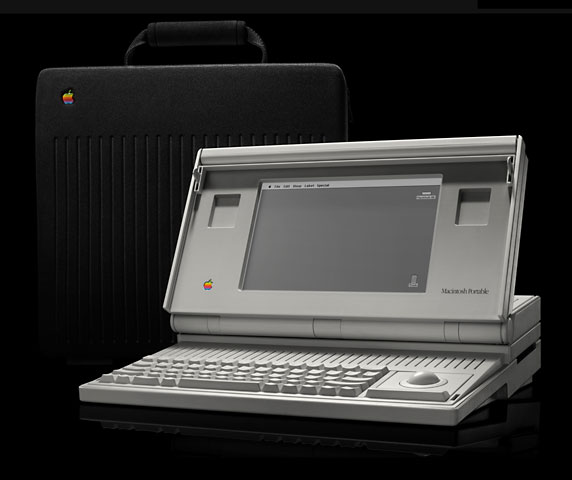 In 1989, when Apple released the Macintosh Portable, the age of the portable Macintosh began. However, competing DOS portables were several pounds lighter than the 16 pound Mac Portable, and most were smaller as well. With the Portable’s introductory price of US$6,500, you could save a lot of money if you were willing to accept DOS. (Of course this is Low End Mac – if I were writing for Low End DOS….) However, it was the first portable Mac, and it forever changed the way the Mac community would compute while on the road, whether on vacation or on business travel.
Introducing the PowerBook
Two years later, in October of 1991, Apple released what was to be one of the most revolutionary computers ever made, the PowerBook.
The PowerBook is Apple’s notebook computer. They feature the same processors used in desktop Macs, and some have modems, but generally they have a lower RAM ceiling than their desktop counterparts, and they usually have a lower capacity, slower hard drive and smaller screen.
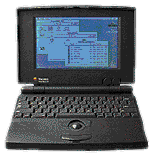
PowerBook 100
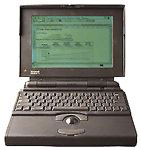
PowerBook 170
The original three models were the PowerBook 100 (16 MHz 68HC000), PowerBook 140 (16 MHz 68030), and the PowerBook 170 (25 MHz 68030). The 100 and 140 have passive-matrix 1-bit screens, and the 170 has a 1-bit active matrix screen. The passive matrix screens are a bit more blotchy and more susceptible to stuck and dead pixels. Active matrix screens are much brighter and tend to be clearer and nicer to look at.
In the years to come, Apple would release other 68030-based PowerBooks: 145, 145b, 160, 165, 165c, 180, 180c, and 150.
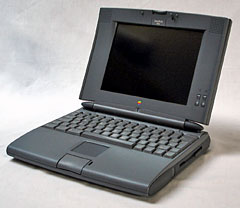 In 1994, Apple released the first 68040-based PowerBooks, the PowerBook 520, 520c, 540, and 540c. These are based on the Motorola 68LC040 processor. The 500 series uses a radically different case design and introduced an input device that is used on even the most modern laptops (yes, even PC notebooks): The trackpad. The trackpad allows the cursor to follow the movement of your finger on a special pad.
The 500 series were also the first PowerBooks to incorporate function keys into the keyboard. The next year, Apple released the PowerBook 550c in Asia. This was the same as the previous PowerBook 540c, except that it has a larger screen, the case is a bit different, and it uses a full 68040 processor.
The last 68K-based PowerBook was the PowerBook 190. It features a 33 MHz 68LC040 processor. Along with the 5300 series, the 190 was loaded with problems, but after being repaired in the Apple repair extension program it is a fairly stable computer.
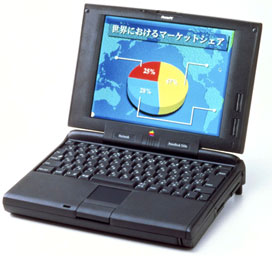 In 1995, Apple introduced the first PowerPC PowerBooks, which I will not fully cover in this article. However, the first model, the PowerBook 5300 series is a model to be aware of. It originally had many problems with the motherboard, screen housing, batteries, and system software, but like the 190, after going through the Apple repair extension program, it is a great, stable little PowerBook and performs quite well.
Some very interesting machines that I have never worked with (as of this writing – I would like to get one someday) are the PowerBook Duo series. The Duo came out as a convertible desktop/laptop computer, and they were quite successful for some time. If you are using your computer at school or at the office and don’t need a floppy drive all the time, a Duo may just be the PowerBook for you. The Duos are all 68K-based machines, except for the 2300c, which has a PowerPC 603e.
Why do you need a PowerBook? If you need to transport files from home to work or home to school and back, you need a PowerBook. If you don’t need to worry about the Internet and don’t need a PowerPC, a colour screen, or lots of speed, go for a PowerBook 140, 160, or 170. The most reasonably priced PowerBooks will be 140’s. The next up in price will be the 170. The 160 came out later and featured a screen capable of more shades of grey.
If you demand colour but don’t need speed, look for a used PowerBook 165c or 180c. These are both higher-speed 68030 machines upgradeable to 14 MB of memory. All model numbers between 140 and 180c share the same case design. However, the colour screens gobble up your battery in no time.
If you need a 68040 machine, you will need to settle for the 68LC040 in the PowerBook 520, 540, or 190, as the 550c is next to impossible to find in the US. It is possible, however, to upgrade the chip in the PowerBook 500 series and maybe the 190 to a full 68040, using a chip from another machine.
Keywords: #powerbooks #powerbookhistory #machistory
Short link: http://goo.gl/9k8EFP
searchword: powerbookhistory

This article is missing the 1400 consumer and the 3400 professional series of pre-G3 PowerBooks. Both decent Macs, but suffering from the shortcomings of the early PowerPC-variants of the classic Mac OS. The OS was slow and buggy, actually the old System 7, forced through an emulator onto the new PowerPC. The situation improved gradually from 1994 to 2000, when System 7 evolved into System 8 and finally Mac OS 9. While I like the later variants a lot (for me: “the golden years” of classic PPC-Mac-computing) they feel really slow on pre-G3 PowerBooks (and are PPC-only anyway).
While literally every PowerBook works with famous (for its Mac-like user experience) MS-Word version 5.1, none of it is up to recent computing tasks. Difficulties start when you try to transfer your files to and from the ‘Books. Only very few have Ethernet, not to mention wireless or USB. Any adapter or PCMCIA-card that could theoretically bridge the gaps, is much more difficult to find than the PowerBook itself. Probably 3.5” floppy disks are a solution for moving small documents, using an USB-connected floppy drive on a recent computer.
I consider the old PowerBooks good for retro gaming or as collector items. If you want to do real (light) work you are much better and cheaper off with later iBooks G4. Both are running circles around the old machines and also do Classic very fast. Working iBooks G4 are available from 40 Euros up, coming with wireless (most of it, you have to check it) and USB.