
2001 – I remember first reading a review of the original PaperPort scanner from Visioneer* in the mid 1990s. It was brilliant – a tiny sheet-fed scanner that could slurp up a typewritten page and automagically turn it into a word processing document.

It was small and easy. When you stuck in a piece of paper, it turned itself on, launched it’s software, and set to scanning. Being sheet-fed meant that you could take your the pieces of paper and just shove them in the slot. The scanner came with software that turned your printer into a copy machine – and other software to organize all the paper you scanned.
The paperless office had finally arrived!
Back in the real world, this great product didn’t stem the tide of paper. In 2001, most offices have more paper, not less. Some people print out email. Others, enabled by computer technology, send out hundreds of paper letters that would have been impossible before the days of mail-merge.
Why didn’t people get away from paper after they had a tool like the PaperPort? The paperless office was like King Arthur’s Grail: All sorts of people were looking for ways to do it, but no one could find one. The theory was great, but it was too much work.
Scanning a document was relatively quick (10 seconds), but it took several minutes to change the picture into editable text. That process, called Optical Character Recognition (OCR), resulted in lots of errors that had to be cleaned up. OCR required a lot of processing power, and it took over the Mac while it was working. It could actually make a person less productive as they cataloged information that they didn’t really need.
Yes, it was faster than typing, but it was nowhere near as fast as filing the paper in an old fashioned manilla folder. The time saved was less than the time spent. It’s great having all your documents easily at hand on a computer with the ability to do full text searches, but spending all the time inputting the data could drive anyone crazy.
So the paperless office fell out of favor.
Underpowered Hardware
After being burned by being on the cutting edge of technology, a lot of people concluded that the paperless office wasn’t worth the effort. The shame was that they made a conclusion based on an implementation. Taking a low-end perspective half a decade later gives me a different conclusion based on the same evidence.
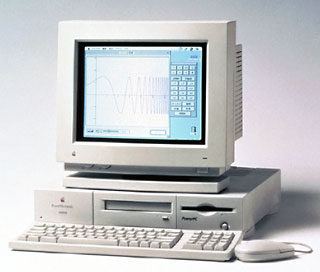 Back when these were introduced, a Power Mac 6100/60 was an expensive machine; most Macs in use back then had a 68030 or 68040 processor. Hard drives were expensive and ranged in the hundreds of megabytes. That put users between a rock and a hard place. On one hand, they didn’t have enough hard drive space to store plain bitmap scans of the paper. On the other, their computer was too slow to easily OCR the bitmaps into text documents that took up less space. And on the third hand (well, I know, people only have two hands), Macs were too expensive to be tied up with the OCR process when they needed to be used for work.
None of those facts are true today. For about about $100 you can buy a Quadra 630 and outfit it with a 30 GB hard drive that could store all the scans as raw bitmaps. Although you wouldn’t be able to do full text searches, you would still save time filing. Managing documents in the Finder can be easier and more flexible than using a paper file cabinet.
Enough Power for OCR
A Power Mac 7500 can be bought and outfitted with a 400 MHz G3 processor for around $200. With the more than tenfold increase in processing power over a 6100 or a 68k Mac, the OCR process ceases to be a bother; it becomes a quick progress bar followed by a few corrections.
There’s a huge usability difference between two minutes and, say, 6 seconds. This is an example where a faster processor can save you as much time as you would expect based on the megahertz. It’s too much of a bother to waste two minutes scanning a letter, but adding six seconds before you put it into the recycle bin would hardly be noticeable.
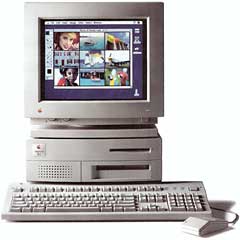 Or another way. Macs used to be expensive. But there’s no reason why you couldn’t have a small network of Macs with a dedicated scanner Mac. A Centris 650 with built-in ethernet and a 68040 processor could take all the pages and OCR them. It would be slow, but if you aren’t using the computer as your own, you wouldn’t even notice. The Centris could run personal file sharing so those documents could be available to your main Mac whenever you wanted them.
The paperless office is an example of the problem of being on the cutting edge. Frequently great ideas are hindered by poor implementation – especially high cost. Apple’s unreleased set-top boxes of the mid-1990s are an example – they cost too much for what they did.
But in 2000, TiVo release a simple computer that is essentially a Power Mac 6100AV with a 15 GB IDE hard drive and an internal modem. TiVo waited until the technology was cheap, and then from out of nowhere it burst (or is bursting) into the mainstream. It’s a low end approach.
Apple tried, failed, and discarded the idea, but TiVo succeeded by focusing on the low end. I’d love to see what Apple could do if they were aiming at the low end like that. Using IBM or Motorola’s System on a Chip (SoC) implementation, Apple could be bringing G3 power to a host of new intelligent appliances.
What’s your favorite discarded Apple idea? If I get a few good responses, I’ll publish an article of other ideas that Apple tried before the market was ready. Drop me a line. (I can already hear all the Newton users….)
* PaperPort dropped Mac support in September 2001. It is currently available for Windows and iPad.
Keywords: #ocr #paperlessoffice
Short link: http://goo.gl/rj8kP3
searchword: paperlessoffice
