
The dual USB iBook form factor was in production for five years – the longest-running laptop design in Apple portable history. That’s not necessarily a bad thing, since its only major shortcoming (albeit a significant one) is that it is relatively difficult to open up and work on – even for routine stuff like hard drive upgrades. However, it still looks great to my eyes, especially the 12″ version.
Late 2003: The First Generation
12″ iBook G4/800 MHz
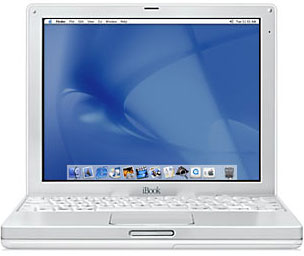
Apple surprised me – and I think a lot of other Apple portable watchers – in October 2003, replacing the dual-USB iBook G3 with a trio of G4 iBooks clocked at 800 MHz, 933 MHz, and 1 GHz. The CPUs had 256 KB of onboard cache running at full processor speed and ran on the same 133 MHz system bus as the 12″ PowerBook. This was a substantial performance upgrade from the 2-1/2-year-old G3 iBooks.
The 12.1″ model was available only with the entry-level 800 MHz G4 chip, and there was no longer a CD-ROM version. All G4 iBooks shipped with a slot-loading Combo drive that can read DVDs and burn CDs (some later models added DVD burning as well). The G4 iBook gained an ATI Radeon 9200 graphics processor with 32 MB of dedicated memory and AGP 4x for gaming performance and watching DVD movies, USB 2.0 connectivity, support for AirPort Extreme (802.11g WiFi, five times as fast as the original AirPort’s 802.11b), optional internal Bluetooth for wirelessly connecting peripherals such as Apple’s Wireless Keyboard and Wireless Mouse, as well as the carryover I/O ports from the previous G3 iBooks, including FireWire 400, and a built-in 56K v.92 modem and ethernet (10/100Base-T).
The specification upgrades and the amalgamation of the 12″ iBook into a single model meant the end of the sub-$1,000 iBook (again, with the exception of that $949 education channel special); the cheapest consumer iBook sold for $1,099, which was still a tremendous deal considering what you got the G4 chip, USB 2.0, AirPort Extreme and Bluetooth support (both require optional additions), better graphics, a Combo drive, a 133 MHz system bus instead of 100 MHz, and 128 MB more onboard RAM for your extra hundred bucks.
14″ iBook G4, 933 MHz and 1 GHz
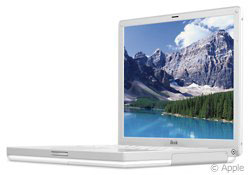
The 933 MHz and 1 GHz speeds (in reality, 1.07 GHz) were only available in 14.1″ models. Some lamented the non-availability of a 1 GHz 12″ iBook, but if you wanted that combination of features, there was the LittleAl PowerBook.
Indeed, the introduction of these G4 iBooks narrowed the gulf between PowerBooks and iBooks substantially. Of course, there were still some bells and whistles you got with a PowerBook that were not available on the iBook. If you wanted a SuperDrive, for example, you had to go PowerBook.
If physical size and weight are considerations, the 12″ PowerBook was still the smallest and lightest Apple portable available:
12″ iBook G4
- Height: 1.35 inches (3.42 cm)
- Width: 11.2 inches (28.5 cm)
- Depth: 9.1 inches (23.0 cm)
- Volume: 137.6 cu. in. (2,242 cm3)
- Weight: 4.9 pounds (2.2 kg)
12″ PowerBook G4
- Height: 1.18 inches (3.0 cm)
- Width: 10.9 inches (27.7 cm)
- Depth: 8.6 inches (21.9 cm)
- Volume: 110.6 cu. in. (1,820 cm3)
- Weight: 4.6 pounds (2.1 kg)
Another area where the PowerBook had an edge was RAM capacity. The iBooks still had only a single RAM upgrade slot and 128 MB of memory soldered to the motherboard, limiting you (at least officially) to a maximum of 640 MB. All the G4 iBooks came with 256 MB of RAM configured with a 128 MB module in the single expansion slot, so if you wanted to upgrade to a really adequate amount of RAM, you had to remove that perfectly good 128 MB module and set it aside.
The 12″ PowerBook also had only one RAM expansion slot, but it came with 256 MB soldered to the motherboard. Both the G4 iBooks and the 12″ PowerBooks can accept a 1 GB RAM module ($31 at Other World Computing in Late 2013), allowing a maximum of 1.125 GB in these iBooks and 1.25 GB in 12″ PowerBooks.
Besides the retirement of G3 chips, there was another “end of an era” aspect to these G4 iBooks – they no longer booted into Mac OS 9. Note that the first-generation 800 MHz iBooks are among the few G4 laptops Apple sold (along with the early revision TiBooks) that aren’t officially supported by Mac OS X 10.5 Leopard, although there are ways to work around that.
Second Generation: Early 2004
12″ iBook G4/1 GHz, 14″ iBook G4/1.2 GHz
The April 2004 iBook speed bumps boosted the 12″ model from 800 MHz to 1 GHz, and the two 14″ variants from 933 MHz and 1 GHz to a uniform 1.2 GHz, all with a 512 KB on-chip level 2 cache running at CPU speed, and all with 256 MB of PC2100 (266 MHz) DDR SDRAM. Combo drives are standard throughout, and all second generation iBook G4s came with ATI Mobility Radeon 9200 graphics with 32 MB of VRAM and AGP 4x support. All models support AirPort Extreme 54 Mbps 802.11g wireless networking, and it comes built-in on the 1.2 GHz 14″ configuration. Carried over unchanged was the 133 MHz system bus.
The iBook features a do-all video output port that displays VGA, S-video, and composite video signals, and it supports both NTSC and PAL formats.
Third Generation: Late 2004
12″ iBook G4/1.2 GHz, 14″ iBook G4/1.33 GHz
In October 2004, Apple upgraded the G4 iBooks again, this time with 1.2 GHz and 1.33 GHz G4 processors. AirPort Extreme 54 Mbps 802.11g wireless networking became standard in every model, and an optional internal Bluetooth module was offered. They have the same Mobility Radeon 9200 graphics with 32 MB of VRAM as second generation G4 iBooks.
These iBook have VGA video out for mirroring to projection systems and external displays, and for the first time a a slot-loading SuperDrive, for burning both DVDs and CDs, was offered as an upgrade from the standard Combo drive.
The 1.33 GHz G4 iBook is essentially identical to the 1 GHz and 1.2 GHz 14″ models that preceded it, with the exceptions of more processor speed, a 50% larger hard drive, and built-in AirPort Extreme 54 Mbps 802.11g wireless networking.
Fourth Generation: Mid 2005
12″ iBook G4/1.33 GHz, 14″ iBooks G4/1.42 GHz
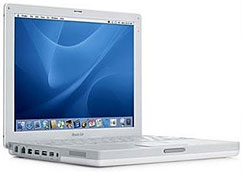
Not a grand slam home run perhaps, but at least a solid triple to the outfield wall, the iBook refreshments announced on July 26, 2005 were the iBook’s final revisions with speed bumps to 1.33 GHz (12″) and 1.42 GHz (14″), 512 MB RAM standard across the line, upgraded video with the ATI Mobility Radeon 9550 GPU and 32 MB of VRAM for full support of OS X 10.4 Tiger‘s Core Image graphics, and built-in AirPort Extreme and Bluetooth wireless connectivity, as well as a couple of high-end features that had been introduced seven months earlier on the PowerBook G4s – the scrolling trackpad and the Sudden Motion Sensor.
This update included just about everything one could have reasonably hoped for in the ultimate refreshment of the dual USB iBook platform, representing a substantial value enhancement with the price points of the preceding models retained, and these are arguably the most desirable iBook models ever.
The 512 MB of logic board RAM, double the previous specification, was long overdue and extremely welcome, making it possible to upgrade to 1 GB with a modestly priced 512 MB module – or go all the way to 1.5 GB with a 1 GB module – truly a value enhancement.
AirPort Extreme (802.11g) and Bluetooth 2.0 ETR support for wireless users were standard as well, and an 8x SuperDrive became standard equipment on the 14″ iBook.
iBook G4 Value
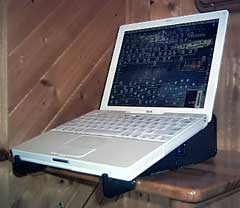 Does it still make sense to buy one of these iBooks? Well, prices are certainly friendly these days, and all except the 800 MHz model can run Leopard without any hacks.
The somewhat spotty reliability record of the G3 dual-USB models wasn’t completely remedied with the G4 model, so caveat emptor there. Hard drive upgrades involve a complete teardown – beyond the capability of most users as a DIY project – so be forewarned about that as well, and I’ve never been a fan of the keyboards used with these machines, although they are not awful.
The dual-USB iBook was and remains a nice package, with good looks, a convenient size (especially the 12″ model), and a lot of power for a relatively low price. They are worth considering if you’re in the market for a low-priced Apple laptop (12-inchers start at under $100, and 14-inchers are generally under $200) that can run Leopard.
See Low End Macs Best iBook G4 Prices for current deals.
Appendix: iBook G4 Technical Specifications
All G4 iBooks have a 1024 x 768 active matrix color display. The 12″ models measure 11.3″ x 9.06″ x 1.35″ (285 x 230 x 34 mm) and weigh 4.9 pounds (2.2 kg), while the 14″ models are 12.7″ x 10.2″ x 1.35″ (323 x 259 x 34 mm) and weigh 5.9 pounds (2.7 kg).
There is no reset button on G4 iBooks. Reset is accomplished by holding down Ctrl-Opt-Shift-power simultaneously.
Specifications are only listed where they differ from the preceding model.
12″ iBook G4/800 MHz (October 2003)
- 800 MHz PowerPC G4
- 256 KB on-chip cache
- 133 MHz System Bus
- 256 MB RAM (128 MB on logic board, expandable to 1.125 GB)
- ATI Radeon 9200 graphics controller with 32 MB RAM and AGP 4x
- VGA and composite video output
- tappable trackpad
- built-in microphone and stereo speakers
- 10/100Base-T ethernet
- Built-in 56k Fax/Modem
- 16-bit stereo sound output
- Combo (DVD-ROM/CD-RW) optical drive
- 30 GB hard drive
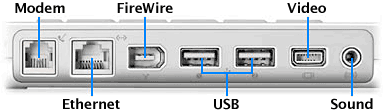 Two USB 2.0 ports
- One FireWire 400 port
- Optional AirPort Extreme wireless networking
- Lithium Ion battery (up to 6 hours use)
14″ iBook G4/933 MHz (October 2003)
- 933 MHz PowerPC G4
- 40 GB hard drive
12″ iBook G4/1 GHz (April 2004)
- 1.07 GHz PowerPC G4 (actually runs at 1.07 GHz)
- 256 MB DDR SDRAM on logic board (expandable to 1.25 GB)
- 30 GB hard drive
- VGA video out, S-video, and composite video out support
14″ iBook G4/1 GHz (April 2004)
- 40 GB hard drive
12″ iBook 1.2 GHz (October 2004)
- 1.2 GHz PowerPC G4
- 60 GB Ultra ATA hard drive
14″ iBook 1.33 GHz (October 2004)
- 1.33 GHz PowerPC G4
- slot-loading Combo (DVD-ROM/CD-RW) drive or SuperDrive (DVD-R/CD-RW)
12″ G4 iBook 1.33 GHz (July 2005)
- 512 MB DDR SDRAM on logic board (expandable to 1.5 GB)
- 40 GB Ultra ATA hard drive
- slot-loading Combo (DVD-ROM/CD-RW) drive.
14″ G4 iBook 1.42 GHz (July 2005)
- 1.42 GHz PowerPC G4
- 60 GB Ultra ATA hard drive
- slot-loading SuperDrive (DVD-R/CD-RW)
* No, it isn’t a typo. Compleat is a legitimate, albeit archaic, spelling for complete. As Kenneth G. Wilson says in The Columbia Guide to Standard American English: “This obsolete spelling of the adjective complete suggests an air of antiquity that seems to please some of those who name things….” We find that fitting for Low End Mac’s Compleat Guides to “obsolete” hardware and software.
Keyword: #compleatibookg4
Short link: http://goo.gl/sA3uti
searchword: compleatibookg4
