
2008 – Macs have been around for a long time, waxing and waning in popularity – 24 years as of this writing. Many people have used Macs in grade school or college, as business users, or personally, and have old data and software stored on floppy disks, SyQuest cartridges, hard drives, etc. from these Paleolithic eras in Macintosh history.
I get semi-regular requests as a Mac consultant and a collector of old Macintosh systems for help accessing data from past computing lives. Here are a few tales of data retrieval that I found interesting – and which may give you some suggestions for your own file resurrection needs.
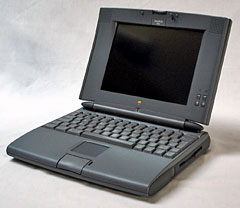 Conversions and data retrievals may involve multiple hops between machines to get from point A to point B. The venerable Quadra and PowerBook 500 series (right) machines contain ethernet, LocalTalk, SCSI, and floppy drives, which – combined with their ability to run Mac OS 8 and network with modern Macs via AppleTalk IP – make them very useful in this process.
MacWrite Files on 400K Floppy Disks
My client was a college professor looking to reissue a textbook he wrote in the 1980s. The only electronic copies of his data were original MacWrite files on Mac 400K floppy disks, and he was looking for somebody who could read and convert these files to a modern accessible format.
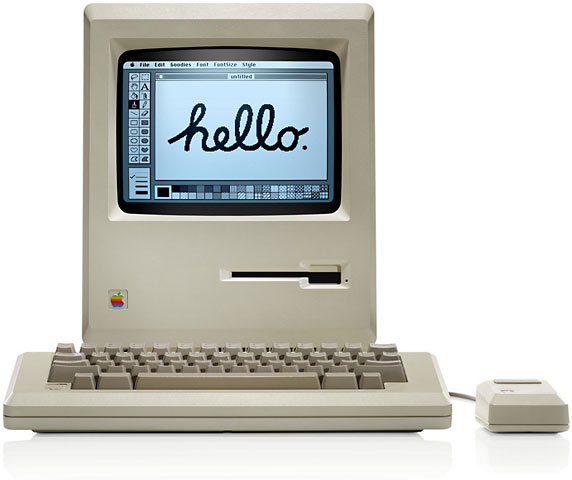 I received an envelope with four 400K disks. I have several machines in my Vintage Mac Museum that can read 400K and 800K floppy disks, along with multiple spare external floppy drives, so I figured I’d be successful.
The redundancy proved helpful.
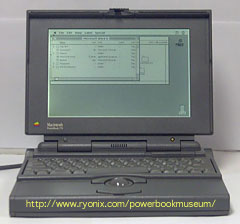 A couple disks were damaged, with the Finder reporting the disks as unreadable upon insertion. I hit eject and retried each disk a few times, then switched to an alternate drive. It took two different machines – a Mac Plus and a PowerBook 170 – and five different floppy drives to read all of the disks. Once each disk was accessible, I copied the files to the hard drive for further processing.
Next step was to open the MacWrite files and convert them to something more current. In my collection I have copies of MacWrite, MacWrite II, Microsoft Word v3, and Word v5, all of which can read the original MacWrite format. MacWrite and MacWrite II can Save As… to plain text files, but this loses all formatting. Word v3 and Word v5 can open and save as RTF or Word format files, which retain formatting, so I chose this option.
I copied the files from a Mac Plus running System 6.0.8 to a PowerBook 540c running Mac OS 8.1 using a LocalTalk connection; the 540c had File Sharing enabled, and the Mac Plus can see it as an AppleShare volume. Once the files were copied to the 540c, I opened them from Microsoft Word v5.1a – a classic! – and resaved as Word 5 format files.
 The Word 5 format is new enough that modern Mac versions of Word can open these documents. Another file transfer was needed, this time via ethernet from the PowerBook to a G4 Cube running Mac OS X 10.3.9 with Classic installed. Any Mac running Mac OS 8 or 9 would also work. Using Microsoft Word 98 in Classic mode, I opened the Word 5 files, then did a Save As… to the modern Word .doc format, which can be accessed by current versions of Word on both the Mac and the PC. I burned all the files to a CD-ROM and sent that to my happy client.
Note that DataViz’ venerable MacLinkPlus software, bundled free for years with the Mac System Software and ClarisWorks, also performs many of these types of file conversions. Formatting info can sometimes get a bit out of whack when you use this method, but if you have a copy, this utility can fill in for software you might otherwise be missing – once you get files off the floppy disks!
AppleShare on Old Disk Image
Data retrieval tale number two involved making a copy of some older Macintosh software accessible to settle a legal dispute. I was contacted one day by a lawyer looking for a copy of AppleShare v1 software, which he needed to settle a technical matter (lawsuits 20 years later – amazing). I have a copy of this software in my Mac Software Archives, stored on a 400K disk image (.img) file, so I was able to assist.
My client did not have a machine capable of reading this disk image or an old floppy drive, but he needed the file nonetheless. I again used intergenerational Mac networking to complete the task.
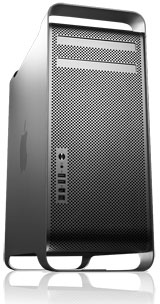 First I copied the disk image from my G4 Cube Server via ethernet to the PowerBook 540c. The internal 1.44 MB floppy SuperDrive can write (but not read) 400K disks. Using Disk Copy v4.2, I made a 400K floppy from the .img file, then ejected the disk and inserted it into my Mac Plus, which has an 800K drive. This could read the floppy, and I copied the files via LocalTalk back to the 540c. From there another hop via ethernet to the Cube relay station, then a final transfer to my Mac Pro (left) running OS X 10.5 Leopard. Now I had a file that I could email to my client.
I have found that the AppleShare component included in Mac OS X 10.3.x Panther works best to communicate with other Macs running Mac OS 8, 9, or X. Newer versions of OS X sometimes have some problems communicating with the OS 8 and 9 systems, but Panther works very reliably. I have Mac OS X 10.3.9 running on a Power Mac G4 Cube to use as a central file server for my old systems. For more info on this kind of setup, see my series on Working with Vintage Macs.
CAD Drawings on an Old Hard Drive
In this final tale, my client was a machine tool manufacturing company. They were also involved in a lawsuit and needed printed copies of some MiniCAD drawings to prove their intellectual property rights. The drawings were on the internal hard drive of a Macintosh SE running System 5! They didn’t know how to get the data off the old computer, and they had no working printer to make local copies.
We first tried to find an old LaserWriter to print out the files, but several models obtained (for free) by both me and my client turned out to not work very well after years in storage. A couple days of crumpled pages and black streaks caused us to switch to the data transfer route.
My client was nearby, so I drove over with an old external SCSI hard drive and my trusty PowerBook 540c. I hooked the drive to the SE, waited for the pre-System 7 obligatory desktop rebuild to occur, then slowly copied over the MiniCAD application and all the files. A few damaged files caused several crashes and reboots (ah, the old SCSI days), but eventually we got everything needed. I connected the drive to the 540c to make sure the files were readable, and after another long desktop rebuild all was well.
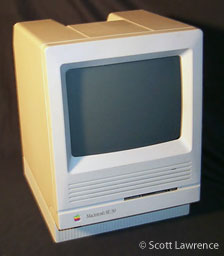
The CAD software was MiniCAD v3, which runs under System 7, so back in my office I hooked the SCSI drive up to an SE/30 running System 7.5.5. I opened the files in MiniCAD and exported them all as PICT files (the only option). If I had a working LaserWriter hooked up to the SE/30, I could have printed the files directly, but since that was a no go, another machine transfer was needed.
The SE/30 has an ethernet card installed, so I copied the PICT files via ethernet back to the 540c and opened them using Photoshop v4. Now I could print the files to my current laser printer. To make them accessible for my client in the future, who is now using PCs instead of Macs, I did another Save As… to JPEG format for all the files. MacDraw II, ClarisWorks, or any other capable graphics program of that era would also have worked.
One final ethernet transfer via the Cube moved the files to my modern Mac, and I burned a couple CD-ROMs for my client. Overnight shipping with the printouts did the rest, and everybody was pleased.
The Oldest Mac OS Still in Use?
On a related note, with System 5 this client now holds my Award for Oldest Mac System Software Still in Use in a modern business application, besting a previous client using System 6.0.8. Anyone out there (besides collectors) still running anything on System 4 or earlier want to claim the prize?
This article was originally published on Adam’s Oakbog website. It has been adapted and reprinted here with his permission.
Keywords: #datarecovery
Short link: http://goo.gl/xHbCT6
searchword: oldmacdatarecovery
