My First Mac
The Easy Computer
Al Miner - 2000.11.14
I've had computers around the house as long as I can remember. That isn't such an amazing claim these days, but I'm probably one of the oldest people who can say that.
In the 70s my father and grandfather, being generations one and two of our family's now four-generation gadget obsession, were some of those first strange people who brought computers into their homes. Those TRS-80s, with the entire computer under the keyboard, had what you might call a "high learning curve." In other words they were plain-old hard to use. You had to know the ins and outs of TRS-DOS to accomplish anything, so Dad and I took a few months and learned TRS-DOS.
In 1985 Dad bought us a shiny new Tandy 1000 (Dad and Grandpa were
serious Radio Shack devotees). This was a very nice 8088 (kind of an LC
version of the first Intel x86 series chip) machine with a whopping 512
KB of RAM. After years with TRS-DOS, MS-DOS was  surprisingly familiar. In fact,
Dad chose MS-DOS over a Mac because they didn't sell Macs at Radio
Shack, he didn't have $2500 for a home computer, and the operating
system was so familiar. So, Dad and I took a few weeks and learned
MS-DOS.
surprisingly familiar. In fact,
Dad chose MS-DOS over a Mac because they didn't sell Macs at Radio
Shack, he didn't have $2500 for a home computer, and the operating
system was so familiar. So, Dad and I took a few weeks and learned
MS-DOS.
When I went to college in 1989, I took that Tandy with me and used it and it's command line interface for the next five years. I typed all my papers on it, used its 300 bps modem to chat with it, used its 9-pin dot matrix printer to print from it, and generally used it into the ground. Windows came along, but it was too much for my old machine. Besides, I knew all the secret words to make DOS sit up and beg - why would I want a messy poorly integrated GUI in my way?
My first job out of college (and the job I have now, six years later) was at a little Catholic school as the "Computer Teacher." They'd set up the Computer Lab the year before, by gathering all the Apple IIs around the building into one room, networking them all to one 20 MB SCSI hard drive, and letting the art teacher run them in her "free" time. Her free time, like all teacher's free time, turned out to be mostly imaginary, so they hired me the next year.
I inherited a room with ten IIes, two IIgses, and a little
collection of LC series Macs that had Apple IIe cards in them.
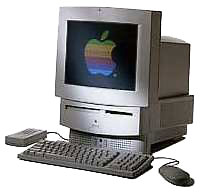 There were two LC
IIs, an LC III, and four never been
opened LC 5xx all-in-ones (two 550s and two 575s). They had come during the summer, and I,
with my extensive DOS knowledge and total lack of Mac knowledge, got to
set them up.
There were two LC
IIs, an LC III, and four never been
opened LC 5xx all-in-ones (two 550s and two 575s). They had come during the summer, and I,
with my extensive DOS knowledge and total lack of Mac knowledge, got to
set them up.
I'd seen Macs in college. I'd used Windows (3.1) and some of the new X-Window clients on the Unix machines at college, so a mouse wasn't a mystery to me. What I did find mysterious was that in the space of one day I'd learned enough of the Mac OS that I was able to set up four machines, install four Apple IIe cards and software, attach them to the LocalTalk network, and have them ready for students.
Nothing in my experience had prepared me for a computer that was easy.
I'd cobbled together a 286 at my house with a 1200 baud modem so I could telnet to one of my Unix accounts and keep chatting with my friends from college, but after a month of using the Macs at school I went out and bought a store demo Power Mac 6100 DOS Compatible.
After the first week or two, I realized I'd paid extra for a feature I probably wasn't ever going to use - the DOS card. Everything I needed was available for the Mac OS (System 7.5 at that time). It came with ClarisWorks 3. I bought a 14.4 kbps modem with it and was surfing the brand new World Wide Web with Netscape v.1. I could telnet to my Unix accounts to do email and chatting. What did I need the DOS card for? Eventually I took it out and replaced it with an AV card from an 8100, which was infinitely more useful.
That machine was the beginning of a collection of Mac hardware. I have, at work or at home, at least one of every form factor of Classic (excluding the XL), LC, and NuBus Mac/Power Mac. I also have a wonderful big blue G3 at home as my workhorse.
This year I finished putting together our new Computer Lab at school. I replaced the '030 and '040 Macs we had collected for school over the years with a suite of 24 iMacs.
We're making a new typing and game lab out of the old machines, which all have ClarisWorks 3 and a ton of educational game titles on them. Prominently featured in that lab will be those LC II, LC III, and LC 5xx Macs - my first Macs.
  ___ ___ __ __  __ _____ ______  ___  __
 |   V   |  |  \|  |  ___|      \/   \|  |
 |       |  |      |  _)_|   O  /  O  \  |__
 |__|V|__|__|__|\__|_____|__|\__\_/ \_/_____)
Al Miner, Computer Guy, St. Thomas More School, Omaha, NE