
Apple’s Boot Camp got the most attention recently as a way to run Windows on the new Intel-powered Macs. But at almost the same time, little-known Virginia-based Parallels, Inc. announced a version of its virtualization software, Parallels Workstation for Intel Macs .
This software solution for running other PC operating systems is more flexible than Apple’s Boot Camp, and for many users, it may prove to be a better solution.
Boot Camp Pros and Cons
A bit of background: Apple’s Boot Camp, like an earlier hacker-built solution, lets users partition their Intel-Mac’s hard drive in order to install another operating system (in Boot Camp’s case, Windows XP only) and allow the user to choose to boot into either Mac OS X or the other operating system.
Only one operating system runs at a time, but it gets full use of all the computer’s hardware resources.
Emulation Pros and Cons
But many Mac owners have long been making use of another way to run multiple operating systems. PC emulation software has long been available for the Mac, with programs like Virtual PC, SoftPC, and GuestPC letting Mac owners install and run a wide range of PC operating systems within a window on their Mac. The Mac operating system is still running allowing the Mac owner to treat the PC operating system and its applications as just another program, switching from one to the other without needing to restart the Mac.
The downside: performance. Emulation requires translating software instructions meant for one CPU into instructions designed for another, and – like translating from Chinese to English – it’s inevitably slower than just working in a single language. Because they are designed at a low level specifically for the PowerPC CPU used on pre-2006 Macs, emulators like Virtual PC and Guest PC don’t run on the new Intel-powered Macs.
Virtualization
But because these new Macs use the same Intel CPUs as other PCs, there’s no longer any need for those sorts of translations. Instead of emulation, software can make use of virtualization – letting the Intel CPU set up a virtual Intel-powered computer running in a portion of the computer’s memory.
Without needing to translate instructions from one CPU to another, performance can be much better – much closer to full speed.
Virtualization software has become increasingly popular in some IT circles as a way, for instance, for programmers running Linux to write code for Windows systems, for help desks to support users running multiple Windows versions, or for network servers to serve applications designed for a range of operating systems. Perhaps the best-known product in this category is VMware, with products for Windows and Linux, including the free VMware Player.
Microsoft has also been active in this area with the Windows version of Virtual PC.
None of these PC virtualization products let users support Mac OS X as a “guest” operating system, and neither VMware nor Virtual PC have software that will run on the Intel Macs.
Parallels Workstation is not as well known as the major players, but the company has virtualization products available for both Windows and Linux. And now it’s first off the mark with a version for Mac OS X on Intel.
As I write, it’s available only as a free prerelease 30-day trial version (registration required to get an evaluation key code). When the product is released (expected relatively soon), pricing will be US$49; the Mac version is currently available for preorder for US$39.
I tested the prerelease version on an Intel-powered iMac (1.83 GHz CPU) loaned me by Apple Canada.
My loaner iMac had 1.5 GB of RAM, increased from the stock 512 MB. As with any emulation or virtualization setup, more RAM is always better, as your system is trying to run the guest operating systems (with their RAM requirements) at the same time as the host operating system (with its RAM requirement).
Setting up Parallels Workstation is not much different from setting up one of the older PC emulation programs; first, you create a new virtual PC, specifying the target operating system, setting a size for the virtual hard drive, and a default memory amount. (Parallels Workstation defaults to 256 MB for Windows XP and Linux installations; I upped that to 512 MB in each case).
OS Installation
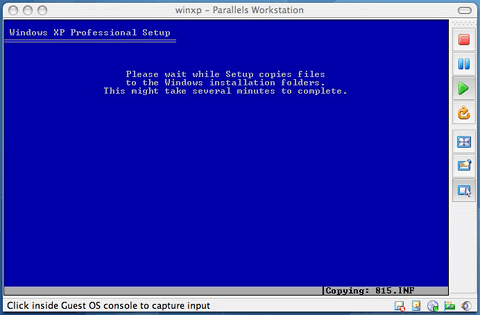
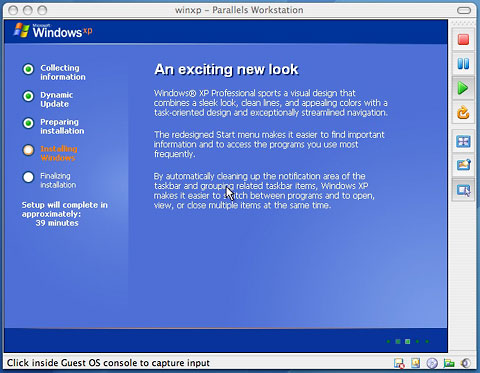
Where Virtual PC was available with a range of Windows operating systems as (expensive) preinstalled drive images, Parallels Workstation requires that you manually install the guest operating system(s) from scratch. In my testing, this worked smoothly; run the wizard to create the new virtual system, insert the operating system install CD, and click the Run button. The virtualized PC starts up with the install CD, and away we go!
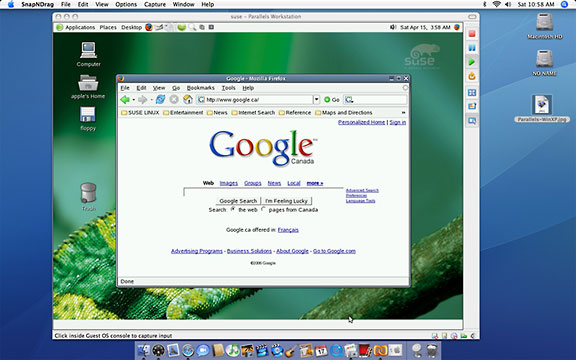
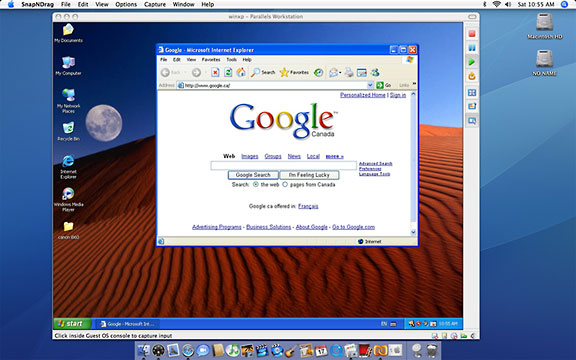
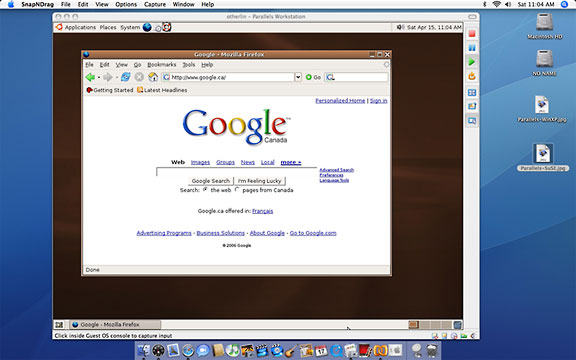
I installed Windows XP Professional, SuSE Linux 10, and Ubuntu Linux 5.10; each installed reasonably quickly and without problem. (SuSE is listed as a supported operating system. I installed Ubuntu using generic “Other Linux” settings. I could not get either to completely shut down their virtualized PCs). Each installation took roughly 45 minutes.
- An aside: If you want your virtual sessions to include right-mouse button support for Apple’s Mighty Mouse, make sure you’ve got support for that feature enabled on your Mac!
Like both Virtual PC and Guest PC, Parallels Workstation includes additional support for Windows operating system versions that can be installed after the operating system itself. These Parallels Tools include tools for sharing the clipboard between the Mac and Windows operating system and for allowing the mouse to smoothly transition from the Mac desktop to the Windows window. It also includes enhanced network and video drivers. (Unlike Virtual PC and Guest PC, you can’t drag files between the Mac and Windows desktops.)
Limitations
For non-Windows operating systems, these tools are not available; users may have to press Control + Option to get the mouse cursor to reappear for other Mac use.
The software emulates an RTL8029 network adapter; drivers for this may have to me manually installed with some operating systems. (It worked automatically in the two Linux distributions I installed).
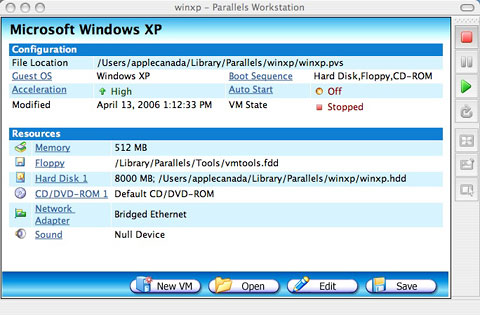
The video display is set to a generic VESA VGA. In my Linux installations, it ran fine at 1024 x 768 mode, but it was limited to 16-bit (64,000) colour.
Don’t expect high-performance 3D video acceleration even with the Parallels Tools video enhancements. This is not a solution for Mac users wanting to play high-end Windows games.
Sound worked, but even the few seconds of Windows startup sound had some breakup. Don’t expect good multimedia performance.
Also lacking at this time is USB support. Some of Parallels documentation claims the product provides a (virtual) pair of USB 1.1 ports; most of the documentation left out mention of USB entirely. I was unable to get the virtualized Windows XP system to see my USB printer. I’m hopeful that this will be improved in the release version.
Network and Internet access was fine in all my installed operating systems with the default “bridged ethernet” setting.
Performance
And given the video, sound, and USB limitations, performance was pretty fine, too. Both Windows XP and the pair of Linux systems seeming plenty perky, comparable to running them on a modern “real” PC. I tested Windows XP using both Boot Camp and the virtualized Parallels Workstation version using the free SiSoft Sandra benchmarks. To my surprise, the virtual installation gave higher scores!
I’ve never been comfortable running Windows XP using any of the emulation software on any PowerPC Mac. No matter how much RAM I’ve devoted to it, it’s always been too slow for my tastes.
By contrast, XP runs quite nicely using Parallels Workstation on my test Intel iMac. If you’re trying this, though, be sure that you’ve got adequate RAM; I would strongly recommend having at least 1 GB of RAM, allowing you to give your virtualized PCs 512 MB while still leaving the same amount for OS X.
Another nice feature: Rather than shutting down your virtualized operating systems, you can choose to suspend them. Parallels Workstation saves your session as a (large) file. Restarting opens that file, quickly returning your virtual operating system to the state it was at when suspended. This is much quicker than rebooting.
If you need to run Windows on your Intel-based Mac, there are now several ways to go about it. Apple’s Boot Camp and Parallels Workstation are easily setup by a moderately comfortable user and have reasonably low geek factors. There are advantages and disadvantages to each.
Boot Camp vs. Parallels Workstation
Boot Camp only supports Windows XP at present; Parallels Workstation can be used with a wide range of PC operating systems, both Windows and non-Windows.
Boot Camp requires rebooting your computer to switch between operating systems, and only one operating system can be running at a time. If you’re running Windows and you need to get a phone number from your Mac’s Address Book, you’re out of luck.
Parallels Workstation allows you to run other PC operating systems in windows from within the Mac OS; this lets you run programs on your Mac and in the PC operating system at the same time.
And if you want to run any PC operating system other than Windows XP, Parallels Workstation makes it easy. It may prove possible to hack Boot Camp to support other operating systems, but you’re on your own at that!
An advantage of booting to Windows, as Boot Camp requires, is that with full control over the hardware, you’ve got full performance. While the virtualized operating systems in Parallels Workstation are fast, Boot Camp’s Windows XP installation is faster. And the RAM requirements of running either Mac OS X or Windows XP on their own are lower than trying to run both operating systems at the same time.
While neither Windows XP via Boot Camp nor any of the PC operating systems via Parallels Workstation fully support all the hardware on the Intel Macs at this time, Boot Camp offers better video, sound, and USB support. If you want to play Windows 3D games or print to a USB printer (at least for now), Boot Camp is the way to go.
It’s great that (Intel) Mac owners now have a variety of options to run Windows and other PC operating systems. There may be more to come; there are rumours that VMware may offer support for its software on the Intel Macs. Other rumours suggest that Apple may include virtualization support along with Boot Camp support in the upcoming OS X 10.5 “Leopard” release.
Be warned: Whether via Boot Camp or any virtualization software, running Windows on a Mac makes you just as vulnerable to all the nasty stuff as running Windows on a generic PC. For more on that, be sure to read Windows Security for Mac Users.
