
I have posted my answer to your question to the Quadlist, simply because it’s the most on-topic question I’ve gotten in a while. Contained within my answer are little tips that I think others need to know so that they can get powerful performance out of their machines as well. I have eliminated a considerable amount of your personal information, so I hope you understand my motives.
- “Scott, my question to you after all this rambling is are there any reasonably priced ways to squeeze a little more performance out of these very serviceable machines? I know clock chipping is not viable and the processor direct slot is already taken by the Power Pro. My hard drives are fast. Am I out of options? Thanks for your time.”
I honestly think there is. I have a tendency, by just thinking the “proper” way about hardware, to create machines that routinely test out 30% higher in performance than their standard scores in MacBench. To do this, some unconventional paths need to be followed. I will make several assumptions about the type of work you do with these machines, since you’re prepress.
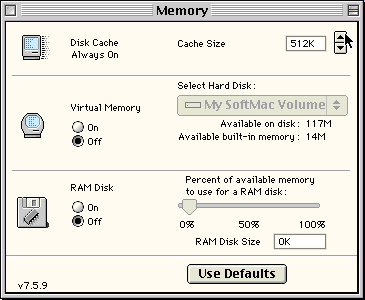 1. Set all machines to maximum disk cache in the Memory control panel. Eliminate all unneeded extensions and control panels. The larger the disk cache, the more of the system file is stored in memory, and the larger a section of a large application is also stored in memory. Elimination of unnecessary extensions and control panels reduces the amount of overhead and interrupts on the machine – toys and neat desktop tricks can slow down a machine 5-10%. Especially important is the elimination of all unused printer drivers – the Mac OS constantly scans for these extra printers, even when not selected. By reducing the search and not loading those resources on bootup, you can increase performance visibly.
2. Use FWB CD-ROM Toolkit for machines with CDs. Apple’s driver is crap – bulky and slow, constantly polling and taking up resources. CD-ROM Toolkit is written correctly.
3. Find, buy, steal, beg, or borrow Conflict Catcher – not only is it a good way to easily manage your extensions on the machine, but it also has the ability to add to the system heap (guarantee system heap option). This is very important, because it’s not addressed properly in any Mac OS release for prepress users. The system heap should be set to 512k (ignore the percentage). This increases system performance visibly.
4. Be vigilant in optimizing the hard drives. Keep them clean and running fast. One percent fragmentation of system files leads to a 10% slow down in performance. Drives in a prepress house should be optimized and checked every Friday before everyone goes home. The first two weeks may take a couple hours – after this it will take 15 minutes. Make it the last thing done before anyone goes home for the weekend. [Norton Speed Disk 3.5 and later is much faster than older optimizers. And always run Disk Doctor, TechTool Pro, or a similar utility before optimizing. dk]
5. Reduce the number of menu patches, especially in PPC mode. If you look at the Conflict Catcher (CC) report, you’ll be able to see how patches to the menu bar end up slowing down PPC functions, because they are PPC code patched over with 68k code. Even CC does this, so remove the menu pull down for CC and try to make sure no one else is using menu patches like this. Using Mac OS 7.6.1 or lower, Now Menus (part of Now Utilities) is a good menu solution, while every other menu option I’ve found is a literal disaster. If you’re using Mac OS 8.1, then FinderPop is a better solution, using the Contextual Menu Manager (Pop up menu).
6. For machines with a 68K processor, remove all unnecessary PPC code from the system file using a program called PowerPCheck. It will remove roughly 1.6 MB of the system file, making the system run up to 30% faster. Of course, if this is a PPC-upgraded Mac, you need that code in PPC mode.
7. For all conventional 68040 machines, Mac OS 8.1 is a real boon. 8.1, part of the NeXTStep project from NeXT, is closer to pure ‘040 code and routinely acts much faster than 7.5.5 or 7.6.1. If possible, standardize on this version. If you have 68030 machines, don’t go beyond System 7.5.5 – Mac OS 7.6 and 7.6.1 are a disaster.
8. If you run Photoshop, you should create a 4 MB RAM disk that is always active. Set the Primary Scratch disk to this 4 MB RAM disk, and the Secondary to whatever hard drive you desire. The reason for this is simple: Photoshop has it’s own virtual memory scheme, and even though you might have 80 or 90 MB attributed to this application, it will always store it’s toolboxes and filters in the scratch file, no matter what. The organization of this file is unique – all the sort headers, plus the active tools, are always at the top of the file – about the first 2 to 3 MB. If the RAM disk is used as the first scratch disk, all of these tools are instantly available in memory, and you’ll see the difference the first time you perform a filter such as a Gaussian blur.
If you’ve noticed, the OS isn’t quick to respond and update when a filter is performed in Photoshop. When you set all of the settings in the filter, then hit OK to apply it, there is a 5-10 second delay – usually accompanied by a white square where the box was – and you continue to wait for the Performing Filter window to pop up with the thermometer bar telling you just how much has been accomplished. With a 4 MB RAM disk, this is almost instantaneous, because the sort table and the filter are immediately available for use. You will notice that filter functions will also work 10-20% faster as well, as rebuilding the sort table during a filter function is not processor intensive, but is instead SCSI intensive – processing of the filter must be stopped to rebuild this sort table every few moments – with the sort being instant now, the filter basically goes along unfettered. This is the most important tip I can give to Photoshop users.
[There are some good alternatives to the RAM Disk built into the Memory control panel. Elsewhere on Low End Mac we have recommended ramBunctious, ShrinkWrap, and AppDisk. Each has its pros and cons.]
9. If virtual memory (VM) is used by the Mac OS for other reasons, virtual memory should always set to a multiple of 32 MB. Hence a machine with 72 MB of memory needs to have VM set to at least 96 MB.* This is because the Mac OS prefers to make 4 MB block transfers, and the sort table inside VM is much easier to work with if it’s a direct multiple, instead of having to figure out how to deal with an extra MB floating at the end of the file or 3 MB outstanding. While I don’t normally support using VM in a prepress house, there are sometimes reasons it must be used.
Lastly, I realize that by creating a RAM disk and setting cache to 8 MB, I’m sacrificing 12 MB of crucial prepress memory. But I still stand by this in a prepress house – if you’re trying to pull that extra horsepower out of the machine, these are necessary steps. Since you’re in a prepress house anyway, getting a bit more money just to increase the memory on these machines shouldn’t be that hard. For the performance it gives, the extra memory, allocated the way I’ve stated above, will increase computer performance by about 50%. If you want to run MacBench after these changes have been made, you’ll see the difference. . . .
In addition to this, there are other important tips from <http://www.macnn.com/mactips/>. Eric has made a wonderful Tip list, and I’ve tended to badger him over the last year with some of the above tips as well.
- Scott L. Barber, serker@earthling.net
- Pres/CEO, SERKER Worldwide, Inc.
- Providing Hardware/Networking/Telecomm for 13 years
Scott L. Barber posted this to Quadlist. It has been the most requested document in the history of the list. It has been edited and is reprinted here with his permission.
* For more on the optimum virtual memory setting, see our in-depth benchmarks of the Beige Power Mac G3. In general, the best performance comes from having virtual memory turned off, but that also leaves less physical memory for programs to work with. If virtual memory is enabled, rounding up to the next multiple of 32 MB beyond the amount of physical memory provides the best performance, exactly as Scott L. Barber suggest here.
Keywords: #prepress #macperformance #diskcache #virtualmemory #photoshop #ramdisk
Short link: https://goo.gl/vvrhfJ
searchword: macperformancetips
