
In recent online discussions (circa August 2004), it is apparent that there is some confusion in some circles regarding the interchangeability of different versions of what Apple calls the “SuperDrive” – the standard 3.5″ floppy drive built into most Macintosh models since just after the original Mac II.
The SuperDrive name came from the drive’s ability to correctly format, write, and read all 400K, 800K, and 1.4 MB Mac HFS-formatted floppy disks – as well as DOS/Windows formatted floppies with the appropriate drivers. From the late 1980s until the birth of the iMac in 1998, there have been several OEM vendors for the floppy drive and two major variations for desktop Macs, auto-inject and manual-inject.
This page attempts to clarify which differences are important and which are insignificant to users. At present, this page only discusses desktop Mac floppy drives, not PowerBook variants.
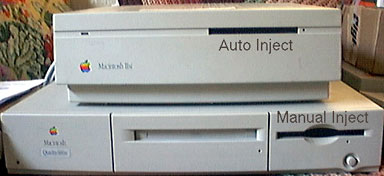
Mac IIsi with an auto-inject floppy and Quadra 660av with a manual-inject mechanism.
Auto-Inject (Apple part #661-0474)
The original SuperDrive was made by Sony, the maker of all Apple 3.5″ floppy drives up until the mid-1990s.

Auto-inject floppy: Note the lack of a dust door and the mechanical eject button on the right side.
The term “auto-inject” derives from the property of the mechanism’s design whereby when a floppy disk is inserted most of the way (say, 3/4 of the way or more), the mechanism grabs and pulls the disk the rest of the way in. There is a characteristic “kerchunk” sound as the disk and holder drop vertically onto the drive motor. As shown in the first photo, machines designed for auto-inject mechanisms have a narrow floppy slot that is just wide enough for the floppy disk itself. The other tell-tale sign is the mechanical emergency eject hole, which can be pushed with a large, straightened paper clib – to the right of the floppy slot and in the same horizontal plane.
All Sony OEM model numbers that i have seen to date start out with MP-F75W. I’ve personally seen three hyphened suffixes:
- MP-F75W-01G
- MP-F75W-11G
- MP-F75W-12G
All three of these were 100% mechanically and electrically interchangeable in my tests. All share part #661-0474 to the best of my knowledge.
Manual-Inject (Apple part #661-0121)
The newer incarnation of the SuperDrive was OEMed by both Sony and Mitsubishi, thus many different OEM part numbers will be found on the drives. All members of this group are manual-inject, and Apple considers all of them to be interchangeable, therefore they all share the same Apple part number, #661-0121.
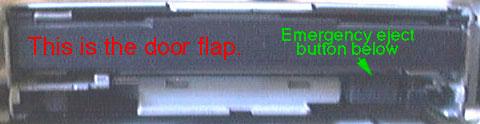
Manual-inject floppy: Note the presence of a dust door and the mechanical eject button beneath the disk slot.
Unlike the auto-inject mechanism, the user must fully insert the floppy disk into the mechanism. For this reason, machines designed for manual-inject mechanisms have two wide oval depressions for fingers above and beneath the floppy, as shown in the first photo on this page. The echoey metallic “kerchunk” is replaced by a milder “click” as the disk seats on the drive’s motor spindle. The mechanical emergency eject button of the manual-inject drives lies beneath the floppy slot and right of center.
It is not a coincidence that this is the same location for manual eject buttons on Wintel machines. Apple’s mid-1990s changeover from auto-inject to manual-inject was at least in part a cost-cutting measure to both stay solvent and attempt to more effectively compete with the (then) lower-priced Wintel systems. There have also been rumors regarding deteriorations in the relation between Apple and Sony (examples: Apple was uncomfortable with a single-source for floppy drives; Sony was angered by Apple’s change of mind regarding clone licensing and manufacture). It was one of many moves from Apple-only to personal computer industry-wide mass storage devices.
I am aware of the following manual-inject floppy drives, all sharing the same Apple 661-0121 part number:
- Sony MPF 42A
- Mitsubishi MF355F-592MA
- Mitsubishi MF355F-2592MA
- Mitsubishi MF355F-3592MA
As with the auto-inject drives, all of these appear to be 100% electrically and mechanically interchangeable with each other in Apple Macintosh computers.
Interchangeability and Compatibility
To put it succinctly: In terms of electromechanical compatibility, my testing shows that all Macs originally equipped with a SuperDrive can use the newer manual-inject 661-0121 floppy drive, whether made by Sony, Mitsubishi, or anyone else. However the converse is not always true: auto-inject floppy drive appears to work on all NuBus 680×0 and PowerPC Macs, yet not on newer PCI-based PowerPC Macs.
Please note that my compatibility tests do not include mechanical considerations, such as proper alignment of the drive with the slot in the case, nor ability to properly mount the drive in the case.
| Mfg. & OEM model # | Auto or Manual Inject? | IIsi (68030 NuBus) | Quadra 660av (68040 NuBus) | 6100 (PPC 601 NuBus) | 8500 (PPC 604 PCI) |
|---|---|---|---|---|---|
| Sony MP-F75W-01G | Auto | x (stock) | – | – | Fail |
| Sony MP-F75W-11G | Auto | x | – | – | Fail |
| Sony MP-F75W-12G | Auto | x | x | x | Fail |
| Sony MPF 42A | Manual | x | – | – | x |
| Mitsubishi MF355F-592MA | Manual | x | x (stock) | x (stock) | x |
| Mitsubishi MF355F-2592MA | Manual | x | – | – | x (stock) |
Legend: x = this combination works; – = this combination not tested; stock = this exact OEM part numbered drive was original to my Macintosh of this model number; Fail = this combination failed to operate properly.
Failure Mode
I have only seen one failure mode: When an auto-inject floppy drive is plugged into a PCI-based Power Macintosh, the drive will attempt to continuously eject as long as power is applied.
If you have further information or specific questions related to floppy drives in Macintosh computers, email me. For more information, there is an excellent website on the history of Apple and the floppy drive.
This article was first published on Sonic Purity’s website on 2004.09.01. It has since been updated there, and this is an edited version of that article.
Keywords: #floppysuperdrive
Short link: http://goo.gl/x8CKeF
searchword: floppysuperdrive
